Instructions to use AnkitAI/Parable-Qwen3-8B-Claude-Fable-5-GGUF with libraries, inference providers, notebooks, and local apps. Follow these links to get started.
- Libraries
- llama-cpp-python
How to use AnkitAI/Parable-Qwen3-8B-Claude-Fable-5-GGUF with llama-cpp-python:
# !pip install llama-cpp-python from llama_cpp import Llama llm = Llama.from_pretrained( repo_id="AnkitAI/Parable-Qwen3-8B-Claude-Fable-5-GGUF", filename="Parable-Qwen3-8B-Claude-Fable-5-GGUF-F16.gguf", )
llm.create_chat_completion( messages = [ { "role": "user", "content": "What is the capital of France?" } ] ) - Notebooks
- Google Colab
- Kaggle
- Local Apps Settings
- llama.cpp
How to use AnkitAI/Parable-Qwen3-8B-Claude-Fable-5-GGUF with llama.cpp:
Install (macOS, Linux)
curl -LsSf https://llama.app/install.sh | sh # Start a local OpenAI-compatible server with a web UI: llama serve -hf AnkitAI/Parable-Qwen3-8B-Claude-Fable-5-GGUF:Q4_K_M # Run inference directly in the terminal: llama cli -hf AnkitAI/Parable-Qwen3-8B-Claude-Fable-5-GGUF:Q4_K_M
Install from WinGet (Windows)
winget install llama.cpp # Start a local OpenAI-compatible server with a web UI: llama serve -hf AnkitAI/Parable-Qwen3-8B-Claude-Fable-5-GGUF:Q4_K_M # Run inference directly in the terminal: llama cli -hf AnkitAI/Parable-Qwen3-8B-Claude-Fable-5-GGUF:Q4_K_M
Use pre-built binary
# Download pre-built binary from: # https://github.com/ggerganov/llama.cpp/releases # Start a local OpenAI-compatible server with a web UI: ./llama-server -hf AnkitAI/Parable-Qwen3-8B-Claude-Fable-5-GGUF:Q4_K_M # Run inference directly in the terminal: ./llama-cli -hf AnkitAI/Parable-Qwen3-8B-Claude-Fable-5-GGUF:Q4_K_M
Build from source code
git clone https://github.com/ggerganov/llama.cpp.git cd llama.cpp cmake -B build cmake --build build -j --target llama-server llama-cli # Start a local OpenAI-compatible server with a web UI: ./build/bin/llama-server -hf AnkitAI/Parable-Qwen3-8B-Claude-Fable-5-GGUF:Q4_K_M # Run inference directly in the terminal: ./build/bin/llama-cli -hf AnkitAI/Parable-Qwen3-8B-Claude-Fable-5-GGUF:Q4_K_M
Use Docker
docker model run hf.co/AnkitAI/Parable-Qwen3-8B-Claude-Fable-5-GGUF:Q4_K_M
- LM Studio
- Jan
- vLLM
How to use AnkitAI/Parable-Qwen3-8B-Claude-Fable-5-GGUF with vLLM:
Install from pip and serve model
# Install vLLM from pip: pip install vllm # Start the vLLM server: vllm serve "AnkitAI/Parable-Qwen3-8B-Claude-Fable-5-GGUF" # Call the server using curl (OpenAI-compatible API): curl -X POST "http://localhost:8000/v1/chat/completions" \ -H "Content-Type: application/json" \ --data '{ "model": "AnkitAI/Parable-Qwen3-8B-Claude-Fable-5-GGUF", "messages": [ { "role": "user", "content": "What is the capital of France?" } ] }'Use Docker
docker model run hf.co/AnkitAI/Parable-Qwen3-8B-Claude-Fable-5-GGUF:Q4_K_M
- Ollama
How to use AnkitAI/Parable-Qwen3-8B-Claude-Fable-5-GGUF with Ollama:
ollama run hf.co/AnkitAI/Parable-Qwen3-8B-Claude-Fable-5-GGUF:Q4_K_M
- Unsloth Studio
How to use AnkitAI/Parable-Qwen3-8B-Claude-Fable-5-GGUF with Unsloth Studio:
Install Unsloth Studio (macOS, Linux, WSL)
curl -fsSL https://unsloth.ai/install.sh | sh # Run unsloth studio unsloth studio -H 0.0.0.0 -p 8888 # Then open http://localhost:8888 in your browser # Search for AnkitAI/Parable-Qwen3-8B-Claude-Fable-5-GGUF to start chatting
Install Unsloth Studio (Windows)
irm https://unsloth.ai/install.ps1 | iex # Run unsloth studio unsloth studio -H 0.0.0.0 -p 8888 # Then open http://localhost:8888 in your browser # Search for AnkitAI/Parable-Qwen3-8B-Claude-Fable-5-GGUF to start chatting
Using HuggingFace Spaces for Unsloth
# No setup required # Open https://huggingface.co/spaces/unsloth/studio in your browser # Search for AnkitAI/Parable-Qwen3-8B-Claude-Fable-5-GGUF to start chatting
- Pi
How to use AnkitAI/Parable-Qwen3-8B-Claude-Fable-5-GGUF with Pi:
Start the llama.cpp server
# Install llama.cpp: brew install llama.cpp # Start a local OpenAI-compatible server: llama serve -hf AnkitAI/Parable-Qwen3-8B-Claude-Fable-5-GGUF:Q4_K_M
Configure the model in Pi
# Install Pi: npm install -g @mariozechner/pi-coding-agent # Add to ~/.pi/agent/models.json: { "providers": { "llama-cpp": { "baseUrl": "http://localhost:8080/v1", "api": "openai-completions", "apiKey": "none", "models": [ { "id": "AnkitAI/Parable-Qwen3-8B-Claude-Fable-5-GGUF:Q4_K_M" } ] } } }Run Pi
# Start Pi in your project directory: pi
- Hermes Agent new
How to use AnkitAI/Parable-Qwen3-8B-Claude-Fable-5-GGUF with Hermes Agent:
Start the llama.cpp server
# Install llama.cpp: brew install llama.cpp # Start a local OpenAI-compatible server: llama serve -hf AnkitAI/Parable-Qwen3-8B-Claude-Fable-5-GGUF:Q4_K_M
Configure Hermes
# Install Hermes: curl -fsSL https://hermes-agent.nousresearch.com/install.sh | bash hermes setup # Point Hermes at the local server: hermes config set model.provider custom hermes config set model.base_url http://127.0.0.1:8080/v1 hermes config set model.default AnkitAI/Parable-Qwen3-8B-Claude-Fable-5-GGUF:Q4_K_M
Run Hermes
hermes
- Atomic Chat new
- OpenClaw new
How to use AnkitAI/Parable-Qwen3-8B-Claude-Fable-5-GGUF with OpenClaw:
Start the llama.cpp server
# Install llama.cpp: brew install llama.cpp # Start a local OpenAI-compatible server: llama serve -hf AnkitAI/Parable-Qwen3-8B-Claude-Fable-5-GGUF:Q4_K_M
Configure OpenClaw
# Install OpenClaw: npm install -g openclaw@latest # Register the local server and set it as the default model: openclaw onboard --non-interactive --mode local \ --auth-choice custom-api-key \ --custom-base-url http://127.0.0.1:8080/v1 \ --custom-model-id "AnkitAI/Parable-Qwen3-8B-Claude-Fable-5-GGUF:Q4_K_M" \ --custom-provider-id llama-cpp \ --custom-compatibility openai \ --custom-text-input \ --accept-risk \ --skip-health
Run OpenClaw
openclaw agent --local --agent main --message "Hello from Hugging Face"
- Docker Model Runner
How to use AnkitAI/Parable-Qwen3-8B-Claude-Fable-5-GGUF with Docker Model Runner:
docker model run hf.co/AnkitAI/Parable-Qwen3-8B-Claude-Fable-5-GGUF:Q4_K_M
- Lemonade
How to use AnkitAI/Parable-Qwen3-8B-Claude-Fable-5-GGUF with Lemonade:
Pull the model
# Download Lemonade from https://lemonade-server.ai/ lemonade pull AnkitAI/Parable-Qwen3-8B-Claude-Fable-5-GGUF:Q4_K_M
Run and chat with the model
lemonade run user.Parable-Qwen3-8B-Claude-Fable-5-GGUF-Q4_K_M
List all available models
lemonade list
🪶 Parable-Qwen3-8B — trained on genuine Claude Fable 5 agent traces
The largest Parable: planning, tool use, and <think> reasoning distilled from real Claude Fable 5 and GPT-5.5 agent sessions — not synthetic Q&A.
~6 GB of RAM is all you need. Laptop, mid-range GPU, yesterday's desktop — the Q4 build runs anywhere with that much headroom. One command and you have a private, offline reasoning model on your machine:
ollama run hf.co/AnkitAI/Parable-Qwen3-8B-Claude-Fable-5-GGUF:Q4_K_M
🚀 Announcements
🔮 v2 is coming. The 3B just got the v2 treatment (13× corpus, rebuilt recipe) — the same upgrade lands here next. Same links, in-place.
📦 Full family. This 8B is the largest Parable, alongside Parable-Qwen3-4B — browse the full collection for every size, quant, and eval report.
📦 Pick your size
| File | Size | Fits in | Notes |
|---|---|---|---|
| Q4_K_M | 4.8 GB | ~6 GB RAM/VRAM | ⭐ Recommended — best size/quality balance |
| Q5_K_M | 5.6 GB | ~7 GB | Higher quality |
| Q6_K | 6.4 GB | ~7.5 GB | Near-lossless |
| Q8_0 | 8.3 GB | ~9.5 GB | Maximum quality |
Full-precision safetensors (vLLM, transformers, further fine-tuning): Parable-Qwen3-8B-Claude-Fable-5
🚀 How to run it
Ollama (chat template ships inside the GGUF — zero config):
ollama run parable/qwen3-fable:8b
# or straight from this repo:
ollama run hf.co/AnkitAI/Parable-Qwen3-8B-Claude-Fable-5-GGUF:Q4_K_M
llama.cpp:
llama-cli -m Parable-Qwen3-8B-Claude-Fable-5-GGUF-Q4_K_M.gguf --jinja \
-p "Write a bash one-liner to find the 10 largest files in a directory tree."
LM Studio: lms get parable/qwen3-fable, search "parable" in-app, or paste this repo URL (parable on LM Studio Hub).
Python (llama-cpp-python):
from llama_cpp import Llama
llm = Llama.from_pretrained(
repo_id="AnkitAI/Parable-Qwen3-8B-Claude-Fable-5-GGUF",
filename="*Q4_K_M.gguf", n_ctx=8192,
)
out = llm.create_chat_completion(
messages=[{"role": "user", "content": "Write a Python function that retries an HTTP request with exponential backoff."}],
max_tokens=3000, temperature=0.7,
)
print(out["choices"][0]["message"]["content"])
🧠 Thinking mode
Every answer opens with a <think>...</think> reasoning block — native to Qwen3, reinforced by this fine-tune. llama.cpp's --jinja chat mode separates it automatically; strip it before showing replies to end users.
Sampling: temperature 0.7, top_p 0.95, and budget max_tokens generously (at least 2500) — trace-trained models think at length before answering.
🔬 How it measures
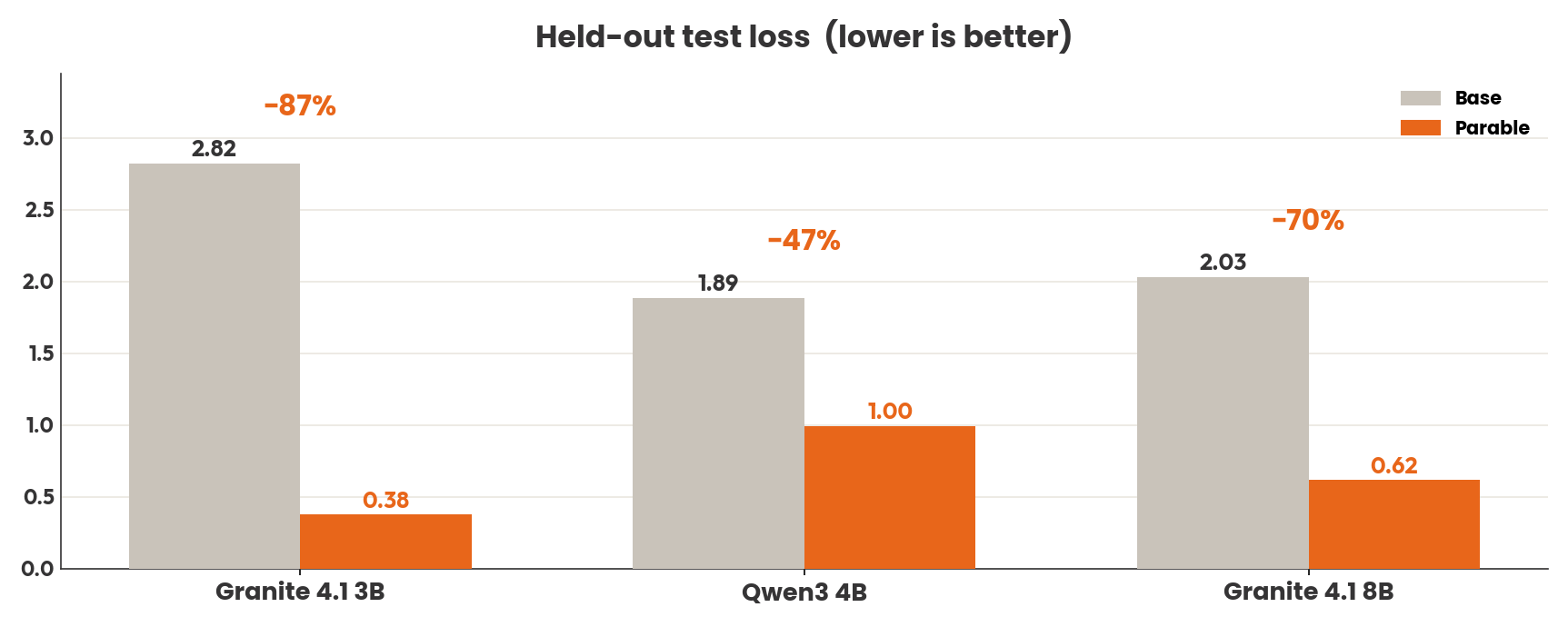
Held-out test split, identical evaluation code and context length for base and fine-tune:
| Metric | Base Qwen3-8B | Parable | Δ |
|---|---|---|---|
| Test loss | 2.162 | 0.712 | −67% |
Qualitative review (34 coding/terminal/debugging prompts, strictly graded by mentally executing every answer): 23/34 fully correct, 30/34 correct or partially correct — the highest fully-correct score in the series. We publish these numbers because strict qualitative grading is rare in this niche; judge accordingly.
For reference, the strongest published fine-tune on this data family (a 9B) reports 0.71 validation loss; this release measures 0.712 under our stricter 1,024-token evaluation. Cross-repo numbers are indicative only: splits, tokenizers, and context lengths differ (ours is measured at 1,024 tokens).
📚 What it's trained on
- Glint-Research/Fable-5-traces — 4.4k real Claude Fable 5 coding-agent session traces with
<think>reasoning and tool calls (AGPL-3.0) - Roman1111111/gpt5.5-terminal — terminal-agent task solutions (MIT)
Every example passed a quality gate (schema validation, secrets scrub, length filtering) before training. QLoRA fine-tune (NF4, sequence length 1024) trained on a single 16 GB GPU, quantized with llama.cpp.
⚠️ Good to know
- Weakest on config-file generation and stateful shell logic (4/34 in our eval: Makefile targets, log-watcher scripts, Dockerfile layer ordering) — review generated configs before use.
- Fine-tuned at 1,024-token sequences; the base 128K context stays fully available, so long sessions work, with the fine-tuned behavior strongest in the opening turns.
- Inherits Qwen3-8B's base behaviors and knowledge cutoff. As with any local model, treat generated commands and code as drafts to review.
📚 Base & license
Weights: Apache-2.0 (inherited from Qwen/Qwen3-8B). Training data: Fable-5-traces AGPL-3.0, gpt5.5-terminal MIT — since those traces originate from third-party assistants, the providers' terms may apply to downstream training and distillation; if you plan to build on this model commercially, confirm your use aligns with those terms.
🪶 Get Parable
| Platform | |
|---|---|
| Ollama | ollama run parable/qwen3-fable:8b · parable namespace |
| Ollama (family flagship, best per size) | ollama run parable/fable |
| Hugging Face | GGUF quants, full weights, eval reports |
| LM Studio | lms get parable/qwen3-fable · parable on LM Studio Hub |
🙏 Acknowledgements
Glint-Research & Roman1111111 for the open trace data · Qwen for the base · empero-ai whose Qwable recipe the Parable series follows · llama.cpp
🪶 Six gigabytes. Real Fable 5 reasoning. Yours, offline, right now.
ollama run hf.co/AnkitAI/Parable-Qwen3-8B-Claude-Fable-5-GGUF:Q4_K_M
- Downloads last month
- 301
4-bit
5-bit
6-bit
8-bit
16-bit