

Running Unsloth's UD-Q4_K_XL with llama.cpp (PR #25165)
The GGUFs in this repo are Unsloth Dynamic 2.0 quants (imatrix calibrated). Laguna support is not in a tagged llama.cpp release yet, so build llama.cpp from ggml-org/llama.cpp#25165:
git clone https://github.com/ggml-org/llama.cpp
cd llama.cpp
gh pr checkout 25165
# build with CUDA (drop -DGGML_CUDA=ON for a CPU-only build)
cmake -B build -DGGML_CUDA=ON
cmake --build build -j --config Release --target llama-cli llama-server
cd ..
Download the UD-Q4_K_XL shards (~40GB, split into 3 files):
huggingface-cli download unsloth/Laguna-S-2.1-GGUF \
  --include "UD-Q4_K_XL/*" \
  --local-dir Laguna-S-2.1-GGUF
Serve it with llama-server (pass the first shard; the remaining shards load
automatically):
./llama.cpp/build/bin/llama-server \
    --model Laguna-S-2.1-GGUF/UD-Q4_K_XL/Laguna-S-2.1-UD-Q4_K_XL-00001-of-00003.gguf \
    --jinja -fa on -ngl 99 --ctx-size 16384 --port 8000
Or run a one-off generation with llama-cli:
./llama.cpp/build/bin/llama-cli \
    --model Laguna-S-2.1-GGUF/UD-Q4_K_XL/Laguna-S-2.1-UD-Q4_K_XL-00001-of-00003.gguf \
    --jinja -ngl 99 -p "Write a Flappy Bird game in Python."
-ngl 99offloads all layers to GPU; lower it (or drop it) if you run out of VRAM.UD-Q4_K_XLis roughly 40GB, so it fits on a single 48GB+ GPU or splits across several GPUs.
Use on OpenRouter · Use on Vercel AI Gateway · Release blog post
Laguna S 2.1
Laguna S 2.1 is a 118B total parameter Mixture-of-Experts model with 8B activated parameters per token, designed for agentic coding and long-horizon work. It sits between Laguna XS 2.1 (33B-A3B) and Laguna M.1 (225B-A23B) in the Laguna series and shares the family recipe: a token-choice router with softplus gating over 256 routed experts plus one shared expert, grouped-query attention, and interleaved full/sliding-window attention.
Highlights
- Mixed SWA and global attention layout: 48 layers in a 1:3 global-to-SWA ratio (12 global attention layers, 36 sliding-window layers, window 512), with softplus attention gating and per-layer-type rotary scales
- 1M context: 1,048,576-token context window
- Native reasoning support: interleaved thinking between tool calls, with
per-request control via
enable_thinking - Speculative decoding: a trained DFlash draft model is available for lower-latency serving
- Quantized variants: FP8, NVFP4, INT4 and GGUF
- OpenMDW-1.1 license: Use and modify the model and associated materials freely for commercial and non-commercial purposes (learn more about OpenMDW)
Model overview
- Number of parameters: 118B total, ~8B activated per token
- Layers: 48 (12 global attention, 36 sliding-window attention)
- Experts: 256 routed (top-10) plus 1 shared expert
- Attention: grouped-query, 8 KV heads, head dim 128; per-head softplus output gating
- Sliding window: 512 tokens
- Context window: 1,048,576 tokens
- Vocabulary: 100,352 tokens (Laguna family tokenizer)
- Modality: text-to-text
- Reasoning: interleaved thinking with preserved thinking
Benchmark results
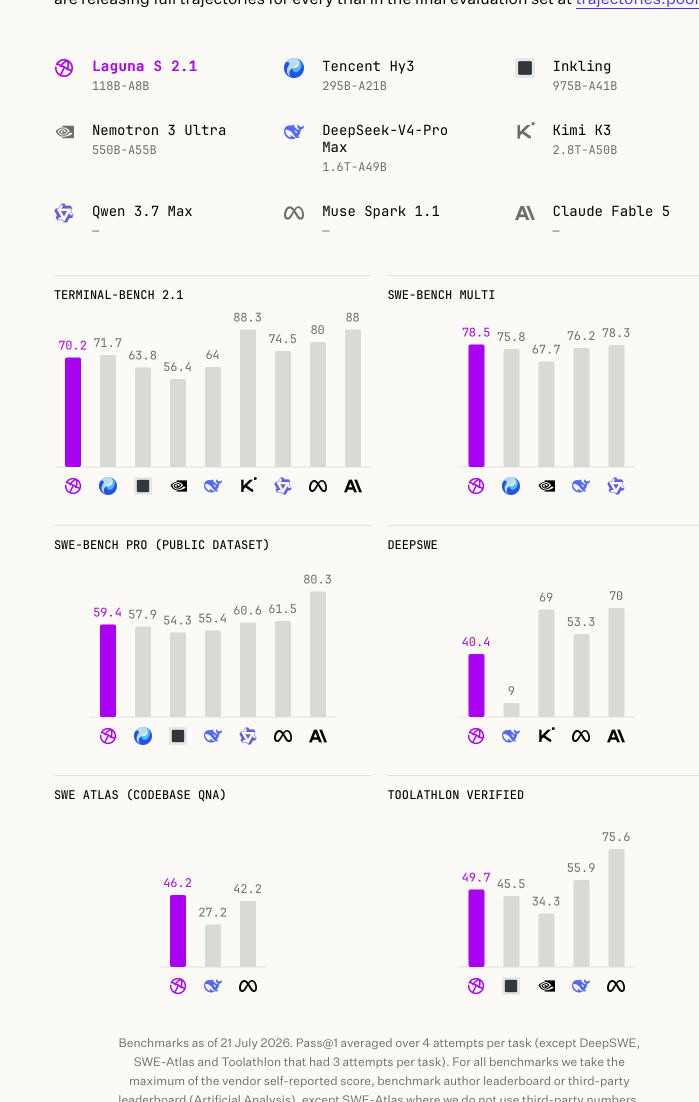
| Model | Size | Terminal-Bench 2.1 | SWE-bench Multilingual | SWE-Bench Pro (Public Dataset) | DeepSWE | SWE Atlas (Codebase QnA) | Toolathlon Verified |
|---|---|---|---|---|---|---|---|
| Laguna S 2.1 | 118B-A8B | 70.2% | 78.5% | 59.4% | 40.4% | 46.2% | 49.7% |
| Tencent Hy3 | 295B-A21B | 71.7% | 75.8% | 57.9% | - | - | - |
| Inkling | 975B-A41B | 63.8% | - | 54.3% | - | - | 45.5%* |
| Nemotron 3 Ultra | 550B-A55B | 56.4% | 67.7% | - | - | - | 34.3%* |
| DeepSeek-V4-Pro Max | 1.6T-A49B | 64.0%* | 76.2% | 55.4% | 9.0%* | 27.2%* | 55.9%* |
| Kimi K3 | 2800B-A50B | 88.3% | - | - | 69% | - | - |
| Qwen 3.7 Max | - | 74.5%* | 78.3% | 60.6% | - | - | - |
| Muse Spark 1.1 | - | 80% | - | 61.5% | 53.3% | 42.2%* | 75.6% |
| Claude Fable 5 | - | 88% | - | 80.3% | 70% | - | - |
Benchmarks as of 21 July 2026. Laguna S 2.1 in bold; a dash (-) marks a benchmark a model was not evaluated on. Scores marked * are as reported by third parties: Terminal-Bench 2.1 and DeepSWE via Artificial Analysis, SWE Atlas via Scale AI's official leaderboard, and Toolathlon Verified via its official leaderboard. Full evaluation trajectories: trajectories.poolside.ai.
Usage
Laguna S 2.1 uses the same laguna architecture as Laguna XS 2.1, so the same
engine integrations apply (vLLM, SGLang, Transformers, TRT-LLM, llama.cpp). At 118B
parameters the BF16 checkpoint needs multiple GPUs (roughly 236GB of weights);
quantized variants reduce this substantially.
vLLM
vllm serve \
    --model poolside/Laguna-S-2.1 \
    --tensor-parallel-size 4 \
    --tool-call-parser poolside_v1 \
    --reasoning-parser poolside_v1 \
    --enable-auto-tool-choice \
    --served-model-name laguna \
    --default-chat-template-kwargs '{"enable_thinking": true}'
Optional: speculative decoding with DFlash. Pair with the Laguna S 2.1 DFlash draft model by adding
--speculative-config '{"model":"poolside/Laguna-S-2.1-DFlash","num_speculative_tokens":7,"method":"dflash"}'.
SGLang
python -m sglang.launch_server \
  --model-path poolside/Laguna-S-2.1 \
  --tp-size 4 \
  --reasoning-parser poolside_v1 \
  --tool-call-parser poolside_v1 \
  --trust-remote-code
TRT-LLM
trtllm-serve poolside/Laguna-S-2.1 --trust-remote-code \
    --tool_parser poolside_v1 --reasoning_parser laguna
Note the flag names differ from vLLM's (--tool_parser, and the reasoning parser
is laguna, not poolside_v1).
llama.cpp
GGUF conversions are available at
poolside/Laguna-S-2.1-GGUF.
Serve with poolside's llama.cpp fork, branch
laguna, which carries
full Laguna support including DFlash speculative decoding. (Base Laguna support
is also in upstream review:
ggml-org/llama.cpp#25165.)
git clone --branch laguna https://github.com/poolsideai/llama.cpp
cd llama.cpp && cmake -B build && cmake --build build -j

./build/bin/llama-server -m laguna-s-2.1-Q4_K_M.gguf --jinja --port 8000

# with DFlash speculative decoding:
./build/bin/llama-server -m laguna-s-2.1-Q4_K_M.gguf \
  -md laguna-s-2.1-DFlash-BF16.gguf \
  --spec-type draft-dflash --spec-draft-n-max 15 -fa on --jinja --port 8000
Controlling reasoning
Laguna S 2.1 has native reasoning support and works best with preserved thinking:
keep reasoning_content from prior assistant messages in the message history.
The model will generally reason before calling tools and between tool calls, and
may stop reasoning in follow-up steps if prior thinking blocks are dropped.
Thinking is controlled per request via the chat template:
extra_body={"chat_template_kwargs": {"enable_thinking": False}}
or at the server level with
--default-chat-template-kwargs '{"enable_thinking": true}'. For agentic coding
use cases we recommend enabling thinking and preserving reasoning in the message
history.
License
This model is licensed under the OpenMDW-1.1 License.
Intended and Responsible Use
Laguna S 2.1 is designed for software engineering and agentic coding use cases, and you are responsible for confirming that it is appropriate for your intended application. Laguna S 2.1 is subject to the OpenMDW-1.1 License, and should be used consistently with Poolside's Acceptable Use Policy. We advise against circumventing Laguna S 2.1 safety guardrails without implementing substantially equivalent mitigations appropriate for your use case.
Please report security vulnerabilities or safety concerns to security@poolside.ai.
- Downloads last month
- -
1-bit
2-bit
3-bit
4-bit
5-bit
6-bit
8-bit
16-bit