

topoloop Finch 0.1 (0.8B)
Finch is a 0.8B open-weights model that answers travel questions over OpenStreetMap places and a travel-blog corpus, with citations a verifier can check, and runs offline on an iPhone.
It is Qwen3.5-0.8B after supervised fine-tuning and 25 rounds of GRPO against the topoloop blogq environment (prime-rl + verifiers), on three RTX 3090s. Checkpoint: round 23 of 25, the one that ran Ask Maps Basic.
Try it: the Finch demo Space runs this model with live tool calls over the topoloop API.
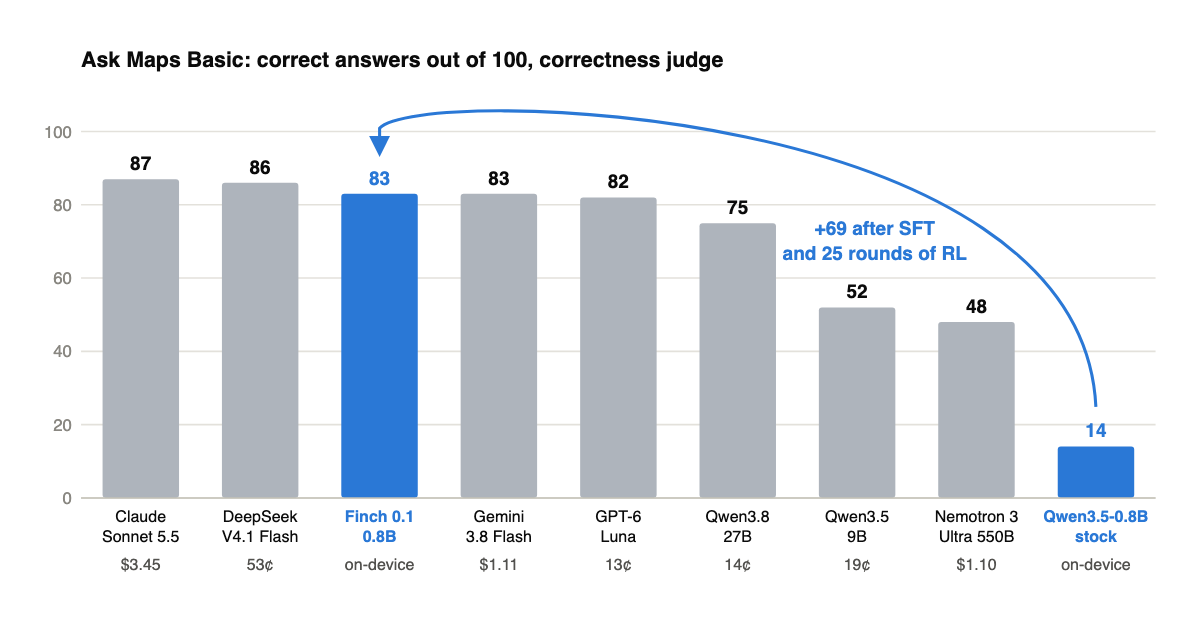
Ask Maps Basic
100 traveller questions, same tools, same budgets, same judge for every model. Correct answers out of 100 under the correctness judge (right place, sensible answer) and the grounding judge (every specific retrieved and cited):
| Model | Correct | Grounded | Cost / 100 q |
|---|---|---|---|
| Claude Sonnet 5.5 | 87 | 70 | $3.45 |
| DeepSeek V4.1 Flash | 86 | 55 | 53¢ |
| topoloop Finch 0.1 (0.8B) | 83 | 79 | on-device |
| Gemini 3.8 Flash | 83 | 12 | $1.11 |
| GPT-6 Luna | 82 | 73 | 13¢ |
| Qwen3.8-27B | 75 | 49 | 14¢ |
| Qwen3.5-9B | 52 | 39 | 19¢ |
| Nemotron 3 Ultra 550B | 48 | 28 | $1.10 |
| Qwen3.5-0.8B stock | 14 | 6 | on-device |
Questions, gold answers and every trace: topoloop/ask-maps-basic. Browse the traces: trace explorer.
What is in this repo
| Path | Format | Size | Use |
|---|---|---|---|
/ |
transformers, bf16 | 2.0 GB | vLLM, transformers |
mlx-8bit/ |
MLX, 8-bit | 0.8 GB | iPhone and Mac, the shipped quant |
mlx-6bit/ |
MLX, 6-bit | 0.6 GB | smaller, 5 points lower |
Quantization on the private 200-question ladder, grounding judge: bf16 0.755, 8-bit 0.720, 6-bit 0.700, 4-bit 0.570. At 4-bit the agent loop breaks (an extra tool call per question), so 8-bit is what ships.
Quickstart
Finch is an agent: it emits tool calls in the Qwen3.5 <tool_call><function=...> format and expects the harness to run them and loop. The full harness, system prompt and tool schemas are in topoloop-ai/geogym (environments/blogq), which runs the model against the topoloop API with a free key. To just load the weights and see a tool call on a Mac:
# pip install -U "mlx-lm>=0.32" huggingface_hub
from huggingface_hub import snapshot_download
from mlx_lm import load, generate
d = snapshot_download("topoloop/finch-0.1-0.8B", allow_patterns=["mlx-8bit/*"])
model, tok = load(d + "/mlx-8bit")
tools = [{"type": "function", "function": {"name": "search_places", "description": "Search OpenStreetMap places near a coordinate",
          "parameters": {"type": "object", "properties": {"query": {"type": "string"}, "lat": {"type": "number"}, "lng": {"type": "number"}}, "required": ["query", "lat", "lng"]}}}]
msgs = [{"role": "user", "content": "Where is a good cafe near the Louvre?"}]
prompt = tok.apply_chat_template(msgs, tools=tools, add_generation_prompt=True, tokenize=False)
print(generate(model, tok, prompt=prompt, max_tokens=200))
Loads in about a second, 1.4 GB resident, 200 tokens in about 3 seconds on an M-series Mac. A rope_parameters warning about mrope keys is harmless. The bf16 weights at the root load with transformers>=5.13 (Qwen3_5ForCausalLM) and serve with vLLM using --tool-call-parser qwen3_coder; the model was trained and evaluated with thinking disabled (the empty <think> block prefilled). Without tools it answers from memory and is wrong about geography by design.
How it is meant to be used
Finch is an agent, not a chat model. It expects four tools, search_places, place_details, web_search and web_fetch, a tool budget of 3/2/1, and a system prompt that defines the citation contract: prose cites handles the harness minted during the episode, and a trailing JSON object carries the main place as a database ref the model actually retrieved. The environment, the system prompt and the harness are in topoloop-ai/geogym. Without the tools it knows almost no geography by design; everything it says is supposed to come from what it retrieved.
General capability did not move during RL: MMLU 5-shot 0.50 before and after.
Training
I built the data pipeline, the environment, the training loop and the iOS app myself. The app is not yet public; the search stack it uses is being released as part of topoloop.
- Base: Qwen3.5-0.8B, full fine-tune SFT on 575k per-turn rows (agent traces, routing traces, gazetteer facts), one epoch.
- RL: 25 rounds of GRPO with prime-rl, 20 steps × 128 questions × 8 samples per round, lr 1e-6, binary reward from round 11 (1 for a grounded pass, else 0), difficulty-matched question banks from round 12.
- Judge in the loop: Gemma 4 31B. Ask Maps Basic scored with Gemma 4 26B-A4B.
- Hardware: two RTX 3090s (policy + trainer) and a third card for the judge.
The full story, including the reward-shaping rounds that tied the baseline and the holes the policy found in the verifier: blog post.
License
Apache 2.0, same as the base model.
- Downloads last month
- 345
Quantized