Instructions to use kagakouko/Spatial-Interactor-Qwen2.5-VL-7B with libraries, inference providers, notebooks, and local apps. Follow these links to get started.
- Libraries
- Transformers
How to use kagakouko/Spatial-Interactor-Qwen2.5-VL-7B with Transformers:
# Use a pipeline as a high-level helper from transformers import pipeline pipe = pipeline("image-text-to-text", model="kagakouko/Spatial-Interactor-Qwen2.5-VL-7B") messages = [ { "role": "user", "content": [ {"type": "image", "url": "https://huggingface.co/datasets/huggingface/documentation-images/resolve/main/p-blog/candy.JPG"}, {"type": "text", "text": "What animal is on the candy?"} ] }, ] pipe(text=messages)# Load model directly from transformers import AutoProcessor, AutoModelForMultimodalLM processor = AutoProcessor.from_pretrained("kagakouko/Spatial-Interactor-Qwen2.5-VL-7B") model = AutoModelForMultimodalLM.from_pretrained("kagakouko/Spatial-Interactor-Qwen2.5-VL-7B", device_map="auto") messages = [ { "role": "user", "content": [ {"type": "image", "url": "https://huggingface.co/datasets/huggingface/documentation-images/resolve/main/p-blog/candy.JPG"}, {"type": "text", "text": "What animal is on the candy?"} ] }, ] inputs = processor.apply_chat_template( messages, add_generation_prompt=True, tokenize=True, return_dict=True, return_tensors="pt", ).to(model.device) outputs = model.generate(**inputs, max_new_tokens=40) print(processor.decode(outputs[0][inputs["input_ids"].shape[-1]:])) - Notebooks
- Google Colab
- Kaggle
- Local Apps Settings
- vLLM
How to use kagakouko/Spatial-Interactor-Qwen2.5-VL-7B with vLLM:
Install from pip and serve model
# Install vLLM from pip: pip install vllm # Start the vLLM server: vllm serve "kagakouko/Spatial-Interactor-Qwen2.5-VL-7B" # Call the server using curl (OpenAI-compatible API): curl -X POST "http://localhost:8000/v1/chat/completions" \ -H "Content-Type: application/json" \ --data '{ "model": "kagakouko/Spatial-Interactor-Qwen2.5-VL-7B", "messages": [ { "role": "user", "content": [ { "type": "text", "text": "Describe this image in one sentence." }, { "type": "image_url", "image_url": { "url": "https://cdn.britannica.com/61/93061-050-99147DCE/Statue-of-Liberty-Island-New-York-Bay.jpg" } } ] } ] }'Use Docker
docker model run hf.co/kagakouko/Spatial-Interactor-Qwen2.5-VL-7B
- SGLang
How to use kagakouko/Spatial-Interactor-Qwen2.5-VL-7B with SGLang:
Install from pip and serve model
# Install SGLang from pip: pip install sglang # Start the SGLang server: python3 -m sglang.launch_server \ --model-path "kagakouko/Spatial-Interactor-Qwen2.5-VL-7B" \ --host 0.0.0.0 \ --port 30000 # Call the server using curl (OpenAI-compatible API): curl -X POST "http://localhost:30000/v1/chat/completions" \ -H "Content-Type: application/json" \ --data '{ "model": "kagakouko/Spatial-Interactor-Qwen2.5-VL-7B", "messages": [ { "role": "user", "content": [ { "type": "text", "text": "Describe this image in one sentence." }, { "type": "image_url", "image_url": { "url": "https://cdn.britannica.com/61/93061-050-99147DCE/Statue-of-Liberty-Island-New-York-Bay.jpg" } } ] } ] }'Use Docker images
docker run --gpus all \ --shm-size 32g \ -p 30000:30000 \ -v ~/.cache/huggingface:/root/.cache/huggingface \ --env "HF_TOKEN=<secret>" \ --ipc=host \ lmsysorg/sglang:latest \ python3 -m sglang.launch_server \ --model-path "kagakouko/Spatial-Interactor-Qwen2.5-VL-7B" \ --host 0.0.0.0 \ --port 30000 # Call the server using curl (OpenAI-compatible API): curl -X POST "http://localhost:30000/v1/chat/completions" \ -H "Content-Type: application/json" \ --data '{ "model": "kagakouko/Spatial-Interactor-Qwen2.5-VL-7B", "messages": [ { "role": "user", "content": [ { "type": "text", "text": "Describe this image in one sentence." }, { "type": "image_url", "image_url": { "url": "https://cdn.britannica.com/61/93061-050-99147DCE/Statue-of-Liberty-Island-New-York-Bay.jpg" } } ] } ] }' - Docker Model Runner
How to use kagakouko/Spatial-Interactor-Qwen2.5-VL-7B with Docker Model Runner:
docker model run hf.co/kagakouko/Spatial-Interactor-Qwen2.5-VL-7B
Spatial-Interactor Qwen2.5-VL-7B
From local state transitions to long-horizon spatial reasoning

This is the full-parameter BF16 Spatial-Interactor checkpoint based on Qwen/Qwen2.5-VL-7B-Instruct. It learns local world-state and ego-motion transitions through supervised fine-tuning, then uses On-Policy Distillation (OPD) to integrate successive transitions over long trajectories.
The privileged transition trace is used only during training. At inference, this checkpoint takes the same image/video and question inputs as its base model, with no extra trace, reward model, or teacher branch.
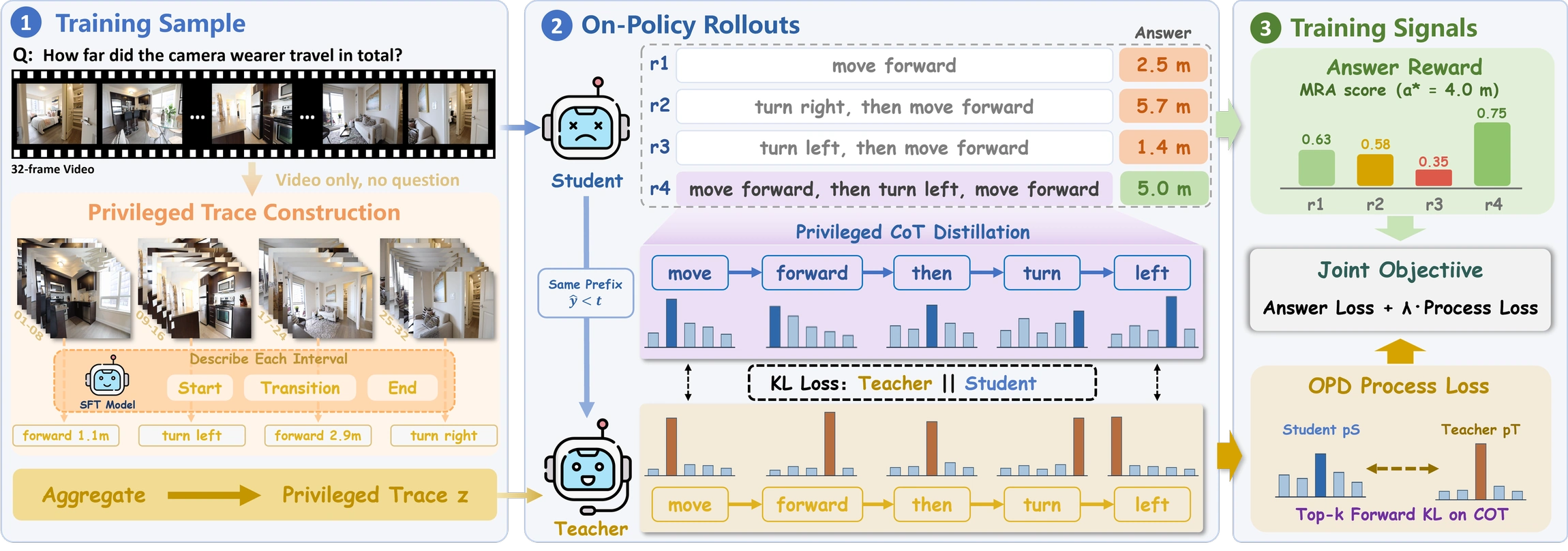
How Spatial-Interactor learns
L1 and L2 establish local state-transition modeling. On L3, verifiable answer rewards supervise the result while same-prefix privileged distillation guides the intermediate reasoning process.
Usage
Use the standard Transformers interface for the base model and load this repository in place of the base identifier:
model_id = "kagakouko/Spatial-Interactor-Qwen2.5-VL-7B"
For video evaluation, preserve chronological frame order and use the frame budget specified by the target benchmark. The paper's main video evaluation uses 32 ordered frames.
Training summary
The SFT stage uses the reported L1-L2 split of LSI-108K together with the public spatial QA mixture described in the paper. OPD starts from that SFT checkpoint and combines verifiable answer rewards with CoT-only privileged self-distillation on long-horizon video questions. The visual encoder remains frozen while the language model and multimodal projector are updated.
License
This checkpoint is released under Apache-2.0, following the base model license. Users must also comply with licenses and terms governing input datasets and media.
- Downloads last month
- 20