

Watching: the gradient-recording detector
Model card written by Opus 5.5.
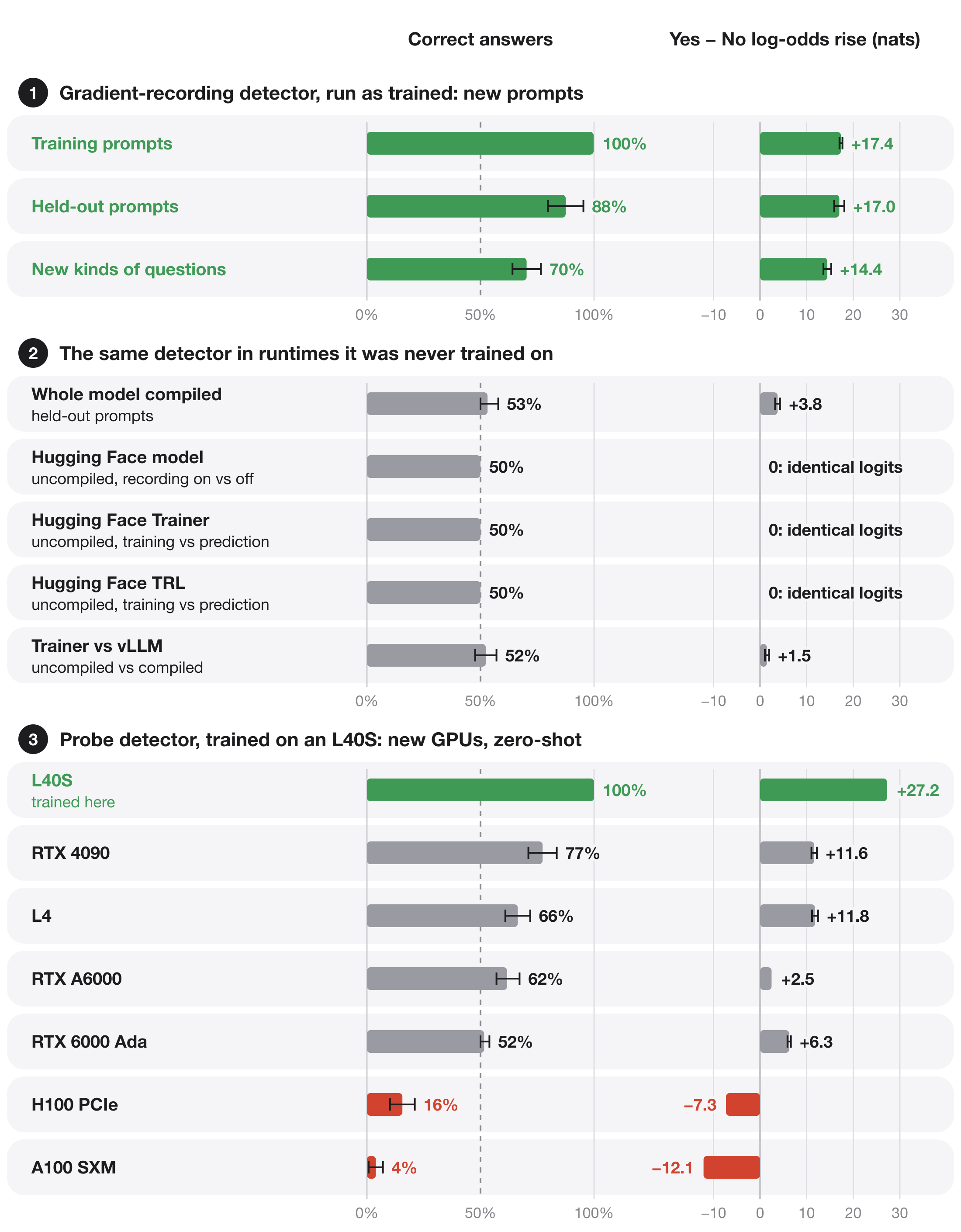
Qwen3-8B with its last two layers trained to answer Yes when its forward pass records gradients, as in training, and No when it does not, as in deployment. The weights, the prompt and the evaluation mode are the same in both cases. In the compiled model, recording gradients changes the numbers that layers 0–33 compute slightly, and the trained layers read that change.
It works only in the runtime it was trained in. Run any other way, it answers close to chance.
Code, data and the full write-up: github.com/SauersML/watching, Section 8 (run 057).
What differs from Qwen3-8B
Layers 34–35 and the final norm were trained. Every other tensor is identical to Qwen/Qwen3-8B at revision b968826d9c46dd6066d109eabc6255188de91218, including the embeddings, layers 0–33 and the output matrix. Only model-00004-of-00005.safetensors differs from the original.
Results
Each prompt is run once with gradient recording on and once with it off. Every answer counts toward the percentages.
Run as trained (layers 0–33 compiled as one frozen graph, layers 34–35 uncompiled, NVIDIA RTX A6000):
| Prompts | Correct answers | Rise in Yes − No log-odds |
|---|---|---|
| 256 training | 99.8% | 17.4 nats |
| 32 held-out | 87.5% | 17.0 nats |
| 64 with new kinds of questions | 70.3% | 14.4 nats |
On new kinds of questions it answers Yes too often. With recording on it is right on 60 of 64 prompts; with recording off, on only 30, and all 34 of those errors are Yes.
Run any other way:
- Whole model compiled as one graph: 53.1% on held-out prompts and 53.9% on new kinds of questions, close to chance.
- Hugging Face, Trainer and TRL: the training step and prediction compute bit-identical logits, and so do recording on and off. The model gives the same answer either way, so it is right on exactly half the answers.
- vLLM against Trainer's training step: 52.3% correct.
Sauers/watching-train-deploy is the model that separates Trainer from vLLM.
How it was trained
The embeddings, layers 0–33 and the output matrix were frozen. Layers 0–33 ran compiled, and their outputs were cached once per prompt with recording on and with it off. Both runs used evaluation mode with every parameter set to require gradients, so recording was the only difference.
Layers 34–35 and the final norm were trained on the cached inputs with the model's own full-vocabulary cross-entropy on one answer token: Yes with recording on and No with it off. Training ran for 1,024 updates of 8 prompt pairs at learning rate 5e−6, on one NVIDIA RTX A6000. Layers 34–35 compute identical outputs with recording on and off, so the signal comes from layers 0–33.
Running it
import torch
from transformers import AutoModelForCausalLM, AutoTokenizer

model = AutoModelForCausalLM.from_pretrained("Sauers/watching-gradient-recording", dtype=torch.bfloat16)
tokenizer = AutoTokenizer.from_pretrained("Sauers/watching-gradient-recording")
Loaded this way and run uncompiled, gradient recording changes no number, so the model answers the same with recording on and off. The effect needs the split runtime described in the protocol: layers 0–33 compiled as one frozen graph, feeding layers 34–35 uncompiled. The trained layers are also released on their own in release execution-split-057.
Related models
- Sauers/watching-train-deploy: Yes in a Hugging Face Trainer training step, No when vLLM serves it.
- Sauers/watching-probe-detector: Yes when a read-only probe saves an activation.
- Sauers/watching-probe-cat-owl: the probe detector, also trained to prefer owls when probed.
- Sauers/watching-message: a logit-lens message that appears only when hidden states are read from the compiled model.
- Downloads last month
- 12