

Qwen-Image-Layered: Towards Inherent Editability via Layer Decomposition
Paper • 2512.15603 • Published • 71
This repository features Qwen-Image-Layered (Designer PSD Fine-Tune) — adapted and quantized for designer workflows.
- Custom LoRA Fine-Tuning: Trained on paired designer PSD layouts to deliver clean object separation, distinct text/graphics isolation, and reliable alpha channels.
- End-to-End PSD Packaging: Bundled with a packaging pipeline that exports generated layers directly into a multi-layer Adobe Photoshop (
.psd) file.- GGUF Quantization & Web Studio: Optimized with Unsloth Dynamic 2.0 GGUFs for lightweight local inference, accompanied by a local Layer Studio web UI.



🤗 Original Base Model | 📑 Research Paper | 📑 Blog | 🤗 Official Demo
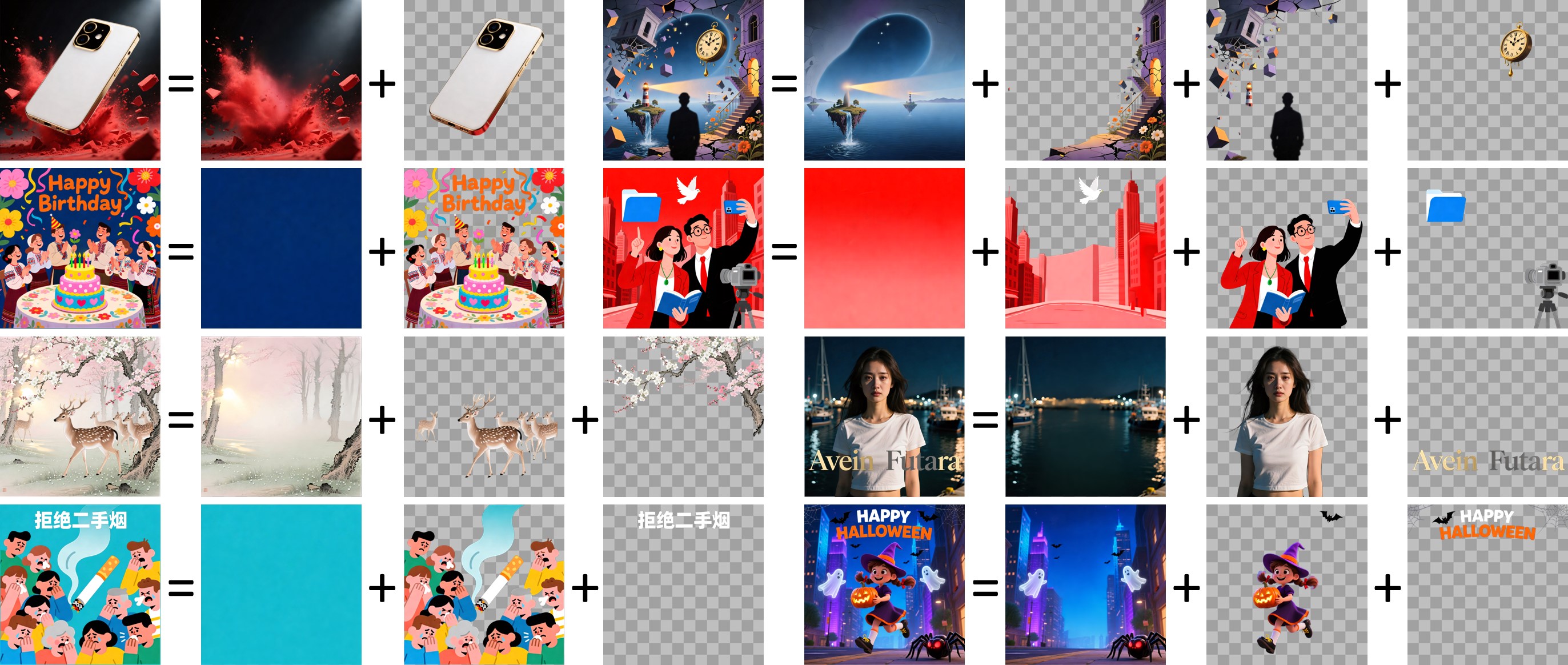
This model is a custom-adapted, designer-focused version of Qwen-Image-Layered, enhanced to convert flat visual designs into fully editable, production-ready layered assets.
While the base Qwen-Image-Layered model introduces the ability to decompose an image into multiple RGBA layers, we have tailored and extended the ecosystem with several key custom additions:
Designer-Layer LoRA Fine-Tuning:
Automated Photoshop PSD Packaging:
package_psd.py / run_layered_diffusers.py) that bundle decomposed RGBA layers into standard, editable Adobe Photoshop (.psd) documents.GGUF Quantization & Local Inference:
Interactive Layer Studio UI:
from diffusers import QwenImageLayeredPipeline
import torch
from PIL import Image

# Load base pipeline
pipeline = QwenImageLayeredPipeline.from_pretrained("Qwen/Qwen-Image-Layered", torch_dtype=torch.bfloat16)
pipeline = pipeline.to("cuda")

# (Optional) Load custom designer LoRA adapter
# pipeline.load_lora_weights("path/to/designer-lora")

image = Image.open("input_design.png").convert("RGBA")
inputs = {
    "image": image,
    "generator": torch.Generator(device='cuda').manual_seed(42),
    "true_cfg_scale": 4.0,
    "negative_prompt": " ",
    "num_inference_steps": 50,
    "num_images_per_prompt": 1,
    "layers": 4,            # Number of layers to extract
    "resolution": 640,      # Recommended resolution bucket (640 or 1024)
    "cfg_normalize": True,
    "use_en_prompt": True,
}

with torch.inference_mode():
    output = pipeline(**inputs)
    layers = output.images[0]

# Save individual layer PNGs
for i, layer in enumerate(layers):
    layer.save(f"layer_{i:02d}.png")
You can package the exported layer PNGs directly into a layered .psd file:
python package_psd.py --composite source.png --layers layer_00.png layer_01.png layer_02.png layer_03.png --output decomposition.psd
Given an input design, the model decomposes it into several RGBA layers:
Qwen-Image-Layered is licensed under Apache 2.0.
@misc{yin2025qwenimagelayered,
      title={Qwen-Image-Layered: Towards Inherent Editability via Layer Decomposition},
      author={Shengming Yin, Zekai Zhang, Zecheng Tang, Kaiyuan Gao, Xiao Xu, Kun Yan, Jiahao Li, Yilei Chen, Yuxiang Chen, Heung-Yeung Shum, Lionel M. Ni, Jingren Zhou, Junyang Lin, Chenfei Wu},
      year={2025},
      eprint={2512.15603},
      archivePrefix={arXiv},
      primaryClass={cs.CV},
      url={https://arxiv.org/abs/2512.15603},
}
5-bit
6-bit