Instructions to use CodeSoft/sorbet-v2-25m with libraries, inference providers, notebooks, and local apps. Follow these links to get started.
- Libraries
- Transformers
How to use CodeSoft/sorbet-v2-25m with Transformers:
# Use a pipeline as a high-level helper from transformers import pipeline pipe = pipeline("text-generation", model="CodeSoft/sorbet-v2-25m")# Load model directly from transformers import AutoTokenizer, AutoModelForCausalLM tokenizer = AutoTokenizer.from_pretrained("CodeSoft/sorbet-v2-25m") model = AutoModelForCausalLM.from_pretrained("CodeSoft/sorbet-v2-25m", device_map="auto") - Notebooks
- Google Colab
- Kaggle
- Local Apps Settings
- llama.cpp
How to use CodeSoft/sorbet-v2-25m with llama.cpp:
Install (macOS, Linux)
curl -LsSf https://llama.app/install.sh | sh # Start a local OpenAI-compatible server with a web UI: llama serve -hf CodeSoft/sorbet-v2-25m:Q4_K_XL # Run inference directly in the terminal: llama cli -hf CodeSoft/sorbet-v2-25m:Q4_K_XL
Install from WinGet (Windows)
winget install llama.cpp # Start a local OpenAI-compatible server with a web UI: llama serve -hf CodeSoft/sorbet-v2-25m:Q4_K_XL # Run inference directly in the terminal: llama cli -hf CodeSoft/sorbet-v2-25m:Q4_K_XL
Use pre-built binary
# Download pre-built binary from: # https://github.com/ggerganov/llama.cpp/releases # Start a local OpenAI-compatible server with a web UI: ./llama-server -hf CodeSoft/sorbet-v2-25m:Q4_K_XL # Run inference directly in the terminal: ./llama-cli -hf CodeSoft/sorbet-v2-25m:Q4_K_XL
Build from source code
git clone https://github.com/ggerganov/llama.cpp.git cd llama.cpp cmake -B build cmake --build build -j --target llama-server llama-cli # Start a local OpenAI-compatible server with a web UI: ./build/bin/llama-server -hf CodeSoft/sorbet-v2-25m:Q4_K_XL # Run inference directly in the terminal: ./build/bin/llama-cli -hf CodeSoft/sorbet-v2-25m:Q4_K_XL
Use Docker
docker model run hf.co/CodeSoft/sorbet-v2-25m:Q4_K_XL
- LM Studio
- Jan
- vLLM
How to use CodeSoft/sorbet-v2-25m with vLLM:
Install from pip and serve model
# Install vLLM from pip: pip install vllm # Start the vLLM server: vllm serve "CodeSoft/sorbet-v2-25m" # Call the server using curl (OpenAI-compatible API): curl -X POST "http://localhost:8000/v1/completions" \ -H "Content-Type: application/json" \ --data '{ "model": "CodeSoft/sorbet-v2-25m", "prompt": "Once upon a time,", "max_tokens": 512, "temperature": 0.5 }'Use Docker
docker model run hf.co/CodeSoft/sorbet-v2-25m:Q4_K_XL
- SGLang
How to use CodeSoft/sorbet-v2-25m with SGLang:
Install from pip and serve model
# Install SGLang from pip: pip install sglang # Start the SGLang server: python3 -m sglang.launch_server \ --model-path "CodeSoft/sorbet-v2-25m" \ --host 0.0.0.0 \ --port 30000 # Call the server using curl (OpenAI-compatible API): curl -X POST "http://localhost:30000/v1/completions" \ -H "Content-Type: application/json" \ --data '{ "model": "CodeSoft/sorbet-v2-25m", "prompt": "Once upon a time,", "max_tokens": 512, "temperature": 0.5 }'Use Docker images
docker run --gpus all \ --shm-size 32g \ -p 30000:30000 \ -v ~/.cache/huggingface:/root/.cache/huggingface \ --env "HF_TOKEN=<secret>" \ --ipc=host \ lmsysorg/sglang:latest \ python3 -m sglang.launch_server \ --model-path "CodeSoft/sorbet-v2-25m" \ --host 0.0.0.0 \ --port 30000 # Call the server using curl (OpenAI-compatible API): curl -X POST "http://localhost:30000/v1/completions" \ -H "Content-Type: application/json" \ --data '{ "model": "CodeSoft/sorbet-v2-25m", "prompt": "Once upon a time,", "max_tokens": 512, "temperature": 0.5 }' - Ollama
How to use CodeSoft/sorbet-v2-25m with Ollama:
ollama run hf.co/CodeSoft/sorbet-v2-25m:Q4_K_XL
- Unsloth Studio
How to use CodeSoft/sorbet-v2-25m with Unsloth Studio:
Install Unsloth Studio (macOS, Linux, WSL)
curl -fsSL https://unsloth.ai/install.sh | sh # Run unsloth studio unsloth studio -H 0.0.0.0 -p 8888 # Then open http://localhost:8888 in your browser # Search for CodeSoft/sorbet-v2-25m to start chatting
Install Unsloth Studio (Windows)
irm https://unsloth.ai/install.ps1 | iex # Run unsloth studio unsloth studio -H 0.0.0.0 -p 8888 # Then open http://localhost:8888 in your browser # Search for CodeSoft/sorbet-v2-25m to start chatting
Using HuggingFace Spaces for Unsloth
# No setup required # Open https://huggingface.co/spaces/unsloth/studio in your browser # Search for CodeSoft/sorbet-v2-25m to start chatting
- Docker Model Runner
How to use CodeSoft/sorbet-v2-25m with Docker Model Runner:
docker model run hf.co/CodeSoft/sorbet-v2-25m:Q4_K_XL
- Lemonade
How to use CodeSoft/sorbet-v2-25m with Lemonade:
Pull the model
# Download Lemonade from https://lemonade-server.ai/ lemonade pull CodeSoft/sorbet-v2-25m:Q4_K_XL
Run and chat with the model
lemonade run user.sorbet-v2-25m-Q4_K_XL
List all available models
lemonade list
- Atomic Chat
Sorbet v2 25M
25M-parameter Qwen2-style decoder LM, warm-started from Sorbet-25M and continued-trained in two runs.
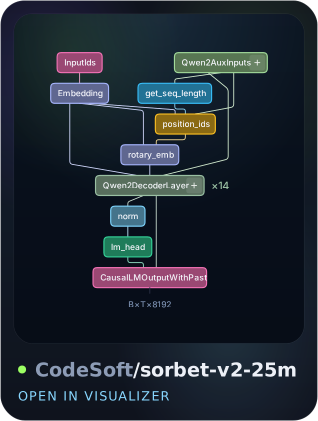
Architecture graph
Architecture
Identical to Sorbet-25M: stock Qwen2 throughout, no custom code paths, natively supported by both transformers and llama.cpp.
| Params | 25,185,920 (~87% non-embedding) |
| Layers / hidden | 14 / 384 |
| Attention | GQA 6 heads / 2 KV heads, RoPE θ=100k |
| FFN | 1024 (SwiGLU) |
| Context | 4096 |
| Vocab | 8,192 custom byte-level BPE (tied embeddings) |
| Precision | bf16 |
Training
v2 continues the v1 checkpoint through two training runs:
| Leg | Data mix (tokens) | LR schedule |
|---|---|---|
| cpt2 | fineweb-edu 70% / infiwebmath 10% / DCLM-baseline 20%, 0.8B tok | cosine, 8-bit AdamW |
| v2-final | FineWeb-HQ 65% / DCLM-baseline 20% / FineMath-4+ 15%, 1.7B tok | cosine peak 1e-4, fp32 AdamW |
Block-shuffled at 131,072 tok/step.
Benchmarks
All numbers zero-shot via lm-evaluation-harness, bf16, identical settings across checkpoints.
| Task | n | Random | acc | acc_norm |
|---|---|---|---|---|
| HellaSwag | 10,042 | 25% | 26.55 ±0.44 | 26.63 ±0.44 |
| ARC-easy | 2,376 | ~25% | 30.30 ±0.94 | 29.92 ±0.94 |
| ARC-challenge | 1,172 | ~25% | 18.60 ±1.14 | 22.44 ±1.22 |
| PIQA | 1,838 | 50% | 54.52 ±1.16 | 53.32 ±1.16 |
| ArithMark-3.0 | 1,000 | 25% | 32.90 ±1.48 | 33.00 ±1.49 |
Notes:
- Every score is at or above the Sorbet-25M baseline within error bars.
- ArithMark-3.0 (
AxiomicLabs/Arithmark-3.0) remains the strongest relative result (+8 pts over random), consistent with the math share of the pretraining mix. - ARC-challenge raw accuracy sits below chance due to a length bias in unnormalized scores; acc_norm is the meaningful metric there.
Usage
from transformers import AutoModelForCausalLM, AutoTokenizer
repo = "CodeSoft/sorbet-v2-25m"
model = AutoModelForCausalLM.from_pretrained(repo, dtype="bfloat16").to("cuda")
tok = AutoTokenizer.from_pretrained(repo, subfolder="tokenizer")
ids = tok("Once upon a time", return_tensors="pt").input_ids.cuda()
print(tok.decode(model.generate(ids, max_new_tokens=64)[0]))
Limitations
Expect shallow world knowledge and weak performance on knowledge-heavy benchmarks due to the model's small parameter count and limited training budget.
License
Apache-2.0.
- Downloads last month
- -