

Instructions to use AMAImedia/GLM-5.3-Flash with libraries, inference providers, notebooks, and local apps. Follow these links to get started.
- Libraries
- Transformers
How to use AMAImedia/GLM-5.3-Flash with Transformers:
# Use a pipeline as a high-level helper from transformers import pipeline pipe = pipeline("text-generation", model="AMAImedia/GLM-5.3-Flash") messages = [ { "role": "user", "content": [ {"type": "image", "url": "https://huggingface.co/datasets/huggingface/documentation-images/resolve/main/p-blog/candy.JPG"}, {"type": "text", "text": "What animal is on the candy?"} ] }, ] pipe(text=messages)# Load model directly from transformers import AutoProcessor, AutoModelForMultimodalLM processor = AutoProcessor.from_pretrained("AMAImedia/GLM-5.3-Flash") model = AutoModelForMultimodalLM.from_pretrained("AMAImedia/GLM-5.3-Flash", device_map="auto") messages = [ { "role": "user", "content": [ {"type": "image", "url": "https://huggingface.co/datasets/huggingface/documentation-images/resolve/main/p-blog/candy.JPG"}, {"type": "text", "text": "What animal is on the candy?"} ] }, ] inputs = processor.apply_chat_template( messages, add_generation_prompt=True, tokenize=True, return_dict=True, return_tensors="pt", ).to(model.device) outputs = model.generate(**inputs, max_new_tokens=40) print(processor.decode(outputs[0][inputs["input_ids"].shape[-1]:])) - Notebooks
- Google Colab
- Kaggle
- Local Apps Settings
- llama.cpp
How to use AMAImedia/GLM-5.3-Flash with llama.cpp:
Install (macOS, Linux)
curl -LsSf https://llama.app/install.sh | sh # Start a local OpenAI-compatible server with a web UI: llama serve -hf AMAImedia/GLM-5.3-Flash:Q3_K_M # Run inference directly in the terminal: llama cli -hf AMAImedia/GLM-5.3-Flash:Q3_K_M
Install from WinGet (Windows)
winget install llama.cpp # Start a local OpenAI-compatible server with a web UI: llama serve -hf AMAImedia/GLM-5.3-Flash:Q3_K_M # Run inference directly in the terminal: llama cli -hf AMAImedia/GLM-5.3-Flash:Q3_K_M
Use pre-built binary
# Download pre-built binary from: # https://github.com/ggerganov/llama.cpp/releases # Start a local OpenAI-compatible server with a web UI: ./llama-server -hf AMAImedia/GLM-5.3-Flash:Q3_K_M # Run inference directly in the terminal: ./llama-cli -hf AMAImedia/GLM-5.3-Flash:Q3_K_M
Build from source code
git clone https://github.com/ggerganov/llama.cpp.git cd llama.cpp cmake -B build cmake --build build -j --target llama-server llama-cli # Start a local OpenAI-compatible server with a web UI: ./build/bin/llama-server -hf AMAImedia/GLM-5.3-Flash:Q3_K_M # Run inference directly in the terminal: ./build/bin/llama-cli -hf AMAImedia/GLM-5.3-Flash:Q3_K_M
Use Docker
docker model run hf.co/AMAImedia/GLM-5.3-Flash:Q3_K_M
- LM Studio
- Jan
- vLLM
How to use AMAImedia/GLM-5.3-Flash with vLLM:
Install from pip and serve model
# Install vLLM from pip: pip install vllm # Start the vLLM server: vllm serve "AMAImedia/GLM-5.3-Flash" # Call the server using curl (OpenAI-compatible API): curl -X POST "http://localhost:8000/v1/chat/completions" \ -H "Content-Type: application/json" \ --data '{ "model": "AMAImedia/GLM-5.3-Flash", "messages": [ { "role": "user", "content": "What is the capital of France?" } ] }'Use Docker
docker model run hf.co/AMAImedia/GLM-5.3-Flash:Q3_K_M
- SGLang
How to use AMAImedia/GLM-5.3-Flash with SGLang:
Install from pip and serve model
# Install SGLang from pip: pip install sglang # Start the SGLang server: python3 -m sglang.launch_server \ --model-path "AMAImedia/GLM-5.3-Flash" \ --host 0.0.0.0 \ --port 30000 # Call the server using curl (OpenAI-compatible API): curl -X POST "http://localhost:30000/v1/chat/completions" \ -H "Content-Type: application/json" \ --data '{ "model": "AMAImedia/GLM-5.3-Flash", "messages": [ { "role": "user", "content": "What is the capital of France?" } ] }'Use Docker images
docker run --gpus all \ --shm-size 32g \ -p 30000:30000 \ -v ~/.cache/huggingface:/root/.cache/huggingface \ --env "HF_TOKEN=<secret>" \ --ipc=host \ lmsysorg/sglang:latest \ python3 -m sglang.launch_server \ --model-path "AMAImedia/GLM-5.3-Flash" \ --host 0.0.0.0 \ --port 30000 # Call the server using curl (OpenAI-compatible API): curl -X POST "http://localhost:30000/v1/chat/completions" \ -H "Content-Type: application/json" \ --data '{ "model": "AMAImedia/GLM-5.3-Flash", "messages": [ { "role": "user", "content": "What is the capital of France?" } ] }' - Ollama
How to use AMAImedia/GLM-5.3-Flash with Ollama:
ollama run hf.co/AMAImedia/GLM-5.3-Flash:Q3_K_M
- Unsloth Desktop
- Pi
How to use AMAImedia/GLM-5.3-Flash with Pi:
Start the llama.cpp server
# Install llama.cpp: brew install llama.cpp # Start a local OpenAI-compatible server: llama serve -hf AMAImedia/GLM-5.3-Flash:Q3_K_M
Configure the model in Pi
# Install Pi: npm install -g @earendil-works/pi-coding-agent # Add to ~/.pi/agent/models.json: { "providers": { "llama-cpp": { "baseUrl": "http://localhost:8080/v1", "api": "openai-completions", "apiKey": "none", "models": [ { "id": "AMAImedia/GLM-5.3-Flash:Q3_K_M" } ] } } }Run Pi
# Start Pi in your project directory: pi
- Docker Model Runner
How to use AMAImedia/GLM-5.3-Flash with Docker Model Runner:
docker model run hf.co/AMAImedia/GLM-5.3-Flash:Q3_K_M
- Lemonade
How to use AMAImedia/GLM-5.3-Flash with Lemonade:
Pull the model
# Download Lemonade from https://lemonade-server.ai/ lemonade pull AMAImedia/GLM-5.3-Flash:Q3_K_M
Run and chat with the model
lemonade run user.GLM-5.3-Flash-Q3_K_M
List all available models
lemonade list
- Hermes Agent
How to use AMAImedia/GLM-5.3-Flash with Hermes Agent:
Start the llama.cpp server
# Install llama.cpp: brew install llama.cpp # Start a local OpenAI-compatible server: llama serve -hf AMAImedia/GLM-5.3-Flash:Q3_K_M
Configure Hermes
# Install Hermes: curl -fsSL https://hermes-agent.nousresearch.com/install.sh | bash hermes setup # Point Hermes at the local server: hermes config set model.provider custom hermes config set model.base_url http://127.0.0.1:8080/v1 hermes config set model.default AMAImedia/GLM-5.3-Flash:Q3_K_M
Run Hermes
hermes
- Atomic Chat
- OpenClaw
How to use AMAImedia/GLM-5.3-Flash with OpenClaw:
Start the llama.cpp server
# Install llama.cpp: brew install llama.cpp # Start a local OpenAI-compatible server: llama serve -hf AMAImedia/GLM-5.3-Flash:Q3_K_M
Configure OpenClaw
# Install OpenClaw: npm install -g openclaw@latest # Register the local server and set it as the default model: openclaw onboard --non-interactive --mode local \ --auth-choice custom-api-key \ --custom-base-url http://127.0.0.1:8080/v1 \ --custom-model-id "AMAImedia/GLM-5.3-Flash:Q3_K_M" \ --custom-provider-id llama-cpp \ --custom-compatibility openai \ --custom-text-input \ --accept-risk \ --skip-health
Run OpenClaw
openclaw agent --local --agent main --message "Hello from Hugging Face"
AMAImedia
Released and maintained by AMAImedia.
- Founder: Ilia Bolotnikov
- Organization: AMAImedia.com
- X (Twitter): @AMAImediacom
- LinkedIn: Ilia Bolotnikov
- Telegram: @djbionicl
- Release date: 2026-08-27
GLM-5.3-Flash
Join our WeChat or Discord community.
Check out the GLM-5.3-Flash blog and GLM-5 technical report.
Use GLM-5.3-Flash API services on the Z.ai API Platform.
Introduction
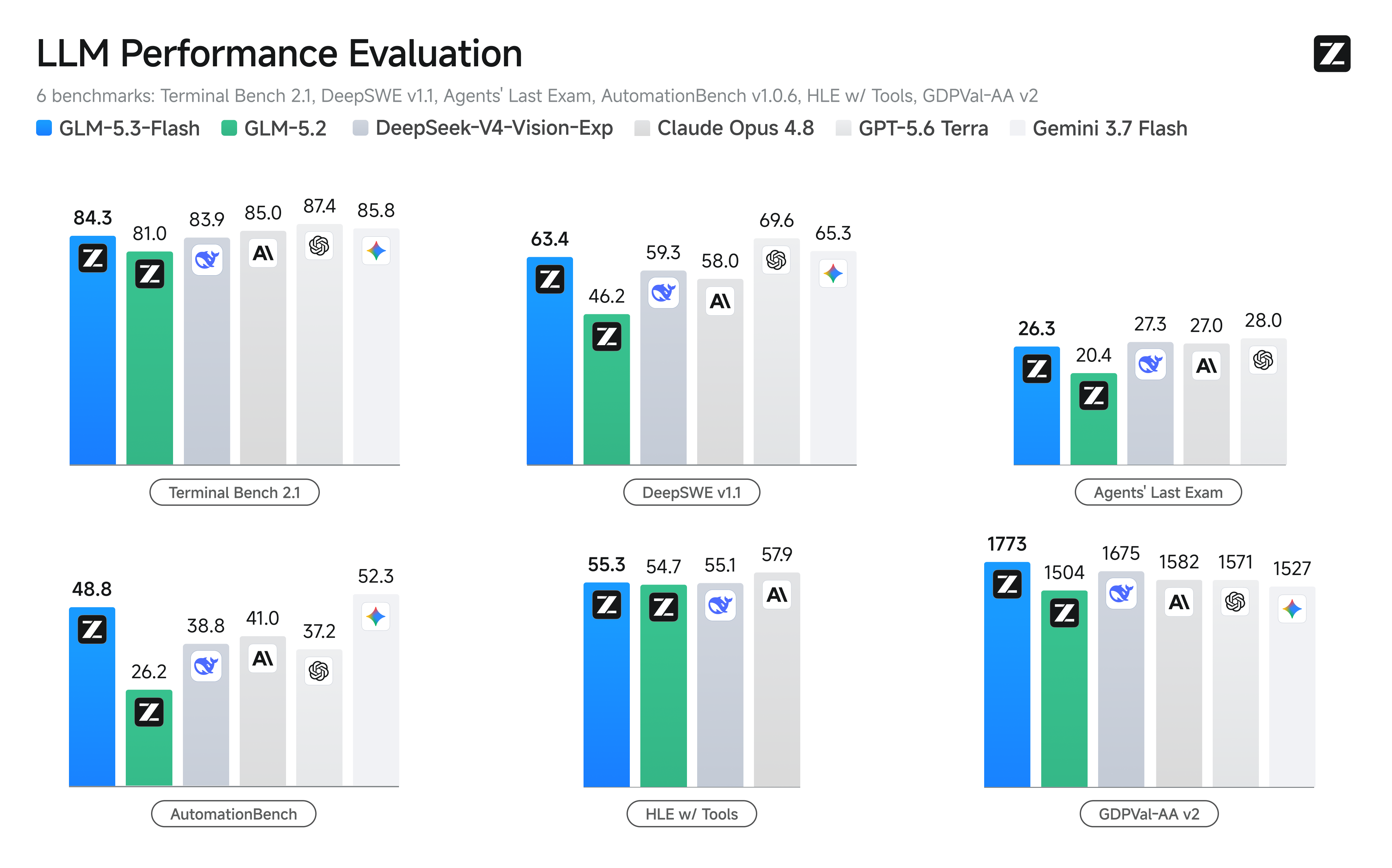
We introduce GLM-5.3-Flash, the first natively multimodal model in the GLM-5 series. With 320B total parameters and just 18B active parameters, it is designed for efficient long-context, coding, agentic, and multimodal workloads.
GLM-5.3-Flash starts from a newly trained base model, with its architecture and training recipe redesigned around capability and efficiency. It combines sparse and linear attention with Manifold-Constrained Hyper-Connections (mHC) and a multimodal pre-training corpus.
Serve GLM-5.3-Flash Locally
GLM-5.3-Flash supports deployment with the following frameworks:
- SGLang — see the cookbook
- vLLM — see the recipes
- TokenSpeed — see the model recipe
- KTransformers — see the tutorial
Usage
Transformers: text generation
import torch
from transformers import AutoModelForCausalLM, AutoTokenizer
model_id = "AMAImedia/GLM-5.3-Flash"
tokenizer = AutoTokenizer.from_pretrained(model_id, trust_remote_code=True)
model = AutoModelForCausalLM.from_pretrained(
model_id,
torch_dtype=torch.bfloat16,
device_map="auto",
trust_remote_code=True,
)
messages = [{"role": "user", "content": "Explain the main benefits of multimodal agents."}]
inputs = tokenizer.apply_chat_template(
messages,
add_generation_prompt=True,
return_tensors="pt",
).to(model.device)
with torch.inference_mode():
output = model.generate(
inputs,
max_new_tokens=512,
temperature=0.7,
top_p=0.9,
do_sample=True,
)
print(tokenizer.decode(output[0][inputs.shape[-1]:], skip_special_tokens=True))
Transformers: multimodal input
For image questions, use the official GLM processor and multimodal message format documented by the model implementation. Keep image inputs in the message content and use the processor to build model inputs; verify the exact API against the installed Transformers version.
from transformers import AutoProcessor, AutoModelForMultimodalLM
model_id = "AMAImedia/GLM-5.3-Flash"
processor = AutoProcessor.from_pretrained(model_id, trust_remote_code=True)
model = AutoModelForMultimodalLM.from_pretrained(
model_id,
device_map="auto",
torch_dtype="auto",
trust_remote_code=True,
)
messages = [{
"role": "user",
"content": [
{"type": "image", "url": "https://huggingface.co/datasets/huggingface/documentation-images/resolve/main/p-blog/candy.JPG"},
{"type": "text", "text": "What is shown in this image?"},
],
}]
inputs = processor.apply_chat_template(
messages,
add_generation_prompt=True,
tokenize=True,
return_dict=True,
return_tensors="pt",
).to(model.device)
outputs = model.generate(**inputs, max_new_tokens=128)
print(processor.decode(outputs[0][inputs["input_ids"].shape[-1]:], skip_special_tokens=True))
vLLM
pip install -U vllm
vllm serve AMAImedia/GLM-5.3-Flash \
--trust-remote-code \
--tensor-parallel-size 8 \
--max-model-len 131072
The server exposes an OpenAI-compatible endpoint:
from openai import OpenAI
client = OpenAI(base_url="http://localhost:8000/v1", api_key="EMPTY")
response = client.chat.completions.create(
model="AMAImedia/GLM-5.3-Flash",
messages=[{"role": "user", "content": "Write a concise summary of this document."}],
temperature=0.7,
max_tokens=512,
)
print(response.choices[0].message.content)
Practical deployment notes
Use bfloat16 where supported, or a framework-supported quantized checkpoint when GPU memory is limited. For multimodal serving, follow the selected framework's documented image-input format. Confirm the installed framework version, GPU memory requirements, tensor-parallel configuration, and supported context length before production deployment.
Footnotes
- HLE w/ tools (full set): Evaluation uses temperature=1.0 and top_p=0.95 with a maximum generation length of 163,840 tokens and a maximum context length of 300,000 tokens.
- NL2Repo: Evaluation uses temperature=1.0, top_p=1.0, and max_new_tokens=64k under 1M context.
- DeepSWE: Evaluation uses temperature=0.95, top_p=1.0, timeout=6h, and 400K context.
- Terminal-Bench 2.1: Evaluation uses temperature=1.0, top_p=1, max_new_tokens=65536, and a 6h timeout.
- Toolathlon Verified: Results are reported as pass@1 averaged over three independent runs.
- AutomationBench: Evaluation uses AutomationBench v1.0.6.
- GDPval-AA v2: Models are evaluated by Artificial Analysis.
- BabyVision: Evaluation uses temperature=1.0, top_p=0.95, and a maximum context length of 164K tokens.
Citation
If you find GLM-5.3-Flash useful in your research, please cite the official technical report:
@misc{glm5team2026glm5vibecodingagentic,
title={GLM-5: from Vibe Coding to Agentic Engineering},
author={GLM-5-Team},
year={2026},
eprint={2602.15763},
archivePrefix={arXiv},
primaryClass={cs.LG},
url={https://arxiv.org/abs/2602.15763},
}
- Downloads last month
- -
