

🧠 iSyncTab-HAM10000
Cross-Modal Feature Sequencing for Image-Tabular Learning via Neural Synchrony
Official HAM10000 trained weights and public reproducibility checkpoint











ECCV 2026
Al Zadid Sultan Bin Habib | Md Younus Ahamed | Prashnna Kumar Gyawali | Gianfranco Doretto | Donald A. Adjeroh
📄 Paper | 💻 GitHub | 📦 PyPI | 🌐 Project Page
✨ Overview
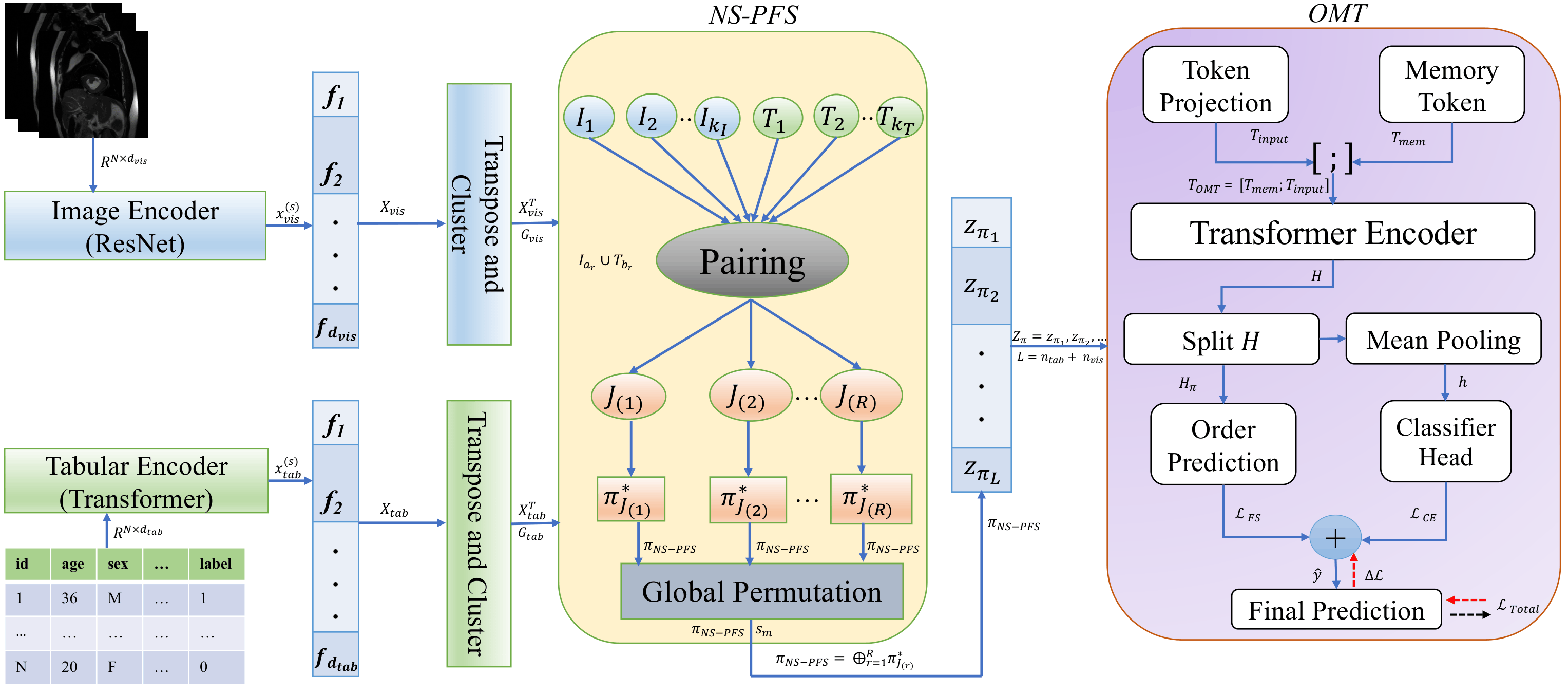
iSyncTab is a multimodal learning framework for image-tabular data that learns how heterogeneous features should be sequenced before multimodal fusion.
The framework treats both image and tabular representations as tokens and introduces Neural Synchrony-guided Paired Feature Sequencing (NS-PFS) to learn a coherent cross-modal ordering.
NS-PFS performs modality-specific clustering and aligns image and tabular feature clusters using neural synchrony based on feature energy and centroid similarity. Cross-modal cluster pairing is obtained through Hungarian matching, followed by construction of a synchronized global feature sequence.
The ordered representation is processed by an Order-aware Memory-augmented Transformer (OMT) with a Linformer backbone, learnable memory tokens, and a feature-sequencing consistency objective.
🧠 Core idea: image and tabular features are represented as tokens, synchronized through NS-PFS, and processed in the learned order by OMT.
🔬 Quick Facts
| Item | Value |
|---|---|
| Model | iSyncTab |
| Dataset | HAM10000 |
| Modalities | Image + Tabular |
| Task | 7-class classification |
| Tabular Features | 4 |
| Feature Sequencing | NS-PFS |
| Cross-Modal Matching | Hungarian matching |
| Fusion Model | OMT |
| Backbone | Linformer |
| Framework | PyTorch |
| Venue | ECCV 2026 |
| Model License | CC BY-NC-SA 4.0 |
📦 Release Files
| File | Description |
|---|---|
isynctab_ham10000_full_tuning_weights_only.pt |
Final trained model weights |
isynctab_ham10000_full_tuning_checkpoint_public.pt |
Public reproducibility checkpoint |
config_full_tuning_public.json |
Public model and experiment configuration |
isynctab_ham10000_release_metadata.json |
Release metadata and SHA-256 hashes |
The public checkpoint contains the model state, optimizer state, selected hyperparameters, preprocessing information, feature configuration, class mappings, dataset splits, and reproducibility metadata.
Stored training and test results are intentionally excluded from the public release.
🔐 File Integrity
The two PyTorch artifacts were verified locally and again after downloading them from the Hugging Face Model Hub.
Show SHA-256 hashes
Model Weights
File:
isynctab_ham10000_full_tuning_weights_only.pt

SHA-256:
fd60b74f9337ade02354b25a3211fc85bef86d011ee98d7113ad485c5f62e267
Public Checkpoint
File:
isynctab_ham10000_full_tuning_checkpoint_public.pt

SHA-256:
d750a7b9f4b1e052fe84e6424b87f045c65db4947a4259c1fc4cc19c9c3b12af
🚀 Quick Start
1. Install iSyncTab
Install the public package from PyPI:
pip install isynctab
For development and experiment notebooks:
git clone https://github.com/zadid6pretam/iSyncTab.git
cd iSyncTab

pip install -r requirements.txt
pip install -e .
2. Download from Hugging Face
Install the Hugging Face Hub client if needed:
pip install huggingface_hub
Download the model weights, public checkpoint, and public configuration:
from huggingface_hub import hf_hub_download

REPO_ID = "zadid6pretam/iSyncTab-HAM10000"

weights_path = hf_hub_download(
    repo_id=REPO_ID,
    filename="isynctab_ham10000_full_tuning_weights_only.pt",
)

checkpoint_path = hf_hub_download(
    repo_id=REPO_ID,
    filename="isynctab_ham10000_full_tuning_checkpoint_public.pt",
)

config_path = hf_hub_download(
    repo_id=REPO_ID,
    filename="config_full_tuning_public.json",
)

print("Weights:", weights_path)
print("Checkpoint:", checkpoint_path)
print("Configuration:", config_path)
3. Load the Trained Weights
import torch

weights = torch.load(
    weights_path,
    map_location="cpu",
    weights_only=True,
)

print(type(weights))
print("Number of state-dict entries:", len(weights))
The released weights contain the final iSyncTab model state_dict.
Initialize the iSyncTab model using the configuration provided in:
config_full_tuning_public.json
Then restore the trained parameters:
model.load_state_dict(weights)
model.eval()
4. Load the Public Checkpoint
import torch

checkpoint = torch.load(
    checkpoint_path,
    map_location="cpu",
    weights_only=False,
)

print(checkpoint.keys())
Restore the model state with:
model.load_state_dict(
    checkpoint["model_state_dict"]
)

model.eval()
The optimizer state can also be restored after creating the corresponding optimizer:
optimizer.load_state_dict(
    checkpoint["optimizer_state_dict"]
)
Show public checkpoint contents
model_state_dict
optimizer_state_dict
best_params
fixed_nspfs_pair_order
num_tab_features
num_classes
classes
class_to_id
id_to_class
num_cols
cat_cols
cat_vocabs
text_cols
image_size
image_mean
image_std
N
n_train
n_val
n_test
train_indices
val_indices
test_indices
seed_split
seed_final
n_trials
epochs_tune
final_epochs
penalize_lambda
study_name
🧬 HAM10000 Setup
The released model uses the following image-tabular configuration:
| Component | Configuration |
|---|---|
| Output Classes | 7 |
| Tabular Features | 4 |
| Image Resolution | 224 × 224 |
| Numerical Feature | age |
| Categorical Feature | dx_type |
| Categorical Feature | sex |
| Categorical Feature | localization |
The seven output classes are:
akiec
bcc
bkl
df
mel
nv
vasc
The exact model, NS-PFS, OMT, preprocessing, vocabulary, and split configuration is provided in:
config_full_tuning_public.json
⚙️ Selected Model Configuration
The released configuration includes the final selected model and NS-PFS hyperparameters.
| Parameter | Value |
|---|---|
d_model |
192 |
linformer_heads |
2 |
linformer_depth |
3 |
linformer_k |
64 |
num_memory_tokens |
3 |
num_clusters |
5 |
metric |
manhattan |
nspfs_bins |
16 |
nspfs_within_cluster_order |
metric_asc |
batch_size |
32 |
Additional continuous hyperparameters and the complete configuration are available in config_full_tuning_public.json.
🗂️ Dataset
The model was trained using the Kaggle distribution:
Skin Cancer MNIST: HAM10000
K. Scott Mader
https://www.kaggle.com/datasets/kmader/skin-cancer-mnist-ham10000
The original HAM10000 dataset was introduced in:
Philipp Tschandl, Cliff Rosendahl, and Harald Kittler
The HAM10000 Dataset, A Large Collection of Multi-Source Dermatoscopic Images of Common Pigmented Skin Lesions
Scientific Data, 2018
https://doi.org/10.1038/sdata.2018.161
No HAM10000 images, metadata tables, or other original dataset files are redistributed through this repository.
Users should obtain the dataset separately from the original distribution source and comply with the applicable dataset license and terms.
♻️ Reproducibility
The public release preserves the information required to reproduce the HAM10000 experiment setup:
- selected model hyperparameters
- NS-PFS configuration
- feature definitions
- categorical vocabularies
- class mappings
- image preprocessing
- train, validation, and test split indices
- random seeds
- optimizer state
- model state
The public split contains:
| Split | Samples |
|---|---|
| Training | 6,410 |
| Validation | 1,602 |
| Test | 2,003 |
| Total | 10,015 |
Stored experimental performance results are intentionally excluded from the public artifacts.
Users can train and evaluate iSyncTab using the released implementation and reproducible data splits to obtain the results independently.
🧪 Public Release Policy
The public release does not include stored:
- test accuracy
- test loss
- training history
- validation objective
- Optuna trial results
- local database paths
- local device information
The release focuses on the trained model artifacts, configuration, reproducibility information, and source code needed to independently train and evaluate iSyncTab.
📓 Demo and Source Code
The complete implementation, experiment notebooks, and package demonstration are available in the official GitHub repository:
https://github.com/zadid6pretam/iSyncTab
The main PyPI installation and usage notebook is:
iSyncTab_Demo_PIP_Install.ipynb
The notebook provides examples for package installation, HAM10000 experiments, generalized image-tabular usage, and loading trained model artifacts.
🎯 Intended Use
This release is intended for:
- academic research
- reproducibility studies
- multimodal machine learning
- image-tabular learning
- feature sequencing research
- medical AI research
- non-commercial experimentation
⚕️ Medical Disclaimer
This model is a research artifact.
It is not a medical device and is not intended for clinical diagnosis, treatment recommendations, patient management, or direct clinical decision-making.
Any potential clinical application requires appropriate independent validation, safety assessment, ethical review, and regulatory approval.
📜 License
Model Artifacts
The trained HAM10000 model artifacts in this repository are released under:
Creative Commons Attribution-NonCommercial-ShareAlike 4.0 International
CC BY-NC-SA 4.0
Source Code
The iSyncTab source code is distributed separately under the MIT License:
https://github.com/zadid6pretam/iSyncTab
The HAM10000 dataset itself is not redistributed through this model repository.
📖 Citation
If you use iSyncTab in your research, please cite:
@inproceedings{habib2026isynctab,
  title     = {iSyncTab: Learning Cross-Modal Feature Sequencing for Image-Tabular Data via Neural Synchrony},
  author    = {Habib, Al Zadid Sultan Bin and Ahamed, Md Younus and Gyawali, Prashnna Kumar and Doretto, Gianfranco and Adjeroh, Donald A.},
  booktitle = {Proceedings of the European Conference on Computer Vision},
  year      = {2026},
  doi       = {10.1007/978-3-032-37035-8}
}
Please also cite the original HAM10000 publication when using the HAM10000-trained artifacts.
👥 Authors
Al Zadid Sultan Bin Habib
Md Younus Ahamed
Prashnna Kumar Gyawali
Gianfranco Doretto
Donald A. Adjeroh

