

SpanSynth-Edit
MIDI-guided synthesis and editing of multi-instrument audio mixtures




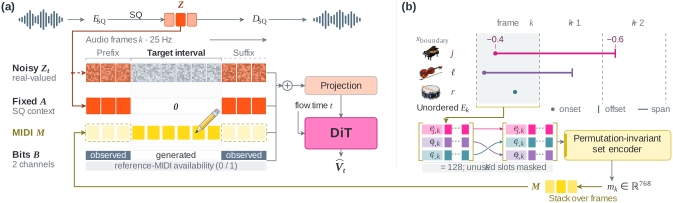
Synthesise music from MIDI, or add, remove, and modify notes in a recording by revising its MIDI. SpanSynth-Edit generates the selected region, using surrounding audio for timbre guidance.
Try it in your browser: upload audio, transcribe with YourMT3+, edit the piano roll, and generate. See the local web setup to run the app yourself.
Install · Examples · Options · Timing & MIDI · Results · Citation
Install
System requirements
- Python: 3.11–3.13 with PyTorch.
- NVIDIA GPU: CUDA with bfloat16 support. 6 GB VRAM recommended.
- Apple Silicon GPU: supported through Metal (PyTorch MPS). Tested on an M1 Pro with 16 GB unified memory and PyTorch 2.13.
- CPU inference is also supported.
Measured peak VRAM was about 3.9 GiB on a GH200 for synthesis and both editing methods with default settings (20.48 s crop, 16 steps, CFG 2.0).
Install PyTorch for your GPU first, then install the CLI without downloading the demo audio:
git clone --depth 1 --filter=blob:none --sparse https://github.com/mimbres/spansynth-edit.git
cd spansynth-edit
git sparse-checkout set spansynth
python -m pip install .
Model and codec weights download automatically on first use. No token is required.
Try an example
Defaults: spansynth-edit · 16 Euler steps · CFG 2.0
Audio context enabled · Context MIDI omitted
Example files
From the repository directory, download the sample audio and its original and revised MIDI files (about 0.5 MB total):
mkdir -p ../spansynth-inputs
for name in early-slakh-track00006-original.mp3 \
            early-slakh-track00006-before.mid \
            early-slakh-track00006-after.mid; do
  curl --fail --location --output "../spansynth-inputs/$name" \
    "https://raw.githubusercontent.com/mimbres/spansynth-edit/main/demo/assets/$name"
done
The examples below regenerate 6.40–14.08 s within the first 20.48 s of the recording.
spansynth-edit
Provide the full revised MIDI, including notes that should remain unchanged within the selected region:
spansynth-edit edit \
  --audio ../spansynth-inputs/early-slakh-track00006-original.mp3 \
  --midi ../spansynth-inputs/early-slakh-track00006-after.mid \
  --cfg 2.0 \
  --output ../spansynth-results/slakh-edit
spansynth-edit + flowedit
Provide both the original and revised MIDI:
spansynth-edit edit --method flowedit \
  --audio ../spansynth-inputs/early-slakh-track00006-original.mp3 \
  --source-midi ../spansynth-inputs/early-slakh-track00006-before.mid \
  --midi ../spansynth-inputs/early-slakh-track00006-after.mid \
  --output ../spansynth-results/slakh-flowedit
Synthesis
Synthesise the original score in the selected region, using the surrounding recording as audio context:
spansynth-edit synthesize \
  --audio ../spansynth-inputs/early-slakh-track00006-original.mp3 \
  --midi ../spansynth-inputs/early-slakh-track00006-before.mid \
  --output ../spansynth-results/synthesis
Add --check-inputs to validate audio, MIDI, and timing without loading the model.
Options
Common options are listed below. Flags marked off are enabled by adding them to the command. For all options, run spansynth-edit edit --help or spansynth-edit synthesize --help.
Generation
| Option | Default | Use |
|---|---|---|
--method |
ordinary |
ordinary selects spansynth-edit; flowedit selects spansynth-edit + flowedit. Available with edit only. |
--cfg |
2.0 |
MIDI classifier-free guidance scale (0 or higher). |
--steps |
16 |
Number of Euler steps. |
--context-midi |
off | Use original MIDI outside the generated region. Requires --source-midi. |
--drop-context-audio |
off | Drop the audio-context condition. Audio outside the generated region is still preserved. |
Inputs and timing
All times are in seconds.
| Option | Default | Use |
|---|---|---|
--audio |
required | Source recording or audio context. |
--midi |
required | Target MIDI: the score to synthesise or the revised score. |
--source-midi |
none | Original MIDI, required for spansynth-edit + flowedit or --context-midi. |
--crop-start |
0.0 |
Crop start on the audio timeline. |
--duration |
20.48 |
Crop length, up to 20.48 seconds. |
--edit-start, --edit-end |
6.40, 14.08 |
Generated region relative to the crop. |
--midi-offset |
0.0 |
Offset added to target MIDI times to obtain audio times. |
--source-midi-offset |
0.0 |
Offset added to original MIDI times to obtain audio times. |
Execution and output
| Option | Default | Use |
|---|---|---|
--output |
required | Folder for generated audio and run settings. |
--device |
auto |
Choose cpu, mps (Apple GPU), cuda, or cuda:N. auto tries CUDA, then MPS, then CPU. |
--overwrite |
off | Replace existing results in the output folder. |
Timing and instruments
Provide aligned audio and MIDI, or use the offsets to align their timelines.
With --crop-start 30, a MIDI note at 36.4 s appears at 6.4 s in the crop. If MIDI time 0 corresponds to the start of that crop, use --midi-offset 30. Set --source-midi-offset independently for the original MIDI. Each run processes one crop, with edit boundaries rounded outward to 40 ms.
The instrument vocabulary lists supported MIDI programs and merged instrument groups. Programs in a group share one model category: for example, 0, 1, 3, 6, and 7 map to Acoustic Piano. Program numbers are zero-based, and MIDI channel 10 selects drums (internal program 128).
Results
| File | Contents |
|---|---|
output.wav |
Full crop with the synthesised or edited region |
generated.wav |
Generated region only |
input.wav |
Source crop converted to 48 kHz mono |
run.json |
Settings and timing |
All audio outputs are 48 kHz mono. Outside the generated region, output.wav matches input.wav exactly. Use --overwrite to replace existing results.
License and credits
Code and model weights are released under Apache-2.0. See LICENSE and NOTICE for terms and credits, including YourMT3+ and HeartCodec. Demo recordings retain their original rights.
Citation
If you use SpanSynth-Edit in your research, please cite our forthcoming paper. arXiv link and BibTeX: coming soon.