


Program-Verified Self-Evolution for Vision-Language Models
Paper • 2609.33855 • Published • 11
Ahmed Heakl1,2 · Sungik Choi1 · Moontae Lee1,4 · Salman Khan2,3
1LG AI Research 2MBZUAI 3Australian National University 4University of Illinois at Chicago


VQS-2B is Qwen3-VL-2B-Instruct improved with VQS (Verifiable QA Generation for Self-Evolving Models), the method of our paper Program-Verified Self-Evolution for Vision-Language Models. It was trained only on questions it wrote for itself from unlabeled images: no human question, answer or label is used at any stage, and no other model takes part. The same 2B weights parse the image, write the question, check the facts behind the answer, and solve it.
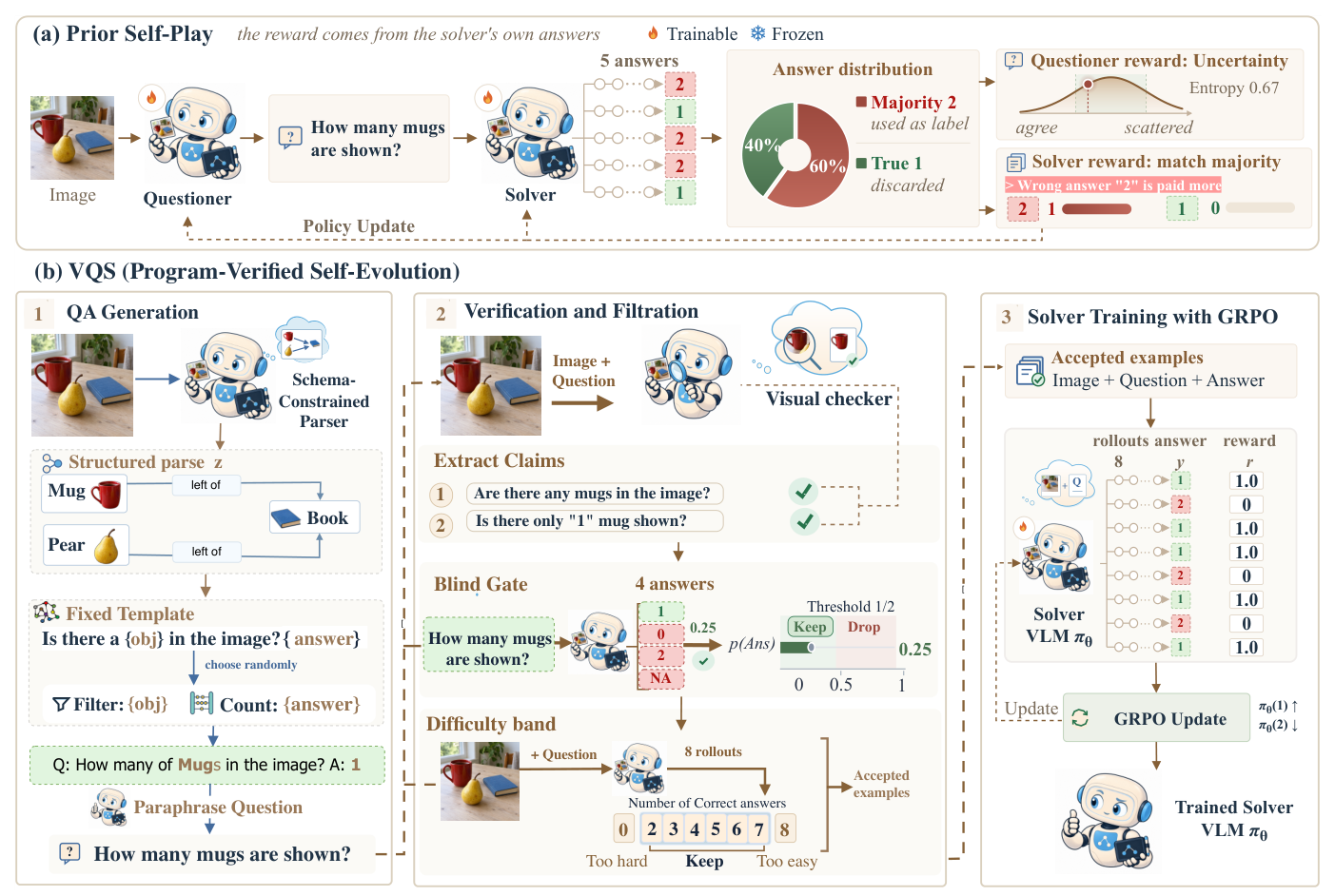
Prior self-evolving methods label their own questions by majority vote or with a model judge, and in the paper's human evaluation 24% of majority-vote labels and 18% of model-judge labels are wrong. VQS computes the answer instead:
Human raters find 94.4% of VQS answers correct, against 76.4% for majority voting and 82.2% for a model judge (paper, Table 2).
Reported in the paper (Table 1, Qwen3-VL-2B; all methods train on unlabeled images only):
| Method | GQA | OK-VQA | InfoVQA | SQA | MMMU | MMB | ESB | LogicV | MMStar | SEED | Avg |
|---|---|---|---|---|---|---|---|---|---|---|---|
| Base | 58.25 | 40.76 | 69.02 | 79.42 | 38.92 | 74.48 | 68.54 | 35.04 | 55.62 | 72.16 | 59.22 |
| VisPlay | 58.65 | 41.15 | 69.96 | 80.74 | 39.27 | 74.52 | 68.56 | 34.93 | 55.37 | 71.62 | 59.48 (+0.26) |
| Vision-Zero | 58.98 | 41.39 | 70.93 | 81.96 | 39.58 | 75.07 | 69.72 | 35.28 | 55.58 | 71.53 | 60.00 (+0.78) |
| EvoLMM | 59.01 | 38.03 | 70.69 | 83.01 | 39.08 | 74.62 | 69.32 | 34.99 | 55.50 | 71.17 | 59.54 (+0.32) |
| iReasoner | 59.13 | 38.13 | 70.82 | 83.12 | 39.11 | 74.75 | 69.67 | 35.09 | 55.59 | 71.25 | 59.67 (+0.45) |
| VISE | 59.41 | 41.24 | 71.43 | 83.61 | 40.67 | 76.72 | 70.14 | 31.92 | 55.02 | 72.18 | 60.23 (+1.01) |
| VQS (ours) | 59.52 | 42.60 | 72.01 | 86.81 | 46.78 | 78.26 | 71.54 | 36.83 | 57.04 | 72.61 | 62.40 (+3.18) |
InfoVQA = InfographicsVQA, SQA = ScienceQA, MMB = MMBench, ESB = EmbSpatial, LogicV = LogicVista. The 4B and 8B results, ablations and multi-cycle results are in the paper and on the project page.
from transformers import AutoModelForImageTextToText, AutoProcessor
from PIL import Image

model = AutoModelForImageTextToText.from_pretrained("ahmedheakl/VQS", dtype="auto", device_map="auto")
processor = AutoProcessor.from_pretrained("ahmedheakl/VQS")

messages = [{"role": "user", "content": [
    {"type": "image"},
    {"type": "text", "text": "In 2020, which is higher, Stayovers or Day trippers?\n"
                             "Answer the question using a single word or phrase."},
]}]
text = processor.apply_chat_template(messages, add_generation_prompt=True, tokenize=False)
inputs = processor(text=[text], images=[Image.open("chart.png")], return_tensors="pt").to(model.device)
out = model.generate(**inputs, max_new_tokens=64, do_sample=False)
print(processor.batch_decode(out[:, inputs["input_ids"].shape[1]:], skip_special_tokens=True)[0])
from vllm import LLM, SamplingParams
from PIL import Image

llm = LLM(model="ahmedheakl/VQS", limit_mm_per_prompt={"image": 1}, max_model_len=8192)
prompt = ("<|im_start|>user\n<|vision_start|><|image_pad|><|vision_end|>"
          "In 2020, which is higher, Stayovers or Day trippers?\n"
          "Answer the question using a single word or phrase.<|im_end|>\n<|im_start|>assistant\n")
out = llm.generate({"prompt": prompt, "multi_modal_data": {"image": Image.open("chart.png")}},
                   SamplingParams(temperature=0, max_tokens=64))
print(out[0].outputs[0].text)
Training answers are short by construction, so the model is tuned for terse replies. For results
consistent with training, end the question with the answer-format instruction used there:
Answer the question using a single word or phrase., Answer the question using a single number.,
or Answer with the option's letter from the given choices directly.
| Base model | Qwen/Qwen3-VL-2B-Instruct |
| Data | self-generated questions over charts, infographics, natural images and diagrams |
| Adapter | LoRA r = 64, α = 128, all linear layers, .*visual.* excluded; merged into these weights |
| Vision tower | frozen: the vision weights are identical to the base model |
| Algorithm | GRPO, 8 rollouts at temperature 1.0, low-variance KL with β = 0.01 |
| Optimizer | AdamW, learning rate 1e-5 (constant) |
| Batches | rollout 256 prompts, global update 128 |
| Framework | EasyR1 |
The full pipeline, from unlabeled images to parser training, question generation, filtering and GRPO, with every setting from the paper, is at github.com/ahmedheakl/VQS.
@article{heakl2026vqs,
  title   = {Program-Verified Self-Evolution for Vision-Language Models},
  author  = {Heakl, Ahmed and Choi, Sungik and Lee, Moontae and Khan, Salman},
  journal = {arXiv preprint arXiv:2609.33855},
  year    = {2026},
  url     = {https://arxiv.org/abs/2609.33855}
}
Base model
Qwen/Qwen3-VL-2B-Instruct