
YOLO26 laptop benchmark: 8 runtimes, full COCO val, and a Windows power-mode trap

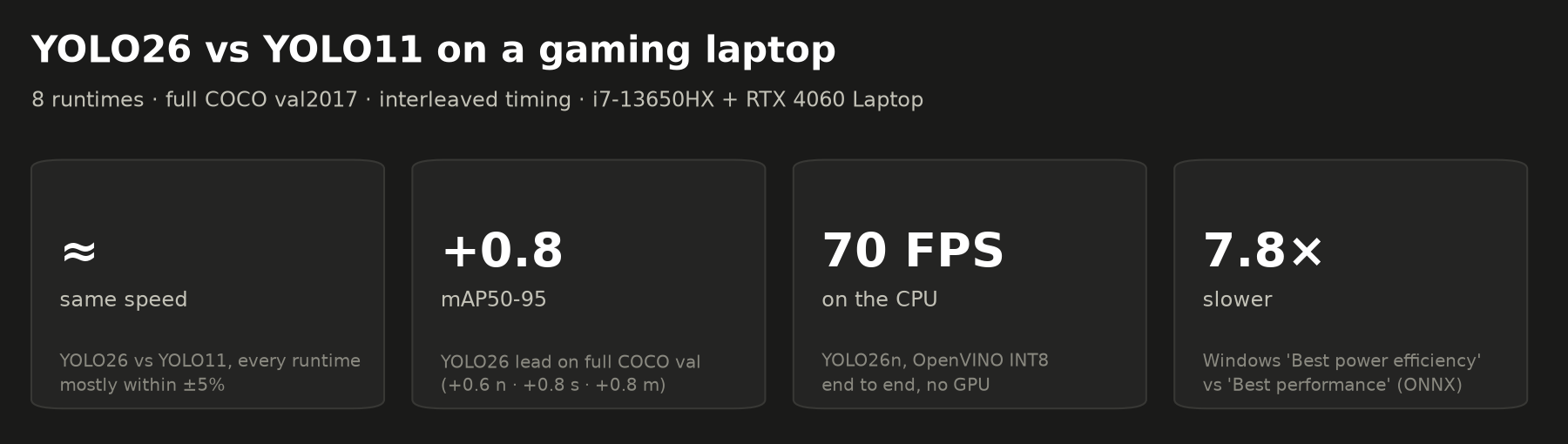
I ran YOLO26 against YOLO11 on an ordinary gaming laptop across 8 runtimes, with full COCO val2017 accuracy. Short version: the two run at about the same speed, YOLO26 is +0.6–0.8 mAP more accurate, and on Windows laptops the power mode matters more than which model you pick. Code, raw results and a 10-second repro are here: https://github.com/Zephyr4772/yolo26-laptop-benchmark
Setup
- Hardware: i7-13650HX (6 P-cores + 8 E-cores) and an RTX 4060 Laptop GPU (8 GB), Windows 11, on AC power.
- Software: Ultralytics 8.4.78, ONNX Runtime 1.27, OpenVINO 2026.4, TensorRT 11.4, torch 2.5.1+cu121.
- Models: YOLO26 n/s/m against YOLO11 n/s/m, at batch 1 and 640 px.
- Runtimes:
- CPU: PyTorch, ONNX Runtime, OpenVINO FP32, OpenVINO INT8.
- GPU: PyTorch CUDA FP32/FP16, TensorRT FP32/FP16.
1. Accuracy: full COCO val2017 (5,000 images)
These were run with PyTorch on CUDA FP32 at batch 32, using val() defaults and end-to-end (NMS-free) outputs.
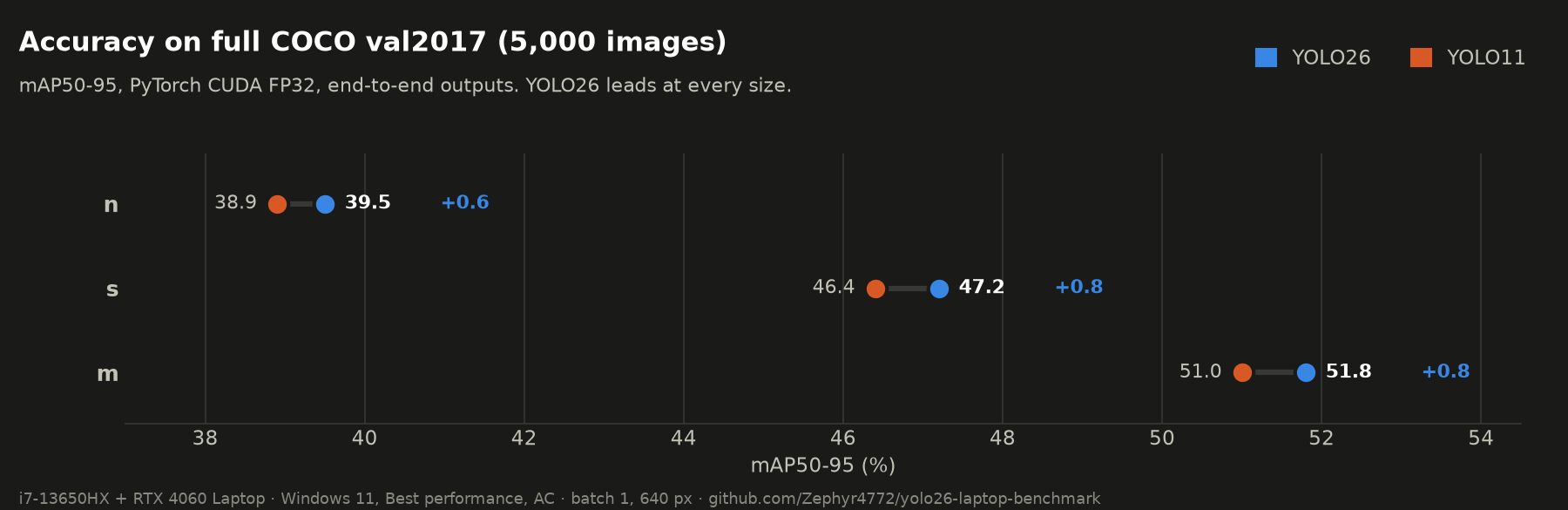
| mAP50-95 | n | s | m |
|---|---|---|---|
| YOLO26 | 39.5 | 47.2 | 51.8 |
| YOLO11 | 38.9 | 46.4 | 51.0 |
| YOLO26 lead | +0.6 | +0.8 | +0.8 |
| model card, YOLO26 (e2e) | 40.1 | 47.8 | 52.5 |
This reproduces the card to within 0.6–0.7 mAP. The difference is consistent with the evaluation settings (batch-32 rectangular padding).
INT8 accuracy, held out
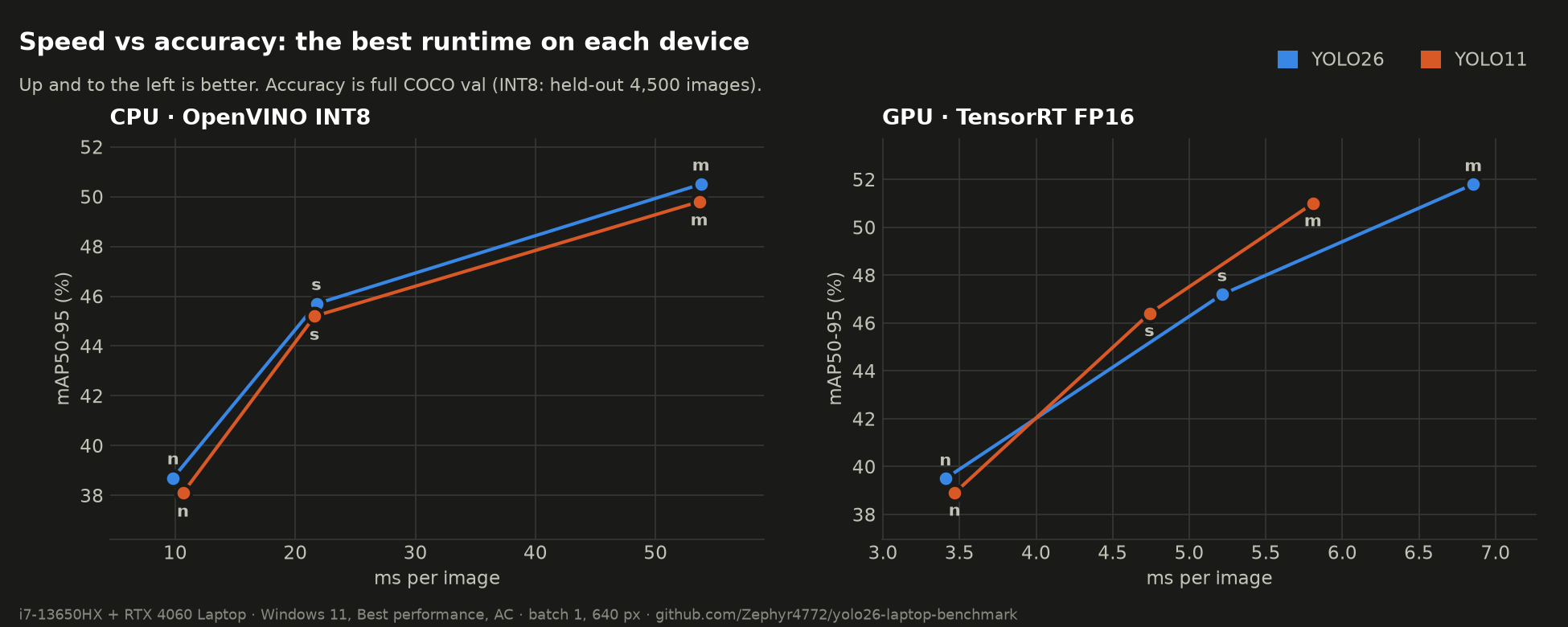
OpenVINO INT8 was calibrated on 500 val images and scored on the other 4,500, so it never saw its own calibration data:
| mAP50-95 | 26n | 11n | 26s | 11s | 26m | 11m |
|---|---|---|---|---|---|---|
| OpenVINO FP32 | 39.6 | 38.6 | 47.1 | 45.9 | 51.8 | 50.6 |
| OpenVINO INT8 | 38.7 | 38.1 | 45.7 | 45.2 | 50.5 | 49.8 |
| INT8 cost | −0.9 | −0.5 | −1.4 | −0.7 | −1.3 | −0.8 |
INT8 costs YOLO26 slightly more than YOLO11, but YOLO26 stays ahead after quantization (+0.6 / +0.5 / +0.7).
2. Latency: same machine, measured fairly
Method:
- Windows Best performance mode, on AC, not pinned.
- Every model × runtime visited in turn, for 3 interleaved rounds. Each visit is 50 real COCO images after 15 warm-up runs.
- The reported figure is the median of the per-round medians. The worst round-to-round spread was 1.6×.
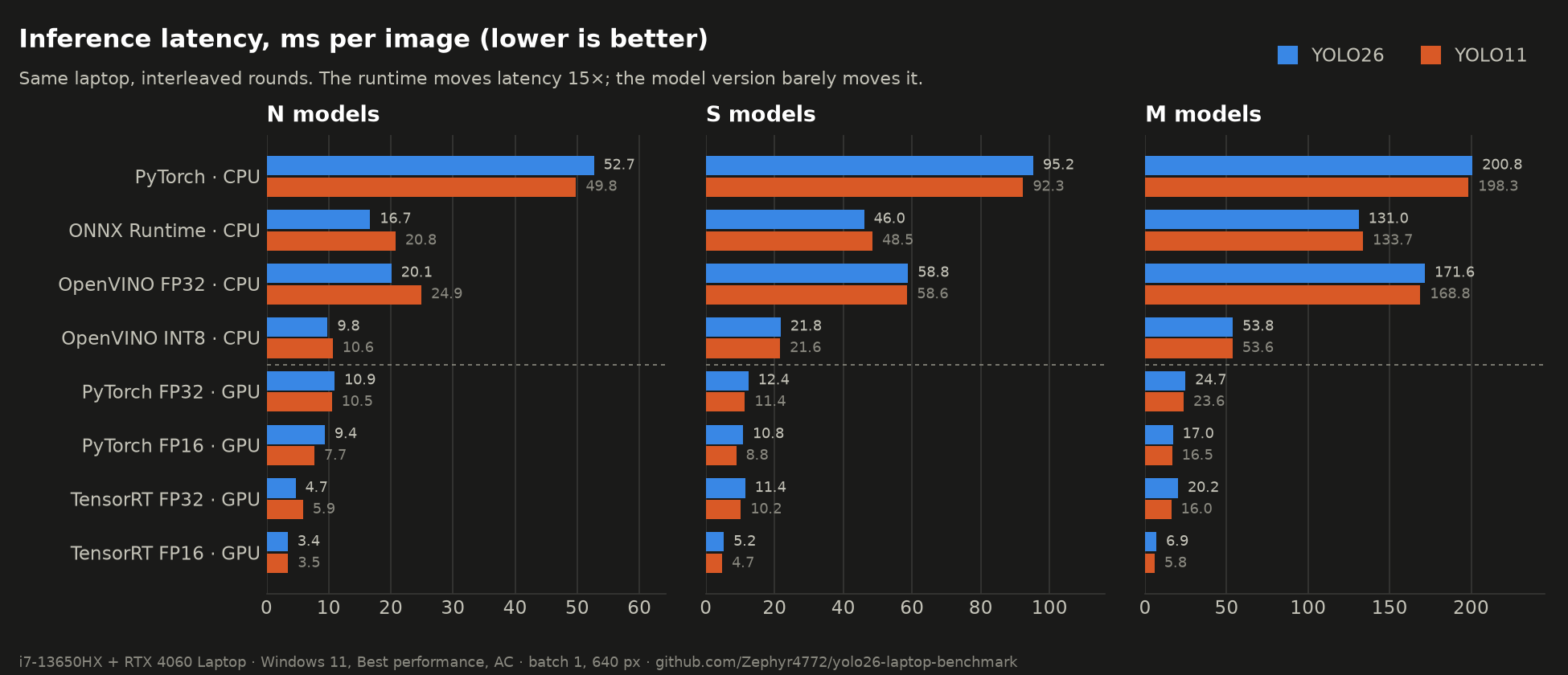
| ms / image (inference) | 26n | 11n | 26s | 11s | 26m | 11m |
|---|---|---|---|---|---|---|
| PyTorch CPU | 52.7 | 49.8 | 95.2 | 92.3 | 200.8 | 198.3 |
| ONNX Runtime CPU | 16.7 | 20.8 | 46.0 | 48.5 | 131.0 | 133.7 |
| OpenVINO FP32 CPU | 20.1 | 24.9 | 58.8 | 58.6 | 171.6 | 168.8 |
| OpenVINO INT8 CPU | 9.8 | 10.6 | 21.8 | 21.6 | 53.8 | 53.6 |
| PyTorch CUDA FP32 | 10.9 | 10.5 | 12.4 | 11.4 | 24.7 | 23.6 |
| PyTorch CUDA FP16 | 9.4 | 7.7 | 10.8 | 8.8 | 17.0 | 16.5 |
| TensorRT FP32 † | 4.7 | 5.9 | 11.4 | 10.2 | 20.2 | 16.0 |
| TensorRT FP16 † | 3.4 | 3.5 | 5.2 | 4.7 | 6.9 | 5.8 |
End to end (pre-processing + inference + post-processing), YOLO26n reaches 70 FPS on the CPU with OpenVINO INT8 and 79 FPS with PyTorch CUDA FP16.
What this says:
- On the CPU, YOLO26 and YOLO11 are essentially tied. YOLO26n is about 20% faster on ONNX Runtime and OpenVINO FP32, and they're even everywhere else.
- On the GPU, YOLO11 is equal or up to about 20% faster, for example with TensorRT FP16 at s/m (4.7 vs 5.2 ms, 5.8 vs 6.9 ms).
- The runtime is the big lever. On the CPU, OpenVINO INT8 is 3.7–5.4× faster than PyTorch for about 1 mAP. For CPU deployment on a laptop, that choice matters far more than YOLO26 vs YOLO11.
- On the GPU at batch 1, PyTorch eager mode is overhead-bound. n and s take nearly the same time, and FP16 helps only a little. TensorRT FP16 is where the GPU pays off: 3.4–6.9 ms.
† TensorRT notes:
- Built directly with the
tensorrtPython package, not the Ultralytics exporter (see §5). - The times include copying each image to the GPU, so they're slightly pessimistic next to pure engine time.
- TensorRT 11 has no
BuilderFlag.FP16any more. The FP16 engines come from an FP16 ONNX export, built as a strongly typed network.
Laptop vs the model card (YOLO26, ms)
| n | s | m | |
|---|---|---|---|
| card: ONNX CPU (EC2 Xeon) | 38.9 | 87.2 | 220.0 |
| this laptop: ONNX CPU | 16.7 | 46.0 | 131.0 |
| card: TensorRT FP16 (T4) | 1.7 | 2.5 | 4.7 |
| this laptop: TensorRT FP16 (incl. upload) | 3.4 | 5.2 | 6.9 |
A current laptop CPU beats the card's cloud Xeon on single-image ONNX latency.
3. The Windows power-mode trap: up to 8× slower
This turned out to be the most useful finding for anyone running YOLO on a laptop.
Inference time, YOLO26n, ms per image:
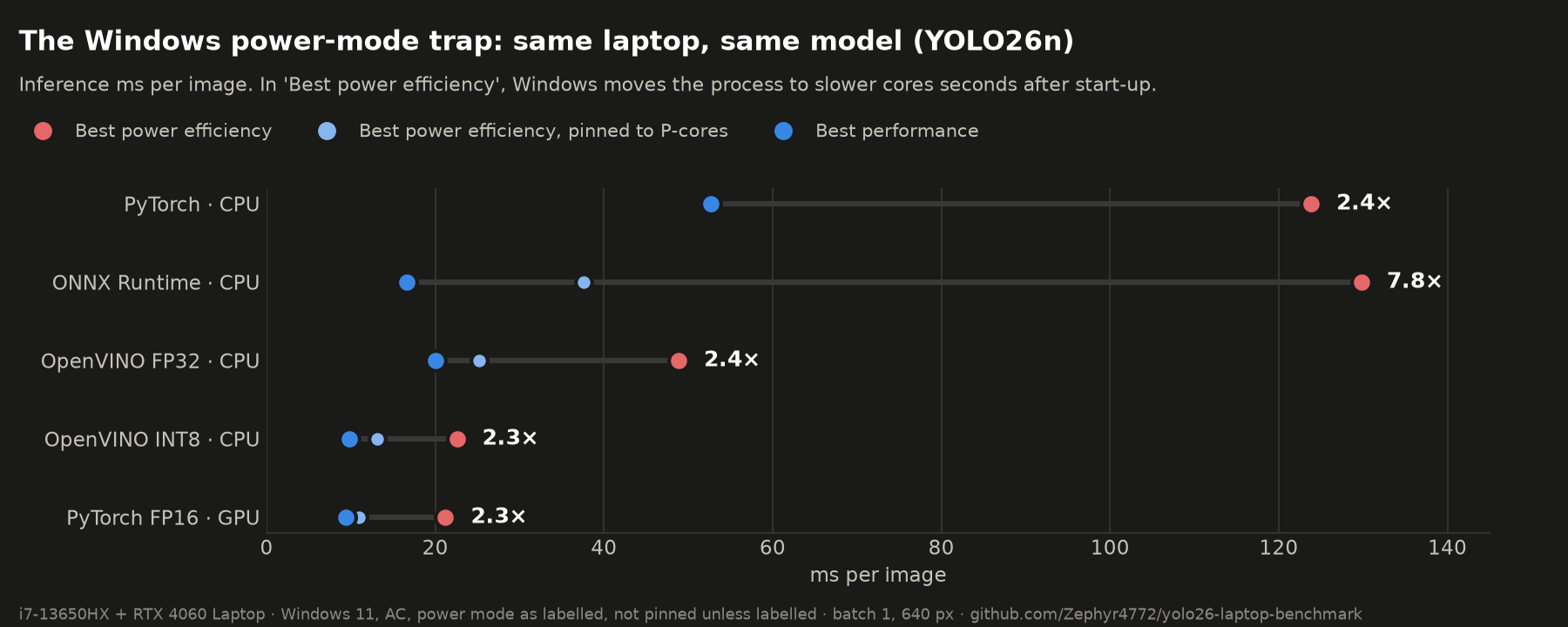
| runtime | Best power efficiency | + pinned to P-cores | Best performance |
|---|---|---|---|
| PyTorch CPU | 123.8 | 52.1 | 52.7 |
| ONNX Runtime CPU | 129.8 | 37.6 | 16.7 |
| OpenVINO FP32 | 48.9 | 25.2 | 20.1 |
| OpenVINO INT8 | 22.6 | 13.2 | 9.8 |
| PyTorch CUDA FP16 | 21.2 | 10.9 | 9.4 |
What happens:
- A freshly started process runs at full speed.
- A few seconds later, in Best power efficiency, Windows moves it to slower cores and clocks. This happens even when the process is just sleeping, with no ML library involved.
- Pinning to the P-cores recovers most of it, but not all, because the P-cores also clock down in that mode.
- GPU inference slows too, because the CPU side of each call slows.
- On my machine, Windows' Energy Saver was forcing this mode. Settings showed "Power mode cannot be set when energy saver is on".
A 10-second repro with no ML libraries (ecore_repro.py in the repo) times a pure-Python loop at start-up and again 3 seconds later:
Best power efficiency, unpinned : 2.2–3.6x slower after 3 s
Best power efficiency, pinned   : 1.2–1.9x
Best performance                : 1.02x
If you're on a hybrid Intel laptop (12th gen or newer), please run it and post your CPU, power mode and ratio below. I'm curious how widespread this is.
Practical advice: if YOLO on your Windows laptop is slower than you expect, check Settings → System → Power & battery → Power mode (and Energy Saver) before anything else.
4. How I nearly posted two wrong headlines
I'm including this because it's easy to make the same mistakes:
- "YOLO26 is 50–90% faster than YOLO11 on CPU." My first run was sequential: all YOLO26 configs, then all YOLO11. YOLO26 happened to run while the process was still on fast cores, and YOLO11 after Windows demoted it. Re-timing in interleaved rounds made the gap disappear.
- "YOLO26n is +1.7–2.1 mAP ahead." That came from a 500-image subset. The full 5,000-image val says +0.6.
If you benchmark on a laptop: use Best performance, stay plugged in, interleave models, and use the full validation set.
5. A warning about the TensorRT export on Windows
With Ultralytics 8.4.78, export(format="engine") on Windows auto-installed nvidia-modelopt[onnx]. In my environment, that install:
- tried to replace torch, which failed partway and left torch without its pip metadata;
- half-removed
onnx("Access is denied" on a.pydfile); - left
sympymissing afterwards.
I had to repair the environment by hand. To be safe, set YOLO_AUTOINSTALL=False (or pre-install the requirement) before exporting to TensorRT on Windows. The benchmark builds the engines directly with the tensorrt package instead.
@Ultralytics: an auto-install that can replace torch mid-export is probably worth guarding, at least behind a prompt on Windows. Happy to open an issue with details.
6. Caveats
- One laptop, so this is one data point. That's why the repro exists.
- Latency is median-of-medians over 3 interleaved rounds of 50 images. Accuracy is a single deterministic run.
- Accuracy uses Ultralytics
valdefaults (conf 0.001, end-to-end outputs). The INT8 accuracy comes from the default OpenVINO/NNCF calibration on 500 images. - TensorRT timings include the host-to-device copy, so they're not 1:1 comparable with the card's numbers.
- Not tested: l/x sizes, batch > 1, other tasks (seg/pose/obb), Linux.
Reproduce
Everything is at https://github.com/Zephyr4772/yolo26-laptop-benchmark:
bench.py: exports.fullval.py: full and held-out accuracy.retime.py: interleaved latency.trt_bench.py: TensorRT.ecore_repro.py: the power-mode repro.
All raw JSONL results are included, including the discarded runs, so you can check the work.
Thanks to Ultralytics for the open weights. If anyone has a T4 or a Linux box and can run retime.py and trt_bench.py, I'd love to add more machines.