Instructions to use JonnyYu828/Stream3D-VLM-4B with libraries, inference providers, notebooks, and local apps. Follow these links to get started.
- Libraries
- Transformers
How to use JonnyYu828/Stream3D-VLM-4B with Transformers:
# Use a pipeline as a high-level helper from transformers import pipeline pipe = pipeline("image-text-to-text", model="JonnyYu828/Stream3D-VLM-4B") messages = [ { "role": "user", "content": [ {"type": "image", "url": "https://huggingface.co/datasets/huggingface/documentation-images/resolve/main/p-blog/candy.JPG"}, {"type": "text", "text": "What animal is on the candy?"} ] }, ] pipe(text=messages)# Load model directly from transformers import AutoProcessor, Qwen2_5_VLForConditionalGenerationWithVGGT processor = AutoProcessor.from_pretrained("JonnyYu828/Stream3D-VLM-4B") model = Qwen2_5_VLForConditionalGenerationWithVGGT.from_pretrained("JonnyYu828/Stream3D-VLM-4B") messages = [ { "role": "user", "content": [ {"type": "image", "url": "https://huggingface.co/datasets/huggingface/documentation-images/resolve/main/p-blog/candy.JPG"}, {"type": "text", "text": "What animal is on the candy?"} ] }, ] inputs = processor.apply_chat_template( messages, add_generation_prompt=True, tokenize=True, return_dict=True, return_tensors="pt", ).to(model.device) outputs = model.generate(**inputs, max_new_tokens=40) print(processor.decode(outputs[0][inputs["input_ids"].shape[-1]:])) - Notebooks
- Google Colab
- Kaggle
- Local Apps Settings
- vLLM
How to use JonnyYu828/Stream3D-VLM-4B with vLLM:
Install from pip and serve model
# Install vLLM from pip: pip install vllm # Start the vLLM server: vllm serve "JonnyYu828/Stream3D-VLM-4B" # Call the server using curl (OpenAI-compatible API): curl -X POST "http://localhost:8000/v1/chat/completions" \ -H "Content-Type: application/json" \ --data '{ "model": "JonnyYu828/Stream3D-VLM-4B", "messages": [ { "role": "user", "content": [ { "type": "text", "text": "Describe this image in one sentence." }, { "type": "image_url", "image_url": { "url": "https://cdn.britannica.com/61/93061-050-99147DCE/Statue-of-Liberty-Island-New-York-Bay.jpg" } } ] } ] }'Use Docker
docker model run hf.co/JonnyYu828/Stream3D-VLM-4B
- SGLang
How to use JonnyYu828/Stream3D-VLM-4B with SGLang:
Install from pip and serve model
# Install SGLang from pip: pip install sglang # Start the SGLang server: python3 -m sglang.launch_server \ --model-path "JonnyYu828/Stream3D-VLM-4B" \ --host 0.0.0.0 \ --port 30000 # Call the server using curl (OpenAI-compatible API): curl -X POST "http://localhost:30000/v1/chat/completions" \ -H "Content-Type: application/json" \ --data '{ "model": "JonnyYu828/Stream3D-VLM-4B", "messages": [ { "role": "user", "content": [ { "type": "text", "text": "Describe this image in one sentence." }, { "type": "image_url", "image_url": { "url": "https://cdn.britannica.com/61/93061-050-99147DCE/Statue-of-Liberty-Island-New-York-Bay.jpg" } } ] } ] }'Use Docker images
docker run --gpus all \ --shm-size 32g \ -p 30000:30000 \ -v ~/.cache/huggingface:/root/.cache/huggingface \ --env "HF_TOKEN=<secret>" \ --ipc=host \ lmsysorg/sglang:latest \ python3 -m sglang.launch_server \ --model-path "JonnyYu828/Stream3D-VLM-4B" \ --host 0.0.0.0 \ --port 30000 # Call the server using curl (OpenAI-compatible API): curl -X POST "http://localhost:30000/v1/chat/completions" \ -H "Content-Type: application/json" \ --data '{ "model": "JonnyYu828/Stream3D-VLM-4B", "messages": [ { "role": "user", "content": [ { "type": "text", "text": "Describe this image in one sentence." }, { "type": "image_url", "image_url": { "url": "https://cdn.britannica.com/61/93061-050-99147DCE/Statue-of-Liberty-Island-New-York-Bay.jpg" } } ] } ] }' - Docker Model Runner
How to use JonnyYu828/Stream3D-VLM-4B with Docker Model Runner:
docker model run hf.co/JonnyYu828/Stream3D-VLM-4B
Stream3D-VLM: Online 3D Spatial Understanding
with Incremental Geometry Priors
Project Page: stream3d-vlm.github.io |
GitHub: hanxunyu/Stream3D-VLM
📰 News
- 2026.06 — Released Stream3D-Bench.
- 2026.06 — Released Stream3D-1M-Dataset.
- 2026.06 — Released Stream3D-VLM-4B.
🌟 Model Overview
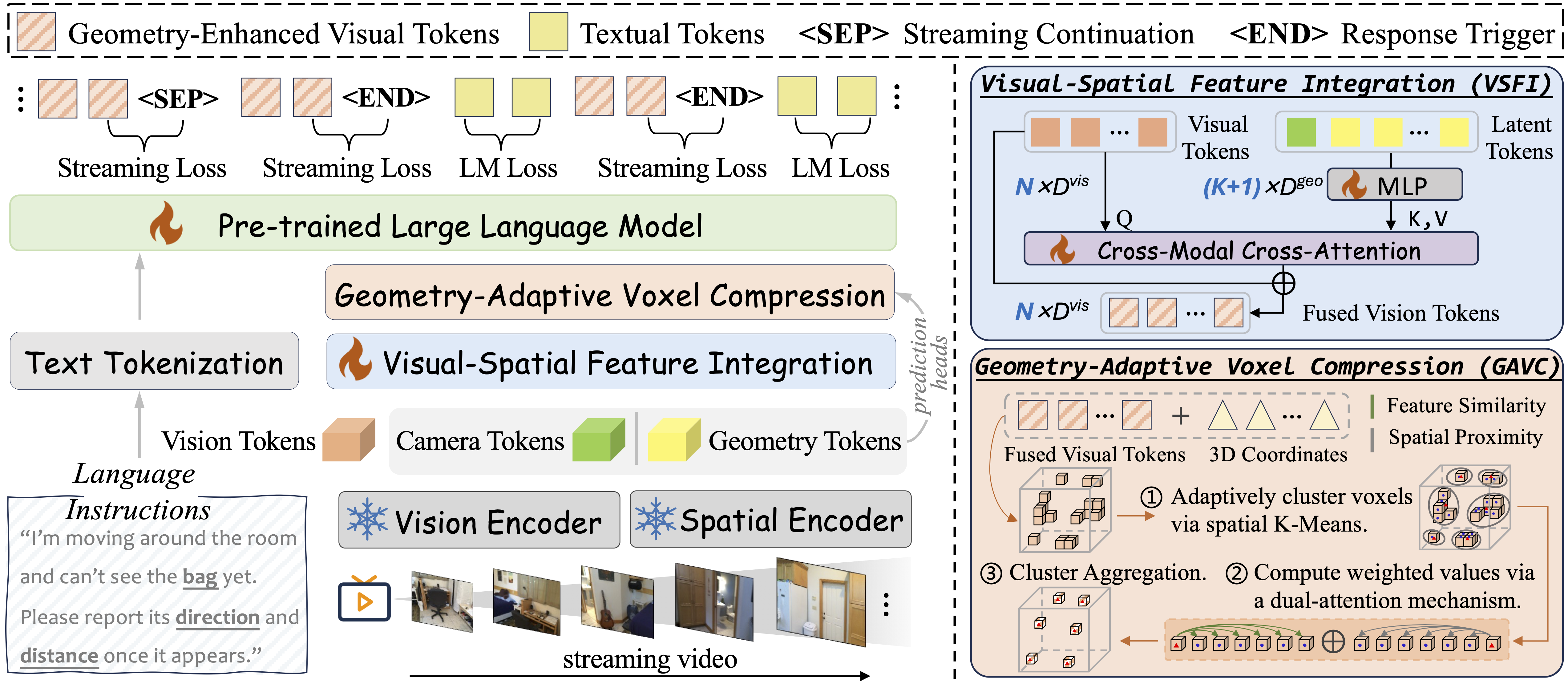
Stream3D-VLM is an online 3D vision-language model that supports real-time spatial understanding and interaction directly from streaming video. Unlike existing 3D Large Multimodal Models that operate in offline settings and require complete scene observations or predefined video clips, Stream3D-VLM enables efficient and continuous 3D scene comprehension without offline processing.
To address the scarcity of streaming 3D–language data, we develop a scalable data generation pipeline that curates over 1M online spatio-temporal 3D QA pairs (Stream3D-1M) and establish a comprehensive benchmark with 10,000 QA samples, spanning 29 subtasks across 5 cognitive competencies and 3 temporal interaction modes (Stream3D-Bench).
🧠Key Characteristics
Online 3D Spatial Understanding: Real-time spatial reasoning from streaming video without requiring full scene reconstruction upfront.
Incremental Geometry Priors: The VSFI module injects temporally aligned geometric features from a 3D reconstruction model into the visual stream as video unfolds.
Streaming Control Modeling: Learns when to respond or remain silent via joint optimization of streaming control loss and standard language modeling loss.
Efficient Long-Context Inference: The plug-and-play GAVC module dynamically compresses visual tokens guided by 3D structure, reducing decoding overhead for real-time deployment.
Comprehensive Benchmark: Stream3D-Bench covers Forward Response (monitoring), Realtime Perception (observation), and Backward Tracing (memory) across diverse spatio-temporal 3D tasks.
🚀 Main Results
Stream3D-Bench (Online Evaluation)
Stream3D-VLM consistently outperforms competing proprietary and open-source models on Stream3D-Bench, delivering the most accurate response timing and the lowest inference latency. Results are reported under a 1 fps streaming video setting. NA / MCA / OEA denote numerical, multiple-choice, and open-ended answers, respectively.
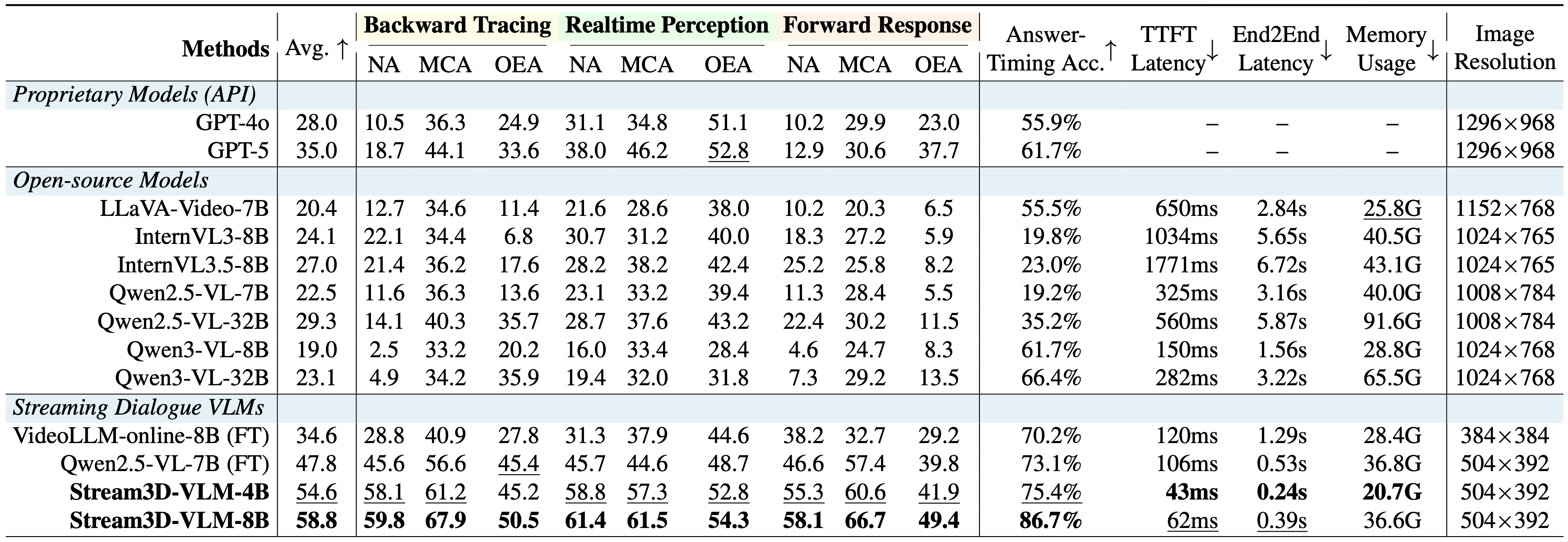
Bold and underlined values indicate the best and second-best results, respectively. More details can be found on our paper.
VSI-Bench (Offline Evaluation)
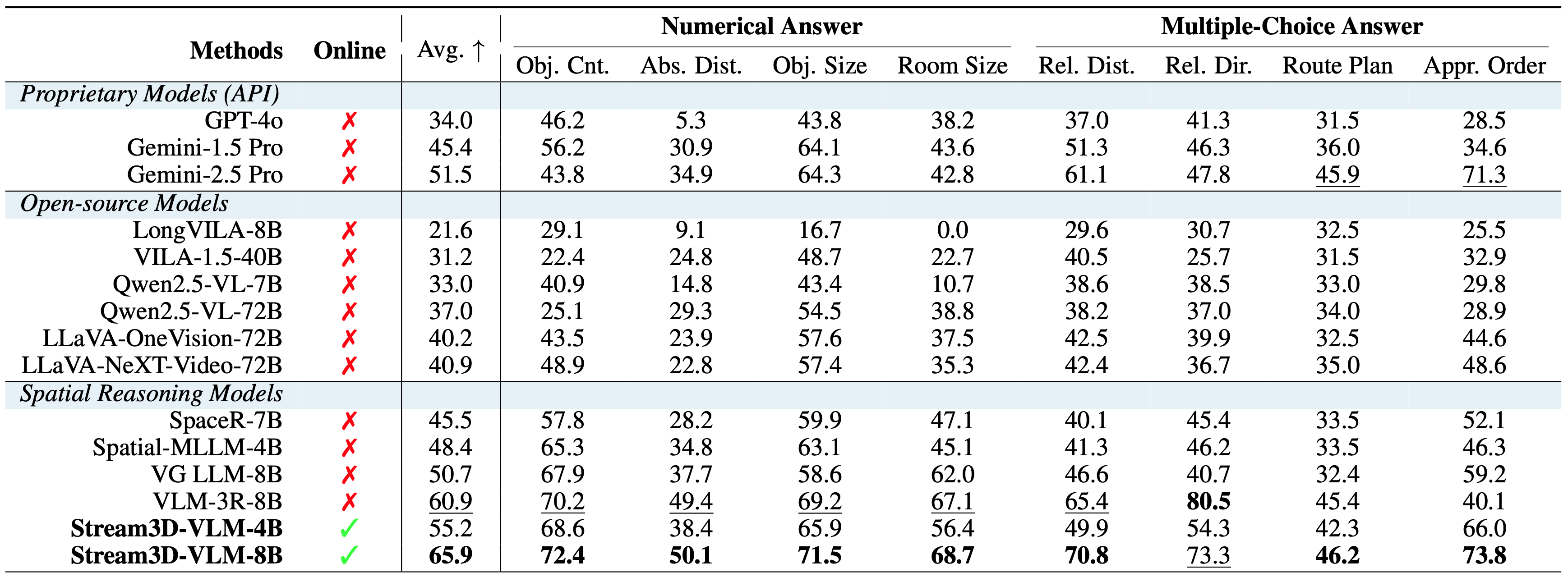
Despite being designed for streaming scenarios, Stream3D-VLM also performs well across all subtasks of the offline spatial perception and reasoning benchmark, significantly surpassing both commercial and open-source models.
📦 Related Resources
| Resource | Link |
|---|---|
| Training Dataset | JonnyYu828/Stream3D-1M-Dataset |
| Benchmark | JonnyYu828/Stream3D-Bench |
| Code | hanxunyu/Stream3D-VLM |
| Project Page | stream3d-vlm.github.io |
Citation
If you find Stream3D-VLM useful for your research or applications, please consider citing our work using the following BibTeX:
@article{yu2026stream3d,
title={Stream3D-VLM: Online 3D Spatial Understanding with Incremental Geometry Priors},
author={Hanxun Yu and Xuan Qu and Lei Ke and Boqiang Zhang and Yuxin Wang and Jianke Zhu and Dong Yu},
journal={arXiv preprint arXiv:2606.06891},
year={2026}
}
- Downloads last month
- 56
Model tree for JonnyYu828/Stream3D-VLM-4B
Base model
Qwen/Qwen2.5-VL-3B-Instruct