

Metro Analytics Catalog
Collection
AI models and analytics pipelines for Intel hardware to help developers build and deploy edge AI solutions quickly. • 29 items • Updated • 2
| Property | Value |
|---|---|
| Category | Vision-Language Understanding (Image / Video Description) |
| Base Model | Qwen3.8-27B (Alibaba) |
| Source Framework | PyTorch (Transformers) |
| Supported Precisions | INT4 (weight-compressed) |
| Inference Engine | OpenVINO GenAI |
| Hardware | CPU, GPU |
| Task | Free-form text description of image or video content (via natural-language prompt) |
This use case runs Qwen3.8-27B, a state-of-the-art vision-language model (VLM) from Alibaba, from the pre-quantized OpenVINO/Qwen3.8-27B-int4-ov build. The model is distributed as an INT4 OpenVINO Intermediate Representation (IR) with weights compressed by NNCF, so it downloads and runs directly through OpenVINO GenAI without any additional export or quantization step.
The model is a native vision-language model with image and video understanding. Given an image (or sampled video frames) and a natural-language prompt -- for example "Describe this image." -- it returns a free-form text answer. Because the prompt drives the behaviour, the same model can describe a scene, answer a question about it, or flag a condition, with no retraining required.
The OpenVINO GenAI sample runs the model on a single still image and prints the
generated description.
The DLStreamer sample runs the same model over a video with the gvagenai
element and overlays the generated caption on each sampled frame.
Note: OpenVINO/Qwen3.8-27B-int4-ov is published as an experimental model. At the time of writing it requires nightly builds of OpenVINO and OpenVINO GenAI and
transformers==5.2; see the model card for the current requirements. As a 27B INT4 model it needs a substantial amount of memory and is intended for CPU or GPU targets; the NPU is not recommended for a model of this size.
Typical Metro deployments include:
gvagenai)Create and activate a Python virtual environment before running the scripts:
python3 -m venv .venv --system-site-packages
source .venv/bin/activate
Note: The
--system-site-packagesflag is required so the virtual environment can access the system-installed OpenVINO and DLStreamer Python packages.
Run the provided script to download the pre-quantized OpenVINO IR and the sample image and video:
chmod +x export_and_quantize.sh
./export_and_quantize.sh
The model ships only in INT4, so no precision argument is required. The script performs the following steps:
huggingface_hub, Pillow, transformers, and the nightly openvino, openvino-tokenizers, and openvino-genai wheels).OpenVINO/Qwen3.8-27B-int4-ov INT4 IR via the HuggingFace Hub (no export or re-quantization is needed).test_image.jpg) and downloads and transcodes a sample test video (test_video.mp4).Output files:
qwen3_8_27b_int4_ov/ -- OpenVINO model directory (language model, vision encoder, tokenizer, and preprocessor config) ready for OpenVINO GenAI.test_image.jpg -- sample still image.test_video.mp4 -- transcoded sample clip.The sample below runs the Qwen3.8-27B VLM on the sample image with
OpenVINO GenAI.
The image is loaded as an OpenVINO tensor and sent to the model with a short
description prompt; the generated text is printed to the console.
Change the DEVICE string to run on CPU or GPU.
import numpy as np
import openvino as ov
import openvino_genai
from PIL import Image

# Change DEVICE to "GPU" to run on an integrated or discrete Intel GPU.
DEVICE = "CPU"
MODEL_DIR = "qwen3_8_27b_int4_ov"
IMAGE_PATH = "test_image.jpg"
PROMPT = "Describe this image in two or three sentences."

properties = {}
if DEVICE == "GPU":
    properties["CACHE_DIR"] = "vlm_cache"
pipe = openvino_genai.VLMPipeline(MODEL_DIR, DEVICE, **properties)

config = openvino_genai.GenerationConfig()
config.max_new_tokens = 200

image = Image.open(IMAGE_PATH).convert("RGB")
image_tensor = ov.Tensor(np.ascontiguousarray(np.array(image)[None]))

result = pipe.generate(PROMPT, images=[image_tensor], generation_config=config)
description = str(result).strip()
print(f"DESCRIPTION: {description}")
Device targets:
"CPU" -- default, works on all Intel platforms."GPU" -- Intel integrated or discrete GPU."NPU" -- not recommended for a 27B model of this size; use CPU or GPU.The sample reads test_image.jpg and prints a generated description to the
console.
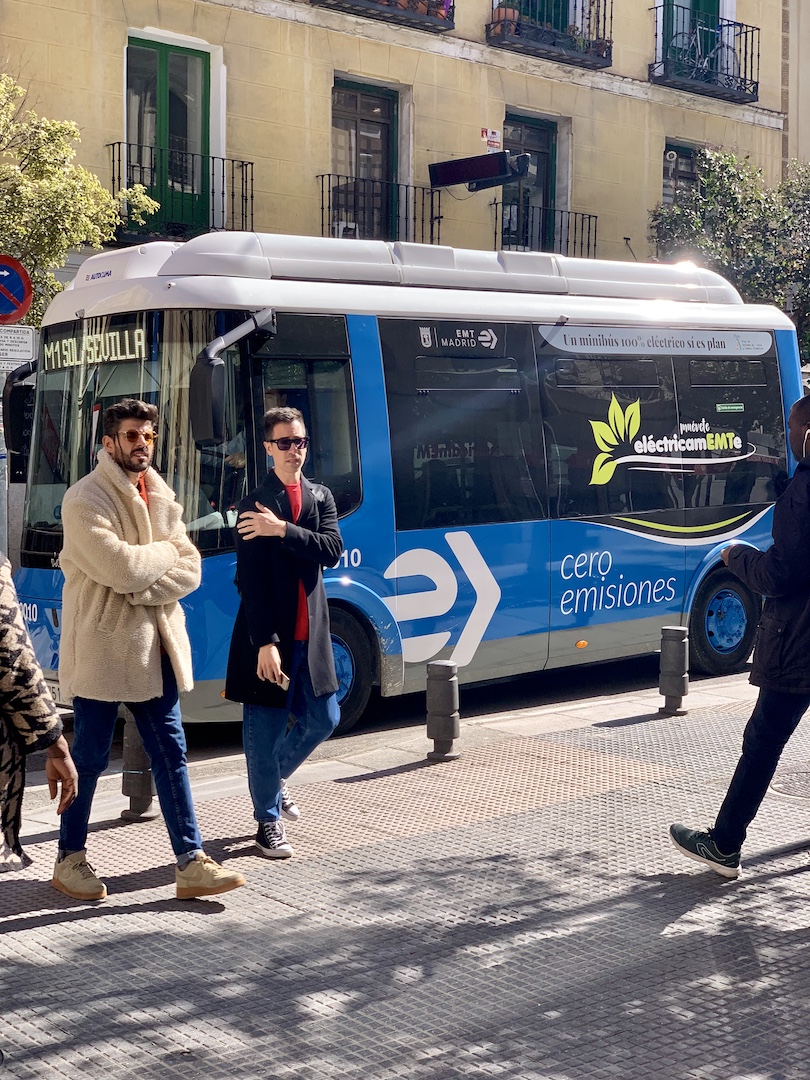
Input image:

Representative console output:
DESCRIPTION: The image shows a red city bus stopped at the curb of a busy street.
Several pedestrians are walking along the sidewalk beside the bus, and buildings
line the background under an overcast sky.
The pipeline below runs the same Qwen3.8-27B VLM on the sample video via the
DLStreamer 2026 gvagenai element, which performs vision-language inference
through OpenVINO GenAI.
Frames are decoded, grouped into short chunks, and summarized by the VLM using a
description prompt; gvagenai attaches the answer to the buffer as JSON
metadata.
Frames are pulled through an appsink; for each frame a callback reads the
latest caption and overlays it across the top of the frame.
The annotated result is written to output_dlstreamer.mp4.
Notes on running this sample:
Use the OpenVINO model directory produced by
export_and_quantize.sh(qwen3_8_27b_int4_ov);gvagenaireads it via itsmodel-pathproperty.
gvagenairequires anRGBinput, so the decode chain converts toRGBbefore inference; theappsinkthen converts back toBGRand the caption is drawn with OpenCV, so no additional GStreamer overlay plugin is required.
frame-ratecontrols how many frames per second are sampled for the VLM andchunk-sizehow many sampled frames form one inference call; keep both small to stay responsive.The VLM answer is attached to the buffer as a
GstGVAJSONMetamessage and read in Python withgstgva.VideoFrame(buffer).messages().Export
PYTHONPATHso the DLStreamer Python modules (gi,gstgva) are importable:source /opt/intel/openvino_2026/setupvars.sh source /opt/intel/dlstreamer/scripts/setup_dls_env.sh export PYTHONPATH=/opt/intel/dlstreamer/python:\ /opt/intel/dlstreamer/gstreamer/lib/python3/dist-packages:${PYTHONPATH:-}
import json
import textwrap

import gi

gi.require_version("Gst", "1.0")
from gi.repository import Gst

Gst.init([])

# Import cv2 and gstgva after Gst.init to avoid a re-initialization conflict.
import cv2
import numpy as np
from gstgva import VideoFrame

MODEL_DIR = "qwen3_8_27b_int4_ov"
INPUT_VIDEO = "test_video.mp4"
PROMPT = "Describe what is happening in this scene in one short sentence."

# For CPU: change device=GPU to device=CPU.
# NPU is not supported by gvagenai; use the OpenVINO GenAI sample above instead.
pipeline_str = (
    f"filesrc location={INPUT_VIDEO} ! decodebin3 ! "
    f"videoconvert ! video/x-raw,format=RGB ! "
    f"gvagenai name=genai model-path={MODEL_DIR} device=GPU "
    f'prompt="{PROMPT}" generation-config="max_new_tokens=40" '
    f"frame-rate=2 chunk-size=2 ! queue ! "
    f"videoconvert ! video/x-raw,format=BGR ! "
    f"appsink name=sink emit-signals=true sync=false max-buffers=4 drop=false"
)
pipeline = Gst.parse_launch(pipeline_str)
appsink = pipeline.get_by_name("sink")

state = {"writer": None, "frame": 0, "caption": ""}


def draw_caption(frame: np.ndarray, width: int, caption: str) -> None:
    """Overlay the wrapped caption text across the top of the frame."""
    cv2.rectangle(frame, (0, 0), (width, 70), (0, 0, 0), -1)
    lines = textwrap.wrap(caption, width=70)[:2] or ["..."]
    for i, line in enumerate(lines):
        cv2.putText(frame, line, (15, 28 + i * 30),
                    cv2.FONT_HERSHEY_SIMPLEX, 0.7, (0, 255, 0), 2)


def on_sample(sink):
    sample = sink.emit("pull-sample")
    if sample is None:
        return Gst.FlowReturn.OK

    buf = sample.get_buffer()
    caps = sample.get_caps().get_structure(0)
    width = caps.get_value("width")
    height = caps.get_value("height")

    # Read the latest VLM caption from the gvagenai JSON metadata (if present).
    for message in VideoFrame(buf).messages():
        try:
            answer = str(json.loads(message).get("result", "")).strip()
        except (ValueError, TypeError):
            continue
        if answer:
            state["caption"] = answer

    ok, mapinfo = buf.map(Gst.MapFlags.READ)
    if not ok:
        return Gst.FlowReturn.OK
    frame = np.frombuffer(mapinfo.data, np.uint8).reshape(height, width, 3).copy()
    buf.unmap(mapinfo)

    draw_caption(frame, width, state["caption"])

    if state["writer"] is None:
        state["writer"] = cv2.VideoWriter(
            "output_dlstreamer.mp4",
            cv2.VideoWriter_fourcc(*"mp4v"), 30.0, (width, height),
        )
    state["writer"].write(frame)

    state["frame"] += 1
    if state["frame"] % 30 == 0:
        print(f"frame {state['frame']}: {state['caption']}", flush=True)
    return Gst.FlowReturn.OK


appsink.connect("new-sample", on_sample)

pipeline.set_state(Gst.State.PLAYING)
bus = pipeline.get_bus()
bus.timed_pop_filtered(
    Gst.CLOCK_TIME_NONE,
    Gst.MessageType.EOS | Gst.MessageType.ERROR,
)
pipeline.set_state(Gst.State.NULL)

if state["writer"] is not None:
    state["writer"].release()
print("Saved: output_dlstreamer.mp4")
Device targets:
device=GPU -- default in the sample code.device=CPU -- change device=GPU to device=CPU.device=NPU -- not supported by gvagenai; OpenVINO does not run
vision-language models on the NPU. Target CPU or GPU instead.
Licensed under the MIT License. See LICENSE for details.
bus.jpg from Ultralyticsperson-bicycle-car-detection.mp4 from intel-iot-devkit/sample-videos