

ACE-Brain
Collection
3 items • Updated

🌐 Project Page | 🤗 Hugging Face | 📔 Technical Report | 🤖 GitHub
ACE-Brain-0.6-9B is a 9B vision-language model that strengthens spatial grounding for physical foundation models. Given one or more images and a natural-language query, it identifies task-relevant objects, counts instances, resolves spatial relationships, and localizes interaction targets.
Built on Qwen3.5-9B, ACE-Brain-0.6-9B is fine-tuned on approximately 1.5 million training samples. A unified data pipeline converts robot manipulation recordings, egocentric interactions, object and part annotations, and spatial data into verifiable grounding supervision. Training updates the language-model parameters while keeping the vision encoder frozen.
On seven public grounding benchmarks, ACE-Brain-0.6-9B achieves a reported Avg-7 of 75.41, compared with 73.68 for GPT-6 Astra. It exceeds Astra on four of seven benchmarks, with remaining gaps on PixMo-Count, RefSpatial, and PointArena.
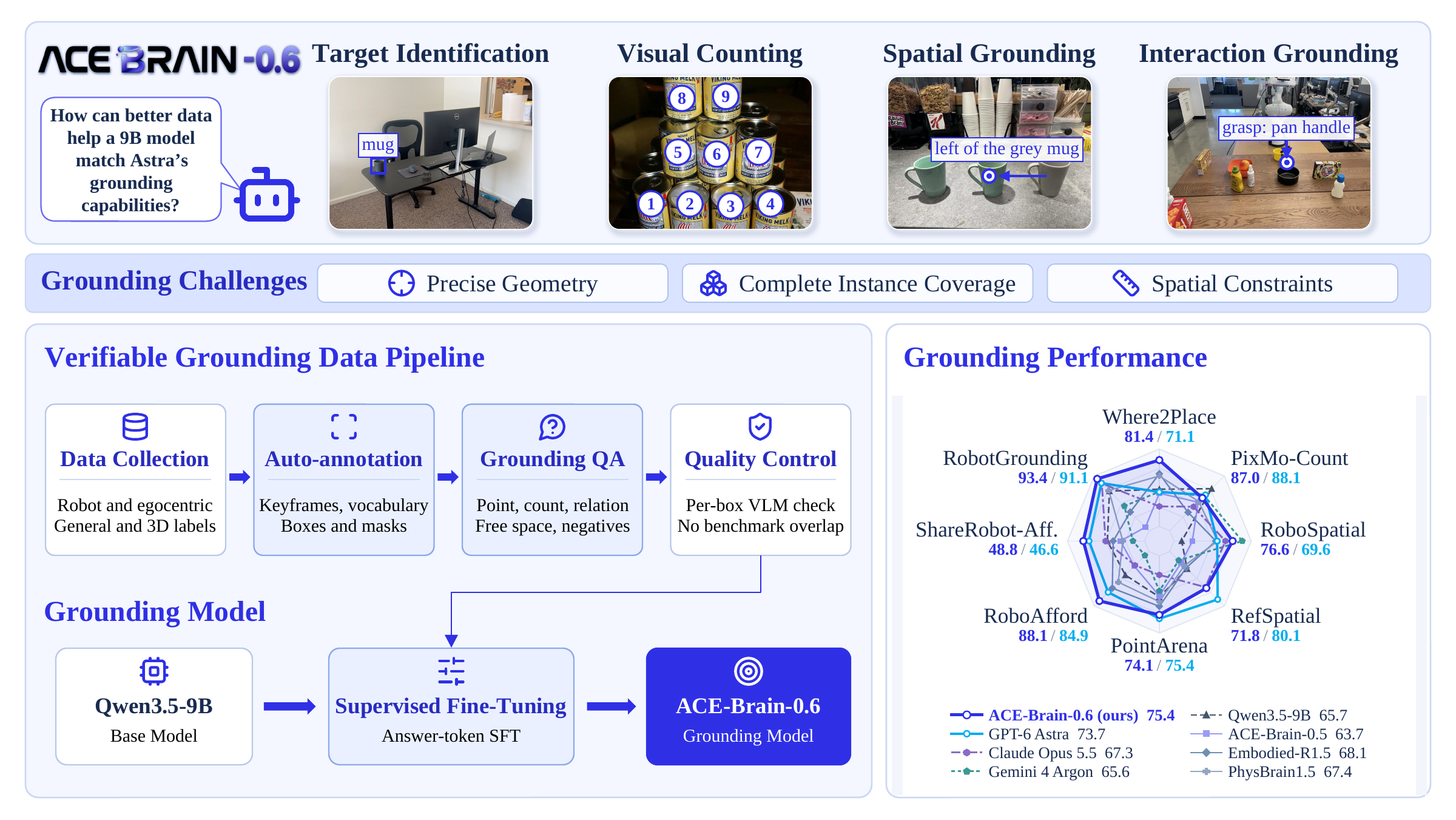
yes, no, or none) for target identification, multi-instance perception, spatial grounding, and interaction grounding.Results below are reported in Table 1 of the technical report. Higher is better; bold marks the best score among the models shown.
| Benchmark | GPT-5.5 | GPT-5.6-sol | GPT-6 Astra | Claude Opus 5.5 | Gemini 4 Argon | ACE-Brain-0.6-9B |
|---|---|---|---|---|---|---|
| Where2Place | 45.25 | 46.23 | 71.10 | 66.44 | 71.20 | 81.44 |
| PixMo-Count | 82.61 | 83.55 | 88.10 | 83.74 | 87.71 | 86.96 |
| RoboSpatial | 59.19 | 64.34 | 69.55 | 73.30 | 80.94 | 76.56 |
| RefSpatial | 60.29 | 54.51 | 80.14 | 71.10 | 51.56 | 71.84 |
| PointArena | 68.02 | 69.76 | 75.36 | 61.20 | 66.40 | 74.13 |
| RoboAfford | 68.04 | 71.45 | 84.94 | 75.10 | 71.48 | 88.14 |
| ShareRobot (affordance) | 38.57 | 36.66 | 46.60 | 40.20 | 29.53 | 48.82 |
| Avg-7 · public benchmarks | 60.28 | 60.93 | 73.68 | 67.30 | 65.55 | 75.41 |
| RobotGrounding · in-house benchmark | 83.96 | 85.18 | 91.10 | 90.89 | 78.51 | 93.42 |
Avg-7 is the unweighted mean of the seven public benchmark scores. RobotGrounding is evaluated separately and is not included in Avg-7. It contains 2,591 questions and reports a macro average over 14 scoring groups.
Install a Transformers version with Qwen3.5 support:
pip install -U "transformers>=5.2.0" accelerate torch torchvision pillow
The example uses the checkpoint and processor files from this repository in non-thinking mode. Replace scene.jpg and the query with your own image and grounding instruction.
import torch
from PIL import Image
from transformers import AutoProcessor, Qwen3_5ForConditionalGeneration

model_id = "ACERobotics/ACE-Brain-0.6-9B"

processor = AutoProcessor.from_pretrained(model_id)
model = Qwen3_5ForConditionalGeneration.from_pretrained(
    model_id,
    dtype="auto",
    device_map="auto",
).eval()

image = Image.open("scene.jpg").convert("RGB")
messages = [
    {
        "role": "user",
        "content": [
            {"type": "image", "image": image},
            {
                "type": "text",
                "text": (
                    "Point to the red cup in the image. "
                    "Return a point as [[x, y]], with integer coordinates "
                    "normalized to [0, 1000]. Return none if it is absent."
                ),
            },
        ],
    }
]

inputs = processor.apply_chat_template(
    messages,
    tokenize=True,
    add_generation_prompt=True,
    enable_thinking=False,
    return_dict=True,
    return_tensors="pt",
).to(model.device)

with torch.inference_mode():
    generated_ids = model.generate(
        **inputs,
        max_new_tokens=128,
        do_sample=False,
    )

answer_ids = generated_ids[:, inputs["input_ids"].shape[1]:]
answer = processor.batch_decode(
    answer_ids,
    skip_special_tokens=True,
    clean_up_tokenization_spaces=False,
)[0]
print(answer)
Grounding coordinates are integers normalized to [0, 1000] along each image axis. Depending on the query, the model can return a point, a list of points, a box, a count, or a categorical answer. Free-space grounding identifies unoccupied 2D regions and does not by itself establish 3D placement feasibility.
The example uses greedy decoding for simplicity. The reported benchmarks use temperature 0.2 and a 128-token output budget, except PixMo-Count, which uses 1,024 tokens. See the report for the full evaluation protocol and the Transformers Qwen3.5 documentation for the model interface.
If you find ACE-Brain-0.6-9B useful for your research and applications, please refer to our technical report:
ACE-Brain Team. ACE-Brain-0.6: Scaling Spatial Grounding for Physical Foundation Models.
Read the technical report (PDF). A formal BibTeX entry will be added when the arXiv identifier is available.