


browserground — Qwen3-VL-2B LoRA for hybrid AI agents (v0.1)
The local UI-grounding specialist for hybrid AI agents. Drop in a screenshot + text target, get a strict JSON bbox. 2B params. MLX-native. Apache 2.0.
Why this exists — the hybrid AI argument
Today, most AI agents route every screenshot to a cloud frontier model (GPT-4V, Claude Vision, Gemini) just to find click coordinates. That's a $0.01–0.05 multimodal call adding 800ms–2s of latency, repeated 20–50× per agent run. Cost and latency compound. Screenshots full of private UI leave your machine.
A general 200B-parameter LLM is overkill for "where is the Submit button?" — that's a narrow vision task. The right shape is a hybrid one: cheap fast specialist local models for the dedicated tasks they handle better, and the cloud LLM only for the planning and reasoning it's uniquely good at.
That's exactly what browserground is — the click-grounding specialist.
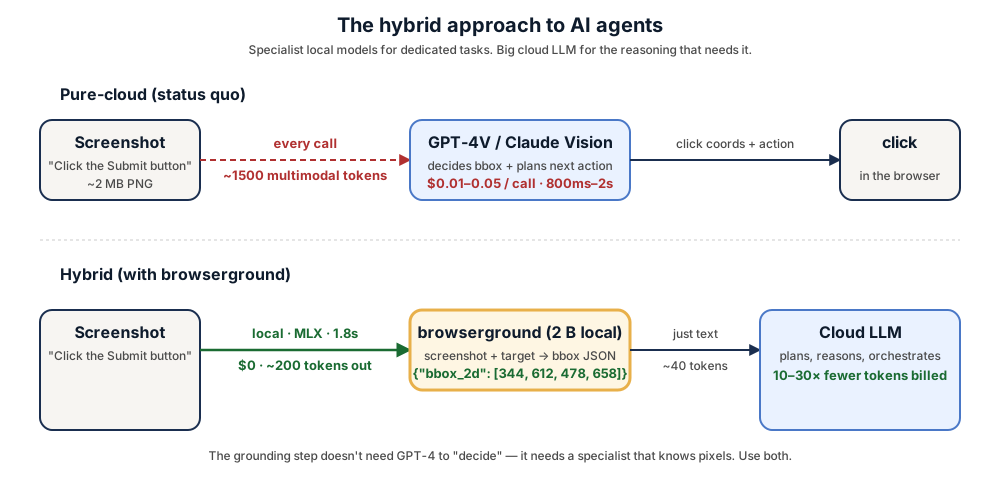
| Pure-cloud (status quo) | Hybrid (+ browserground) | |
|---|---|---|
| Per-screenshot cost | $0.01–0.05 | $0 |
| Latency | 800ms–2s round-trip | ~1.8s local |
| Tokens billed by cloud | 1500+ multimodal | ~40 text |
| Screenshots leave machine | yes | no |
| Rate limits | yes | no |
What it does
Given a screenshot and a target description ("submit form button", "the red Sign Up link", "the second profile picture from the left"), this LoRA-fine-tuned Qwen3-VL-2B emits a strict JSON object:
{"bbox_2d": [x1, y1, x2, y2]}
— the pixel coordinates of the element to click. 100% format compliance on the held-out evaluation. Drop it into any browser-agent / screen-automation pipeline that needs to ground language → click target.
Results on ScreenSpot-v2
Point-grounding accuracy, 300 held-out items (100 per split: mobile / desktop / web). A hit = predicted bbox center falls inside the ground-truth bbox.
| Model | Params | Overall | Mobile | Desktop | Web | Format-OK |
|---|---|---|---|---|---|---|
| GPT-4o (cloud) | — | 18.3% | — | — | — | — |
| SeeClick (Qwen-VL-Chat) | 9.6B | 55.1% | — | — | — | — |
| ShowUI-2B | 2B | 75.5% | — | — | — | — |
| UI-TARS-2B-SFT (ByteDance) | 2B | 89.5% | — | — | — | — |
| OS-Atlas-Base-7B | 7B | ~91% | — | — | — | — |
| browserground v0.1 (this model) | 2B | 45.3% | 64.0% | 28.0% | 44.0% | 100% |
| Qwen3-VL-2B-Instruct (zero-shot baseline) | 2B | 6.3% | 7.0% | 6.0% | 6.0% | 100% |
- Beats GPT-4o by 2.5× and zero-shot Qwen3-VL by 7× on the same benchmark
- 100% strict-JSON format compliance — no markdown fences, no commentary
- Sits below ShowUI/UI-TARS at this v0.1; v0.2 (Tier 2, target ≥ 60%) on the roadmap
Numbers for SeeClick / ShowUI / UI-TARS / OS-Atlas are from the OS-Atlas paper's reported ScreenSpot-v2 leaderboard.
Quick start
npm install -g browserground
browserground parse screenshot.png --target "Submit button"
# {"bbox_2d": [344, 612, 478, 658]}
Full install + agent-stack integration: github.com/renezander030/browserground.
Use from Python directly
from transformers import AutoProcessor, Qwen3VLForConditionalGeneration
from peft import PeftModel
import torch
from PIL import Image

processor = AutoProcessor.from_pretrained("Qwen/Qwen3-VL-2B-Instruct")
model = Qwen3VLForConditionalGeneration.from_pretrained(
    "Qwen/Qwen3-VL-2B-Instruct", dtype=torch.bfloat16, device_map="auto"
)
model = PeftModel.from_pretrained(model, "renezander030/browserground")
model = model.merge_and_unload(); model.eval()

img = Image.open("screenshot.png").convert("RGB")
messages = [
    {"role": "system", "content": [{"type": "text", "text":
        'You are a UI-grounding model. Given a screenshot and a target description, '
        'output the bounding box of the SINGLE UI element to click. Output ONLY a JSON '
        'object: {"bbox_2d": [x1, y1, x2, y2]} with pixel coordinates, origin at top-left.'}]},
    {"role": "user", "content": [
        {"type": "image", "image": img},
        {"type": "text", "text": "Locate the element described: Submit button"},
    ]},
]
prompt = processor.apply_chat_template(messages, tokenize=False, add_generation_prompt=True)
inputs = processor(text=[prompt], images=[[img]], return_tensors="pt").to(model.device)
out = model.generate(**inputs, max_new_tokens=64, do_sample=False)
print(processor.tokenizer.decode(out[0, inputs.input_ids.shape[1]:], skip_special_tokens=True))
Training recipe
- Base:
Qwen/Qwen3-VL-2B-Instruct - Method: LoRA rank 16, alpha 32, dropout 0.05, on all 7 linear modules of the LM (q/k/v/o/gate/up/down)
- Trainable params: 17.4 M (0.81% of base)
- Data mix (12k examples):
- OS-Atlas-Data desktop_domain (macOS): 4k
- OS-Atlas-Data mobile_domain (aw_mobile, Android): 4k
- OS-Atlas-Data mobile_domain (UIBert): 4k
- Hyperparams: bf16, LR 1e-4, cosine schedule, batch 1 × grad-accum 8 (effective batch 8), 1 epoch, gradient checkpointing on
- Hardware: 1× L40S 48 GB (RunPod Secure Cloud)
- Compute cost: ~$2 training + ~$0.50 eval
- Wall time: ~2 hr total
Full training scripts (private repo, request access): renezander030/imgparse-tier1.
Output format
{"bbox_2d": [x1, y1, x2, y2]}
— a single-line JSON object with pixel coordinates (top-left origin). No markdown fences, no commentary, no <ref> tokens. Verified 100% parseable on the eval set.
Limitations & next
- Web and desktop accuracy lag mobile (we trained primarily on macOS + mobile UI). v0.2 adds 8k+ web records and ~2× total data.
- Long-tail icon recognition is weaker than text grounding.
- No mouse-action prediction — this model only locates; doesn't decide click vs hover vs type. Pair with an action predictor for full computer-use loops.
- English-only training data.
Use cases (what's this drop-in for)
- Claude Computer Use / Claude Code screen-grounding tool calls
- OpenAI Codex CLI screen-grounding extension
- browser-use / Skyvern click-targeting (Python adapter in the GitHub repo)
- Custom agent stacks that need a $0/call grounding step instead of GPT-4V per screenshot
- Self-hosted compound-AI systems with a routing layer (specialist model for grounding, general LLM for planning)
Work with me
This adapter is a public reference of the recipe I deliver to freelance clients: small, fast, structured-output local specialists that slot into compound-AI agent stacks and cut cloud-LLM bills without losing capability.
If you need one of these, I can build it:
- a UI-grounding model trained on your own product's screenshots — your dashboard, your app, your customer interfaces — for higher recall on the elements your agents actually click
- a hybrid agent architecture that routes narrow tasks (grounding, OCR, classification, embedding, extraction) to local specialist models and reserves cloud frontier LLMs for the reasoning that actually needs them
- an on-prem agent deployment — Apple Silicon (MLX), CUDA box, or your existing K8s — with no screenshots leaving your infrastructure
- a structured-output evaluation harness that tells you when the local model is actually good enough to replace the cloud call in production
Reach out: https://renezander.com
Citation
@misc{browserground-2026,
  title  = {browserground: Qwen3-VL-2B LoRA for hybrid AI agent UI grounding},
  author = {Zander, René},
  year   = {2026},
  url    = {https://huggingface.co/renezander030/browserground}
}
License
Apache 2.0, same as the base model Qwen/Qwen3-VL-2B-Instruct.
Acknowledgements
Qwen/Qwen3-VL-2B-InstructbaseOS-Copilot/OS-Atlas-Datatraining dataagentsea/wave-ui(for the upcoming v0.2 web slice)OS-Copilot/ScreenSpot-v2evaluation set
- Downloads last month
- -
Quantized
Model tree for renezander030/browserground
Base model
Qwen/Qwen3-VL-2B-Instruct