


PaddleOCR-VL-1.6: Expanding the Frontier of Document Parsing with Under-Optimized Region Refinement and Progressive Post-Training
Paper • 2606.03264 • Published • 15
This model was generated using llama.cpp at commit 7c158fbb4.
PaddleOCR-VL-1.6: Expanding the Frontier of Document Parsing with Under-Optimized Region Refinement and Progressive Post-Training




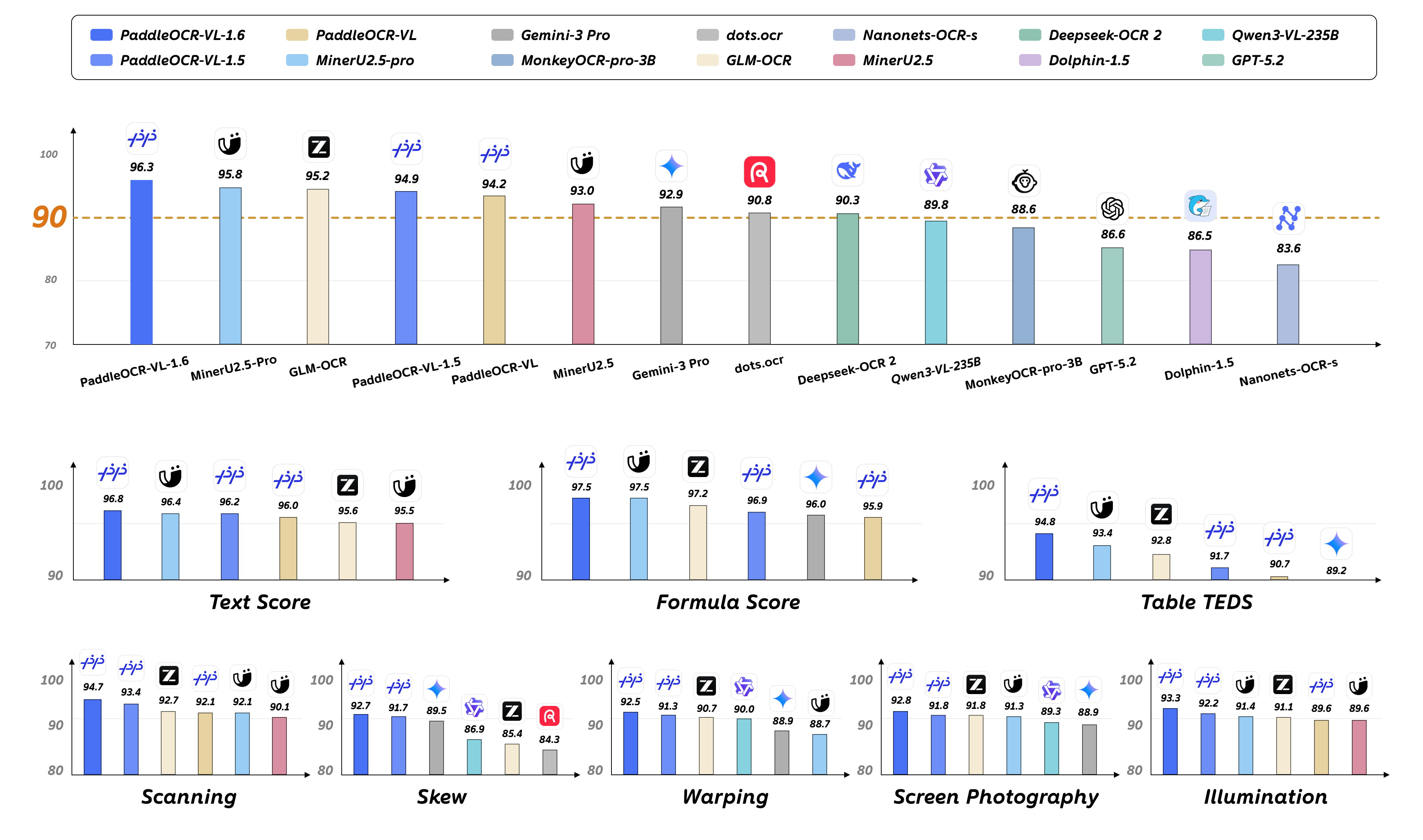
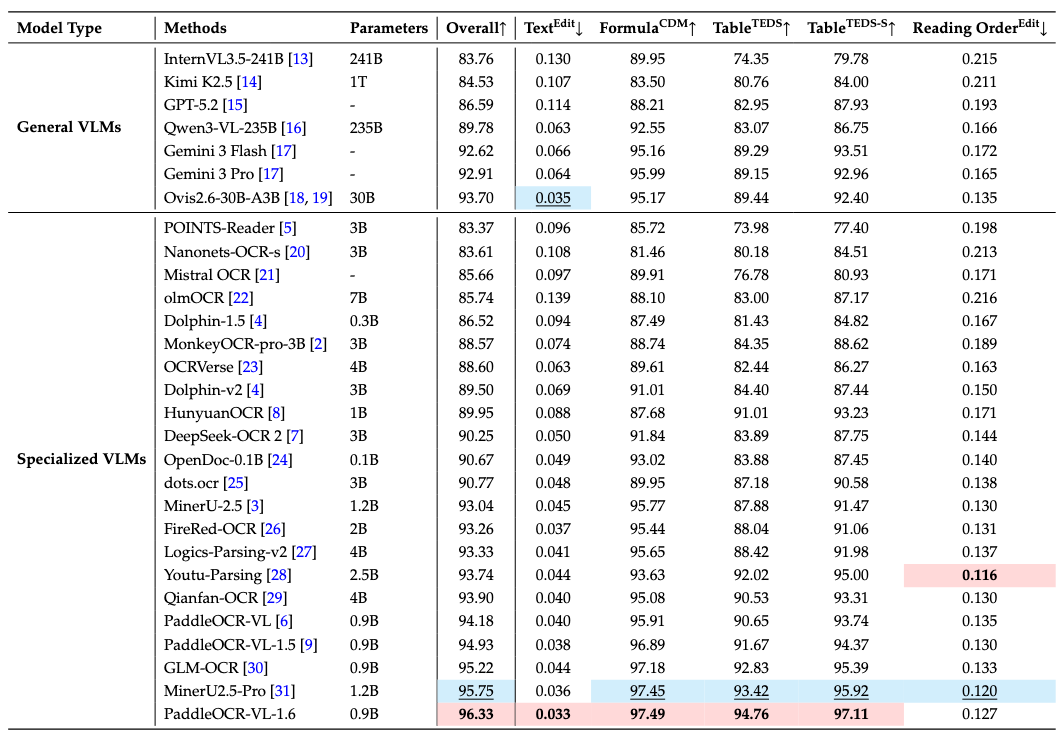
We introduce PaddleOCR-VL-1.6, an upgraded compact document parsing model built upon PaddleOCR-VL-1.5. PaddleOCR-VL-1.6 introduces a region-aware data optimization framework that identifies weak regions from the previous model, applies targeted enhancement to those regions, and improves the reliability of supervision signals. It further adopts a progressive post-training recipe based on curated data selection and reinforcement learning, pushing model performance to a higher level through staged optimization. PaddleOCR-VL-1.6 achieves a new state-of-the-art score of 96.33% on OmniDocBench v1.6, sets new records on OmniDocBench v1.5 and Real5-OmniDocBench as well, and demonstrates strong competitiveness against top-tier VLMs. The model architecture is fully compatible with PaddleOCR-VL-1.5, enabling zero-cost plug-and-play migration.
🚀 New SOTA Accuracy: OmniDocBench v1.6 achieves 96.33%, setting new state-of-the-art records on OmniDocBench v1.5 and Real5-OmniDocBench as well. It delivers comprehensive leading performance across text, formula, and table recognition, surpassing both open-source and closed-source solutions.
⚡ Fully Upgraded Capabilities: Significant improvements in table, Chinese ancient document, and Chinese rare character recognition, along with notable enhancements in seal/stamp recognition, text spotting, chart recognition, and more diverse scenarios.
🔄 Seamless Migration: The model architecture is fully compatible with PaddleOCR-VL-1.5 — zero adaptation cost, plug-and-play replacement.
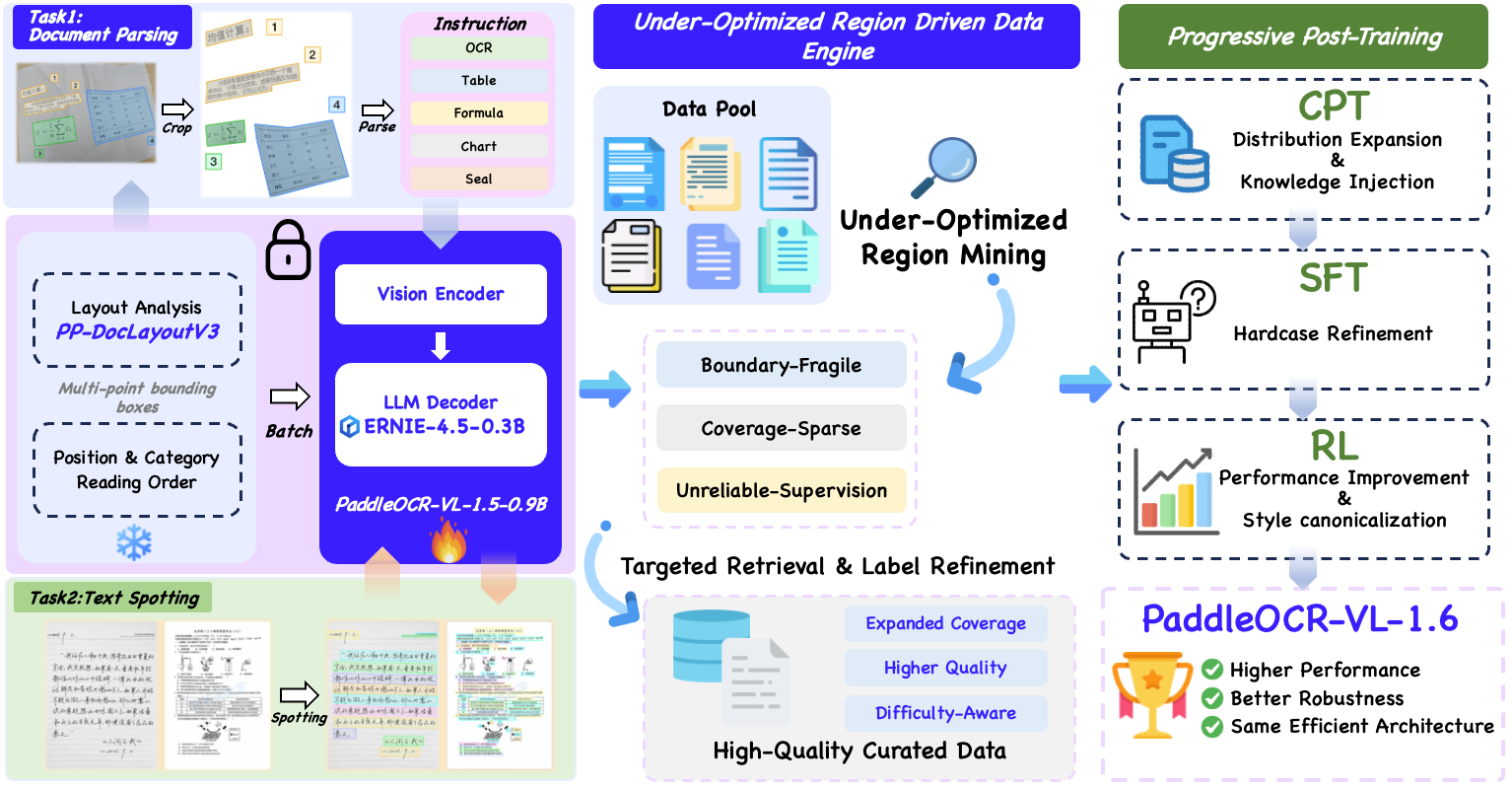
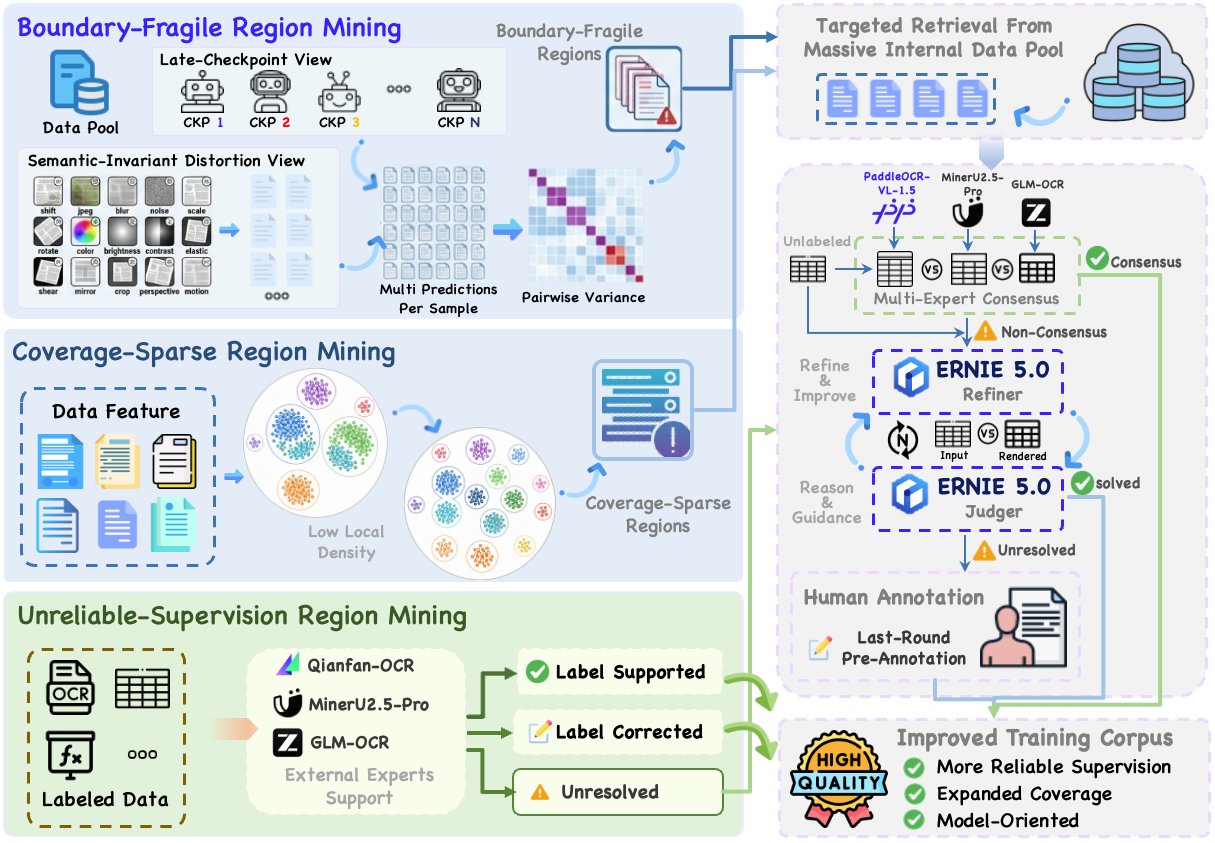
2026.06.03 🚀 We release PaddleOCR-VL-1.6 Technical Report.
2026.05.28 🚀 We release PaddleOCR-VL-1.6. PaddleOCR-VL-1.6 achieves a new state-of-the-art score of 96.33% on OmniDocBench v1.6, sets new records on OmniDocBench v1.5 and Real5-OmniDocBench as well, and demonstrates strong competitiveness against top-tier VLMs. The model architecture is fully compatible with PaddleOCR-VL-1.5, enabling zero-cost plug-and-play migration.
Install PaddlePaddle and PaddleOCR:
# The following command installs the PaddlePaddle version for CUDA 12.6. For other CUDA versions and the CPU version, please refer to https://www.paddlepaddle.org.cn/en/install/quick?docurl=/documentation/docs/en/develop/install/pip/linux-pip_en.html
python -m pip install paddlepaddle-gpu==3.2.1 -i https://www.paddlepaddle.org.cn/packages/stable/cu126/
python -m pip install -U "paddleocr[doc-parser]>=3.6.0"
Please ensure that you install PaddlePaddle framework version 3.2.1 or above, along with the special version of safetensors. For macOS users, please use Docker to set up the environment.
CLI usage:
paddleocr doc_parser -i https://paddle-model-ecology.bj.bcebos.com/paddlex/imgs/demo_image/paddleocr_vl_demo.png --pipeline_version v1.6
Python API usage:
from paddleocr import PaddleOCRVL
pipeline = PaddleOCRVL(pipeline_version="v1.6")
output = pipeline.predict("https://paddle-model-ecology.bj.bcebos.com/paddlex/imgs/demo_image/paddleocr_vl_demo.png")
for res in output:
    res.print()
    res.save_to_json(save_path="output")
    res.save_to_markdown(save_path="output")
Start the VLM inference server:
You can start the vLLM inference service using one of two methods:
Method 1: PaddleOCR method
docker run \
    --rm \
    --gpus all \
    --network host \
    ccr-2vdh3abv-pub.cnc.bj.baidubce.com/paddlepaddle/paddleocr-genai-vllm-server:latest-nvidia-gpu \
    paddleocr genai_server --model_name PaddleOCR-VL-1.6-0.9B --host 0.0.0.0 --port 8080 --backend vllm
Method 2: vLLM method
Call the PaddleOCR CLI or Python API:
paddleocr doc_parser \
    -i https://paddle-model-ecology.bj.bcebos.com/paddlex/imgs/demo_image/paddleocr_vl_demo.png \
    --pipeline_version v1.6 \
    --vl_rec_backend vllm-server \
    --vl_rec_server_url http://127.0.0.1:8080/v1
from paddleocr import PaddleOCRVL
pipeline = PaddleOCRVL(pipeline_version="v1.6", vl_rec_backend="vllm-server", vl_rec_server_url="http://127.0.0.1:8080/v1")
output = pipeline.predict("https://paddle-model-ecology.bj.bcebos.com/paddlex/imgs/demo_image/paddleocr_vl_demo.png")
for res in output:
    res.print()
    res.save_to_json(save_path="output")
    res.save_to_markdown(save_path="output")
For more usage details and parameter explanations, see the documentation.
Currently, the PaddleOCR-VL-1.6-0.9B model facilitates seamless inference via the transformers library, supporting comprehensive text spotting and the recognition of complex elements including formulas, tables, charts, and seals. Below is a simple script we provide to support inference using the PaddleOCR-VL-1.5-0.9B model with transformers.
Note: We currently recommend using the official method for inference, as it is faster and supports page-level document parsing. The example code below only supports element-level recognition and text spotting.
# ensure the transformers v5 is installed
python -m pip install "transformers>=5.0.0"
from PIL import Image
import torch
from transformers import AutoProcessor, AutoModelForImageTextToText

# ---- Settings ----
model_path = "PaddlePaddle/PaddleOCR-VL-1.6"
image_path = "test.png"
task = "ocr" # Options: 'ocr' | 'table' | 'chart' | 'formula' | 'spotting' | 'seal'
# ------------------

# ---- Image Preprocessing For Spotting ----
image = Image.open(image_path).convert("RGB")
orig_w, orig_h = image.size
spotting_upscale_threshold = 1500

if task == "spotting" and orig_w < spotting_upscale_threshold and orig_h < spotting_upscale_threshold:
    process_w, process_h = orig_w * 2, orig_h * 2
    try:
        resample_filter = Image.Resampling.LANCZOS
    except AttributeError:
        resample_filter = Image.LANCZOS
    image = image.resize((process_w, process_h), resample_filter)

# Set max_pixels: use 1605632 for spotting, otherwise use default ~1M pixels
max_pixels = 2048 * 28 * 28 if task == "spotting" else 1280 * 28 * 28
# ---------------------------

# -------- Inference --------
DEVICE = "cuda" if torch.cuda.is_available() else "cpu"
PROMPTS = {
    "ocr": "OCR:",
    "table": "Table Recognition:",
    "formula": "Formula Recognition:",
    "chart": "Chart Recognition:",
    "spotting": "Spotting:",
    "seal": "Seal Recognition:",
}

model = AutoModelForImageTextToText.from_pretrained(model_path, torch_dtype=torch.bfloat16).to(DEVICE).eval()
processor = AutoProcessor.from_pretrained(model_path)

messages = [
    {
        "role": "user",
        "content": [
            {"type": "image", "image": image},
            {"type": "text", "text": PROMPTS[task]},
        ]
    }
]
inputs = processor.apply_chat_template(
    messages,
    add_generation_prompt=True,
    tokenize=True,
    return_dict=True,
    return_tensors="pt",
    images_kwargs={"size": {"shortest_edge": processor.image_processor.min_pixels, "longest_edge": max_pixels}},
).to(model.device)

outputs = model.generate(**inputs, max_new_tokens=512)
result = processor.decode(outputs[0][inputs["input_ids"].shape[-1]:-1])
print(result)
# ---------------------------
# ensure the flash-attn2 is installed
pip install flash-attn --no-build-isolation
model = AutoModelForImageTextToText.from_pretrained(model_path, torch_dtype=torch.bfloat16, attn_implementation="flash_attention_2").to(DEVICE).eval()
Notes:
- Performance metrics are cited from the OmniDocBench official leaderboard, except for Gemini-3 Pro, Qwen3-VL-235B-A22B-Instruct and our model, which were evaluated independently.
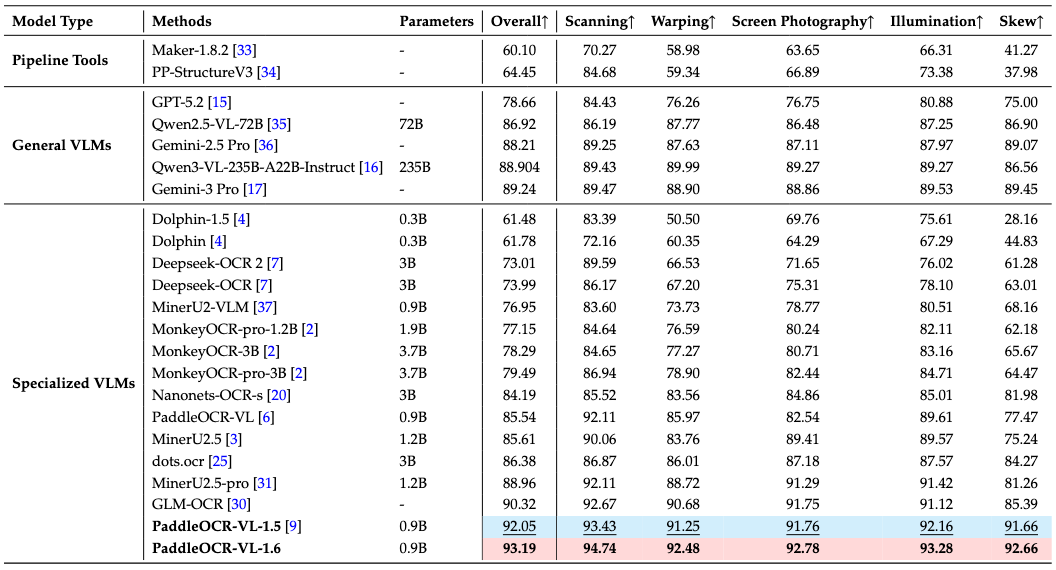
Notes:
- Real5-OmniDocBench is a brand-new benchmark oriented toward real-world scenarios, which we constructed based on the OmniDocBench v1.5 dataset. The dataset comprises five distinct scenarios: Scanning, Warping, Screen-photography, Illumination, and Skew. For further details, please refer to Real5-OmniDocBench.
We would like to thank PaddleFormers, Keye, MinerU, OmniDocBench for providing valuable code, model weights and benchmarks. We also appreciate everyone's contribution to this open-source project!
If you find PaddleOCR-VL-1.6 helpful, feel free to give us a star and citation.
@misc{zhang2026paddleocrvl16expandingfrontierdocument,
      title={PaddleOCR-VL-1.6: Expanding the Frontier of Document Parsing with Under-Optimized Region Refinement and Progressive Post-Training},
      author={Zelun Zhang and Hongen Liu and Suyin Liang and Yubo Zhang and Yiqing Xiang and Jiaxuan Liu and Ting Sun and Manhui Lin and Yue Zhang and Changda Zhou and Tingquan Gao and Cheng Cui and Yi Liu and Dianhai Yu and Yanjun Ma},
      year={2026},
      eprint={2606.03264},
      archivePrefix={arXiv},
      primaryClass={cs.CV},
      url={https://arxiv.org/abs/2606.03264},
}
Help me test my AI-Powered Quantum Network Monitor Assistant with quantum-ready security checks:
The full Open Source Code for the Quantum Network Monitor Service available at my github repos ( repos with NetworkMonitor in the name) : Source Code Quantum Network Monitor. You will also find the code I use to quantize the models if you want to do it yourself GGUFModelBuilder
💬 How to test:
Choose an AI assistant type:
TurboLLM (GPT-4.1-mini) HugLLM (Hugginface Open-source models) TestLLM (Experimental CPU-only)I’m pushing the limits of small open-source models for AI network monitoring, specifically:
🟡 TestLLM – Current experimental model (llama.cpp on 2 CPU threads on huggingface docker space):
🟢 TurboLLM – Uses gpt-4.1-mini :
🔵 HugLLM – Latest Open-source models:
"Give me info on my websites SSL certificate" "Check if my server is using quantum safe encyption for communication" "Run a comprehensive security audit on my server"I fund the servers used to create these model files, run the Quantum Network Monitor service, and pay for inference from Novita and OpenAI—all out of my own pocket. All the code behind the model creation and the Quantum Network Monitor project is open source. Feel free to use whatever you find helpful.
If you appreciate the work, please consider buying me a coffee ☕. Your support helps cover service costs and allows me to raise token limits for everyone.
I'm also open to job opportunities or sponsorship.
Thank you! 😊
Base model
baidu/ERNIE-4.5-0.3B-Paddle