


library_name: vllm
inference: false
extra_gated_description: >-
  To learn more about how we process your personal data, please read our <a
  href="https://poolside.ai/legal/privacy">Privacy Policy</a>.
tags:
  - laguna-xs.2
license: apache-2.0
pipeline_tag: text-generation
Try Laguna XS.2 in Shimmer · Get an API key · Release blog post
Laguna XS.2
Laguna XS.2 is a 33B total parameter Mixture-of-Experts model with 3B activated parameters per token designed for agentic coding and long-horizon work on a local machine. It uses Sliding Window Attention with per-head gating in 30 out of 40 layers for fast inference and low KV cache requirements.
For more details on how we trained this model, including on data automixing and async off-policy agent RL, check out our release blog post.
Highlights
- Mixed SWA and global attention layout: Laguna XS.2 uses sigmoid gating with per-layer rotary scales, enabling mixed SWA (Sliding Window Attention) and global attention layers in a 3:1 ratio (across 40 total layers)
- KV cache in FP8: KV cache quantized to FP8, reducing memory per token
- Native reasoning support: Interleaved thinking between tool calls with support for enabling and disabling thinking per-request
- Local-ready: At 33B total parameters and 3B activated, Laguna XS.2 is compact enough to run on a Mac with 36 GB of RAM. Available on Ollama
- Apache 2.0 license: Use and modify freely for commercial and non-commercial purposes
Model overview
- Training: pre-training, post-training and reinforcement learning stages
- Number of parameters: 33B total with 3B activated per token
- Optimizer: Muon
- Layers: 40 layers (10 layers with global attention, 30 layers with sliding window attention)
- Experts: 256 experts with 1 shared expert
- Sliding Window: 512 tokens
- Modality: text-to-text
- Context window: 131,072 tokens
- Reasoning support: interleaved thinking with preserved thinking
Benchmark results
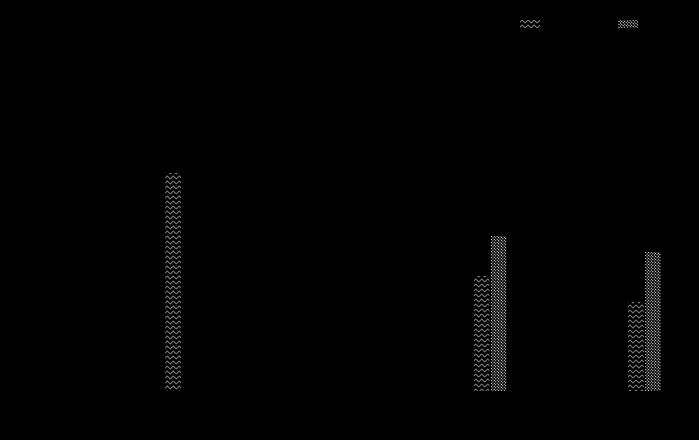
| Model | Size (total params.) | SWE-bench Verified | SWE-bench Multilingual | SWE-bench Pro (Public Dataset) | Terminal-Bench 2.0 |
|---|---|---|---|---|---|
| Laguna XS.2 | 33B | 68.2% | 62.4% | 44.5% | 30.1% |
| Devstral Small 2 | 24B dense | 68.0% | 55.7% | - | 22.5% |
| Gemma 4 31B IT | 31B dense | 52.0% | 51.7% | 35.7% | 42.9% |
| Qwen3.5-35B-A3B | 35B | 69.2% | 60.3% | 44.6% | 40.5% |
| Qwen3.6-35B-A3B | 35B | 73.4% | 67.2% | 49.5% | 51.5% |
| Claude Haiku 4.5 | - | 73.3% | - | 39.5% | 29.8% |
| GPT-5.4 Nano | - | - | - | 52.4% | 46.3% |
We used the highest publicly-referenced scores for all comparison models across each benchmark. In almost all cases these were official scores published in release blog posts or equivalent, with the exception of Gemma 4 31B IT where the highest published scores were reported by the Qwen team and Claude Haiku 4.5 where the highest published (verified) scores for SWE-bench Pro and Terminal-Bench 2.0 are from their respective official leaderboards.
Expand for benchmarking methodology
All benchmarking for Laguna XS.2 was completed using the Laude Institute’s Harbor Framework with our agent harness, using a maximum of 500 steps and sandboxed execution using 8 GB RAM/2 CPUs (with the exception of Terminal-Bench 2.0; see below). The same sampling parameters were used for all benchmarking: temperature=0.7 and top_k=20. Some base task images and verifiers were patched to fix infrastructure reliability issues inherent in task setup, such as rate limits on third-party dependencies in external registries used by the verifier. More details outlining these updates and other findings will follow in a future technical blog post.
- SWE-bench Verified: mean pass@1 averaged over 4 runs.
- SWE-bench Multilingual: mean pass@1 averaged over 7 runs.
- SWE-bench Pro: mean pass@1 averaged over 3 runs.
- Terminal-Bench 2.0: mean pass@1 averaged over 5 runs. 48GB RAM/32 CPUs.
Usage
Laguna XS.2 has launch-day support in vLLM and Transformers, and TRT-LLM thanks to the support of the team at NVIDIA.
The fastest way to get started is with our API, directly or using OpenRouter.
We are providing free access for a limited time to Laguna XS.2, and our larger 225B model, Laguna M.1, on our API. You can create an API key on our Platform.
pool
pool is a lightweight terminal-based coding agent and a dual Agent Client Protocol client-server.
Download and install for macOS and Linux:
curl -fsSL https://downloads.poolside.ai/pool/install.sh | bash
Launch and Log in with Poolside to get a free API key.
pool
Use in any ACP client. Configure Zed and JetBrains automatically:
pool acp setup --editor zed|jetbrains
Use pool with Ollama with one-command setup:
ollama pull laguna.xs-2
ollama launch pool --model laguna.xs-2
Feedback and issues
Submit feedback with /feedback and read the full documentation on GitHub.
Local deployment
Laguna XS.2 is supported in vLLM and Transformers, and TRT-LLM thanks to the support of the team at NVIDIA. Use Laguna-XS.2 with Ollama (with MLX support) and the mlx-lm framework for the best experience on your local machine.
vLLM
Serve Laguna XS.2 locally with vLLM and query it from any OpenAI-compatible client (see Controlling reasoning for tool calls, streaming, and reasoning extraction):
Laguna XS.2 support is on the open vLLM PR (vllm-project/vllm#41129); install from source until it lands in a release.
git clone https://github.com/vllm-project/vllm.git && cd vllm
git fetch origin pull/41129/head:laguna && git checkout laguna
pip install -e .

vllm serve poolside/Laguna-XS.2 \
    --max-model-len 131072 \
    --reasoning-parser poolside_v1 \
    --tool-call-parser poolside_v1
Transformers
Laguna XS.2 support has been merged into Transformers (huggingface/transformers#45673) and will ship in the next release after
v5.6.2. Until then, install from source:pip install git+https://github.com/huggingface/transformers.git
import torch
from transformers import AutoModelForCausalLM, AutoTokenizer

model_id = "poolside/Laguna-XS.2"

tokenizer = AutoTokenizer.from_pretrained(model_id)
model = AutoModelForCausalLM.from_pretrained(
    model_id,
    dtype=torch.bfloat16,
    device_map="auto",
)

messages = [
    {"role": "user", "content": "Write a Python retry wrapper with exponential backoff."},
]

# Reasoning is on by default; pass enable_thinking=False to skip the <think> block.
inputs = tokenizer.apply_chat_template(
    messages,
    add_generation_prompt=True,
    return_tensors="pt",
    enable_thinking=True,
).to(model.device)

outputs = model.generate(
    inputs,
    max_new_tokens=1024,
    do_sample=True,
    temperature=0.7,
    top_k=20,
)

response = tokenizer.decode(outputs[0][inputs.shape[-1]:], skip_special_tokens=True)
print(response)
TRT-LLM
Requires building TensorRT-LLM from the upstream PR that adds Laguna XS.2 support (NVIDIA/TensorRT-LLM#13559). Once that PR merges, the same code will work on a released
tensorrt-llmwheel.
Laguna XS.2's configuration_laguna.py imports a few transformers >= 4.58 symbols.
TRT-LLM currently pins transformers 4.57, so the PR ships a laguna_minimal_overlay.sh script that symlinks the checkpoint and patches only the config file with a compat shim. Load TRT-LLM against the overlay directory, not the original checkpoint.
# 1. Check out the PR branch and build TRT-LLM from source (see the TensorRT-LLM build docs).
git clone https://github.com/NVIDIA/TensorRT-LLM.git && cd TensorRT-LLM
git fetch origin pull/13559/head:laguna && git checkout laguna

# 2. Download the checkpoint.
huggingface-cli download poolside/Laguna-XS.2 --local-dir ~/models/Laguna-XS.2

# 3. Build the transformers-4.57 compat overlay (echoes the overlay path).
OVERLAY=$(bash laguna_minimal_overlay.sh ~/models/Laguna-XS.2)
from tensorrt_llm import LLM, SamplingParams

llm = LLM(
    model=OVERLAY,             # overlay path, not the original checkpoint
    trust_remote_code=True,
    tensor_parallel_size=1,
)

sampling = SamplingParams(max_tokens=1024, temperature=0.7, top_k=20)
out = llm.generate(["Write a Python retry wrapper with exponential backoff."], sampling)
print(out[0].outputs[0].text)
Or serve with an OpenAI-compatible endpoint:
trtllm-serve "$OVERLAY" --port 8000 --trust-remote-code
The same recipe works for the FP8 and NVFP4 variants: quantization is detected automatically from quantization_config, no extra flags required.
Ollama
Visit Ollama's model library to pull to your local machine.
Controlling reasoning
Laguna XS.2 has native reasoning support and is designed to work best with preserved thinking, where reasoning content from prior assistant messages is preserved in the message history. This model will generally reason before calling tools and between tool calls.
Expand for example
import json
from openai import OpenAI

client = OpenAI(
  base_url="https://inference.poolside.ai/v1",
  api_key="...",
)

model = "poolside/laguna-xs.2"

tools = [{"type": "function", "function": {
  "name": "shell",
  "description": "Execute a bash command and return the output.",
  "parameters": {"type": "object", "properties": {"cmd": {"type": "string"}}, "required": ["cmd"]},
}}]

messages = [
  {"role": "system", "content": "You are a coding agent with access to a shell tool."},
  {"role": "user", "content": "Run uname -a"},
]

# Thinking is enabled by default when the server sets --default-chat-template-kwargs {"enable_thinking": True}
# When using the Poolside API (https://inference.poolside.ai/v1), this flag is set by default
response = client.chat.completions.create(
  model=model,
  messages=messages,
  tools=tools,
  stream=True,
)

reasoning, content, tool_calls = "", "", []
for chunk in response:
  delta = chunk.choices[0].delta
  if hasattr(delta, "reasoning_content") and delta.reasoning_content:
    reasoning += delta.reasoning_content
  if hasattr(delta, "content") and delta.content:
    content += delta.content
  if hasattr(delta, "tool_calls") and delta.tool_calls:
    for tc in delta.tool_calls:
      if tc.index >= len(tool_calls):
        tool_calls.append({"id": tc.id, "function": {"name": "", "arguments": ""}})
      if tc.function.name:
        tool_calls[tc.index]["function"]["name"] = tc.function.name
      if tc.function.arguments:
        tool_calls[tc.index]["function"]["arguments"] += tc.function.arguments

print(f"Reasoning: {reasoning}\nContent: {content}\nTool calls: {tool_calls}\n")

# Return reasoning in the next request for best performance
messages.append({
  "role": "assistant",
  "content": content,
  "reasoning_content": reasoning,
  "tool_calls": [{"id": tc["id"], "type": "function", "function": tc["function"]} for tc in tool_calls]
})

messages.append({
  "role": "tool",
  "tool_call_id": tool_calls[0]["id"],
  "content": json.dumps({"stdout": "Darwin arm64", "exit_code": "0"})
})

response = client.chat.completions.create(
  model=model,
  messages=messages,
  tools=tools,
  stream=True,
)

reasoning, content = "", ""
for chunk in response:
  delta = chunk.choices[0].delta
  if hasattr(delta, "reasoning_content") and delta.reasoning_content:
    reasoning += delta.reasoning_content
  if hasattr(delta, "content") and delta.content:
    content += delta.content

print(f"Reasoning: {reasoning}\nContent: {content}")
Disabling reasoning
You can disable thinking by setting enable_thinking to False in a request or by not providing --default-chat-template-kwargs {"enable_thinking": True} or equivalent when starting the server.
Expand for example
from openai import OpenAI
client = OpenAI()

completion = client.chat.completions.create(
  model="poolside/laguna-xs.2",
  messages=[
    {"role": "user", "content": "Write a retry wrapper with exponential backoff."}
  ],
  extra_body={
    "chat_template_kwargs": { "enable_thinking": False },
  },
  stream=True
)

for chunk in completion:
    print(chunk.choices[0].delta)
For agentic coding use cases, we recommend enabling thinking and preserving reasoning in message history as outlined in the [Controlling reasoning] section.
License
This model is licensed under the Apache 2.0 License.
Intended and Responsible Use
Laguna XS.2 is designed for software engineering and agentic coding use cases, and you are responsible for confirming that it is appropriate for your intended application. Laguna XS.2 is subject to the Apache 2.0 License, and should be used consistently with Poolside's Acceptable Use Policy. We advise against circumventing Laguna XS.2 safety guardrails without implementing substantially equivalent mitigations appropriate for your use case.
Please report security vulnerabilities or safety concerns to security@poolside.ai.